LIBRO BLANCO
Problemas y resolución de problemas del software de integración de Formlabs y 3Shape
Problemas y resolución de problemas del software de integración de Formlabs y 3Shape
Formlabs ofrece un componente de integración de socios (PIC) para 3Shape Unite, que permite enviar sin problemas las piezas creadas con una aplicación de origen de 3Shape Unite a PreForm y a tu impresora de Formlabs. Si se producen errores:
- Confirma que la última versión del Conector de impresión de Formlabs está instalada en el mismo ordenador que ejecuta 3Shape Unite. Puedes descargar el PIC aquí o a través de 3Shape.
- Actualiza PreForm a la última versión.
- Comprueba la fuente del mensaje de error. El propio PIC solo emite mensajes de error en el área de notificaciones de Windows, en la barra de tareas. Otros errores proceden de 3Shape Unite. Si te encuentras con un error emitido por el PIC, ponte en contacto con el servicio de asistencia de Formlabs. En caso contrario, continúa leyendo.
- Confirma que tu copia de 3Shape Unite y sus aplicaciones de origen están actualizadas. El PIC de Formlabs requiere:
- 3Shape Unite versión 1.8.10.1 o superior (no 3Shape Dental System)
- Splint Studio versión 10.0.0.6 o superior
- Implant Studio 13.0.0.11 o superior
- TRIOS Design Studio versión 13.1.1.9 o superior
- Model Builder Express versión 6.0.1.3 o superior
- Confirma que estás utilizando una impresora compatible:
- Form 4B
- Form 3B o Form 3B+
- Form 2
- Confirma que la impresora está en línea y conectada a la misma red que el ordenador que ejecuta 3Shape Unite y el PIC. Si necesitas más información sobre la conectividad de las impresoras SLA de Formlabs, consulta nuestro artículo Conexión de una impresora SLA de Formlabs mediante USB, Ethernet o wifi.
- Confirma que tienes al menos un perfil de impresión válido activo para tu combinación actual de material e impresora. El PIC de Formlabs incluye perfiles de impresión predefinidos para la Form 4B y materiales asociados a aplicaciones específicas. Si utilizas una impresora SLA de Formlabs más antigua, tendrás que crear y activar un perfil de impresión personalizado. Sin un perfil de impresión, la integración no puede ejecutar el trabajo.
Creación de un perfil de impresión personalizado
Para crear un perfil de impresión personalizado con el componente de integración de socios de Formlabs para 3Shape Unite:
- Busca el icono del PIC (un cuadrado azul con el logotipo de la mariposa de Formlabs) en el área de notificaciones de la barra de tareas de Windows. Puede que tengas que hacer clic en el botón ^ para ver todas las aplicaciones en segundo plano.
- Haz clic con el botón derecho en el icono del PIC. Aparecerá un menú contextual. Haz clic en
- Open control panel (Abrir panel de control). Aparecerá la ventana PreForm Integration for 3Shape Produce (Integración de PreForm para 3Shape Produce).

Haz clic en
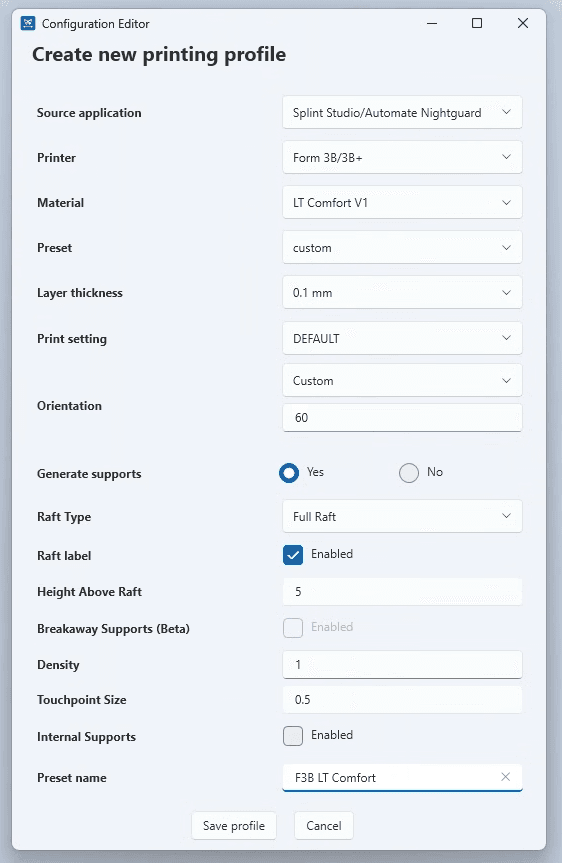
- Create new profile (Crear nuevo perfil). Aparecerá la ventana Configuration Editor (Editor de configuración).
- Selecciona los ajustes deseados para el perfil de impresión. Haz clic en Save profile (Guardar perfil) cuando hayas terminado.