
Note:
The FormWashCureUpdater is included in installations of PreForm version 2.15.1 and later.

Formlabs occasionally releases new firmware versions for the Form Wash and the Form Cure to introduce features and critical updates. The FormWashCureUpdater updates firmware for both the Form Wash and the Form Cure.
To update firmware on a Form Wash or a Form Cure, connect the unit with a USB cable to a computer running the latest version of PreForm. Locate and run the FormWashCureUpdater in the PreForm installation folder to check for firmware updates and to update the firmware. Update one unit at a time.
Note:
The FormWashCureUpdater is included in installations of PreForm version 2.15.1 and later.
Windows instructions
macOS instructions
FormWashCureUpdater.FormWashCureUpdater application file into the Applications folder.FormWashCureUpdater.FormWashCureUpdater detects your Form Wash or Form Cure, select Update Firmware.FormWashCureUpdater uploads the new firmware and restarts your Form Wash or Form Cure to complete the update. The update should take approximately 20 seconds. The turntable may rotate during firmware updates on the Form Cure.FormWashCureUpdater.Troubleshooting
Only attempt to troubleshoot or force a firmware update if the initial attempt fails.
Display freezes during firmware update
Unplug the Form Wash or Form Cure then reconnect to a power source if the screen freezes during a firmware update.
If the display freezes during or after the firmware update, power cycle your Form Wash or Form Cure.
Firmware update fails
The display on a Form Wash or Form Cure typically goes blank and won’t turn back on if a firmware update fails.
Notice:
Do not daisy chain USB cords when updating the firmware on a Form Wash or Form Cure. This may result in the machine becoming inoperable.
Forcing an update should only be considered after a Form Wash or Form Cure fails to update. To force an update:
FormWashCureUpdater application file on your Windows or Mac computer.FormWashCureUpdater detects the Form Wash or Form Cure, select Update Firmware.FormWashCureUpdater uploads the new firmware and restarts the Form Wash or Form Cure to complete the update. The update should take approximately 20 seconds. Forcing a firmware update on a Form Wash or Form Cure after daisy chaining USB cords may bring the unit back online.FormWashCureUpdater utility crashes
On Windows systems, if driver installation fails, FormWashCureUpdater.exe can crash when it detects your device. To resolve this, reinstall the newest drivers:
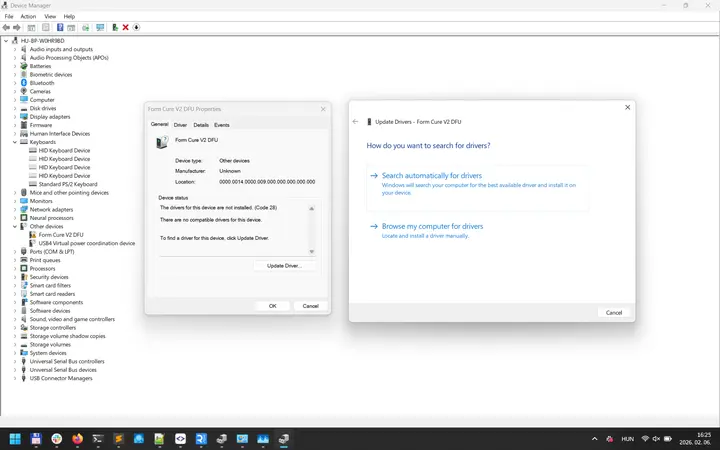
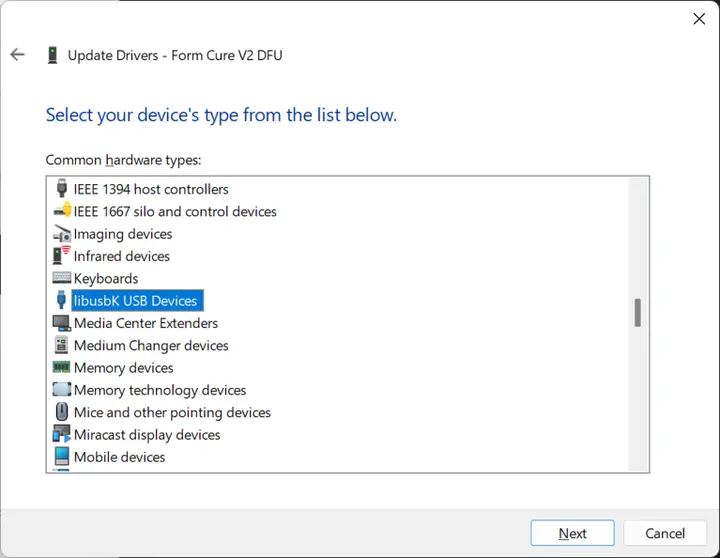
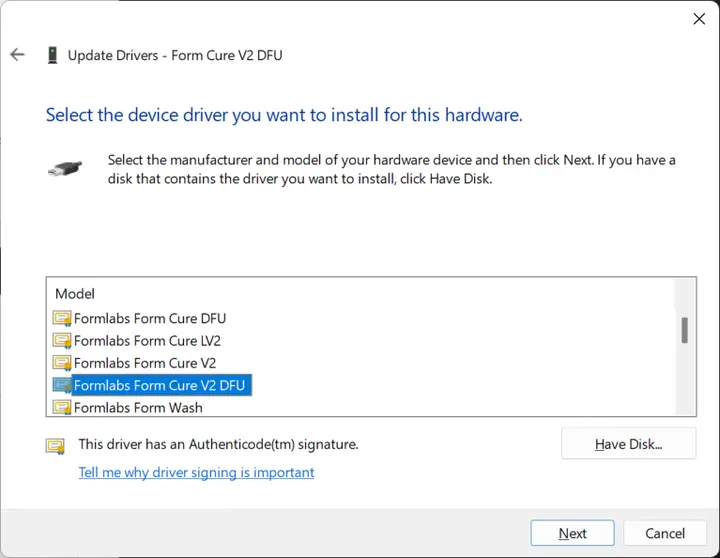
FormWashCureUpdater utility does not recognize connected machine
If the FormWashCureUpdater utility does not recognize a connected machine:
Form Cure V2 and Form Cure L V2 units do not support connectivity via USB C-to-C cables. When updating firmware, use a USB A-to-C that supports data transfer (with a dongle if needed to connect to your computer).
Contact Support
Contact Formlabs Support or your authorized reseller for additional help with the FormWashCureUpdater.
Please provide the following information:
To download the FormWashCureUpdater log file on Windows:
To download the FormWashCureUpdater log file on macOS:
Additional resources