
WHITE PAPER
Form 3L generation tank detection issues
Form 3L generation tank detection issues
Explanation
Some Form 3L generation printers are not able to detect resin tanks. In many cases, the problem is limited to a specific tank and another tank will work in the printer.
Causes
- Faulty RFID sticker on resin tank
- Firmware bug
- Faulty tank induction sensor
- Unplugged tank induction sensor
- Faulty RFID reader
Symptoms
- Form 3L or Form 3BL printer is unable to detect an inserted resin tank
Troubleshooting steps
- Update your printer's firmware.
- Upload diagnostic logs.
- Try inserting different resin tanks into the printer, if any are available. If the issue is limited to one tank, replace the affected resin tank.
- If the printer fails to detect multiple tanks, test the tank induction sensor. Remove the resin tank and touch a metal magnetic object to the tank induction sensor in the rear left of the printer cavity. A red light turns on if the tank induction sensor is working correctly. If there is no red light, contact Formlabs Support or your authorized reseller for a replacement tank induction sensor.
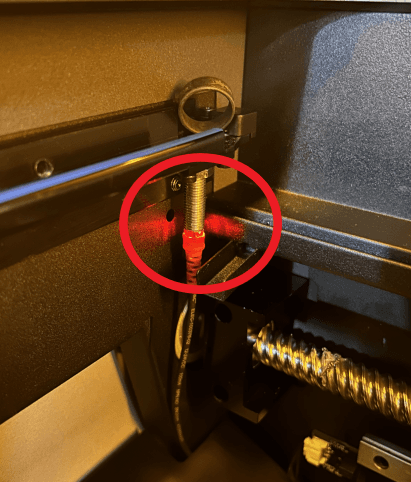
- If the tank induction sensor light does turn on, the issue may be with the printer’s RFID reader.
- Take a video of the printer failing to detect multiple tanks.
- Upload diagnostic logs if you have not done so already.
- Contact Formlabs Support or your authorized reseller for further assistance.