WHITE PAPER
Formlabs Logo

Shipping your Form 4L generation printer

Shipping your Form 4L generation printer

Follow these instructions to package your Form 4L generation printer for protection during shipping or transit. The printer’s original packaging is required for warranty service.

Packaging materials

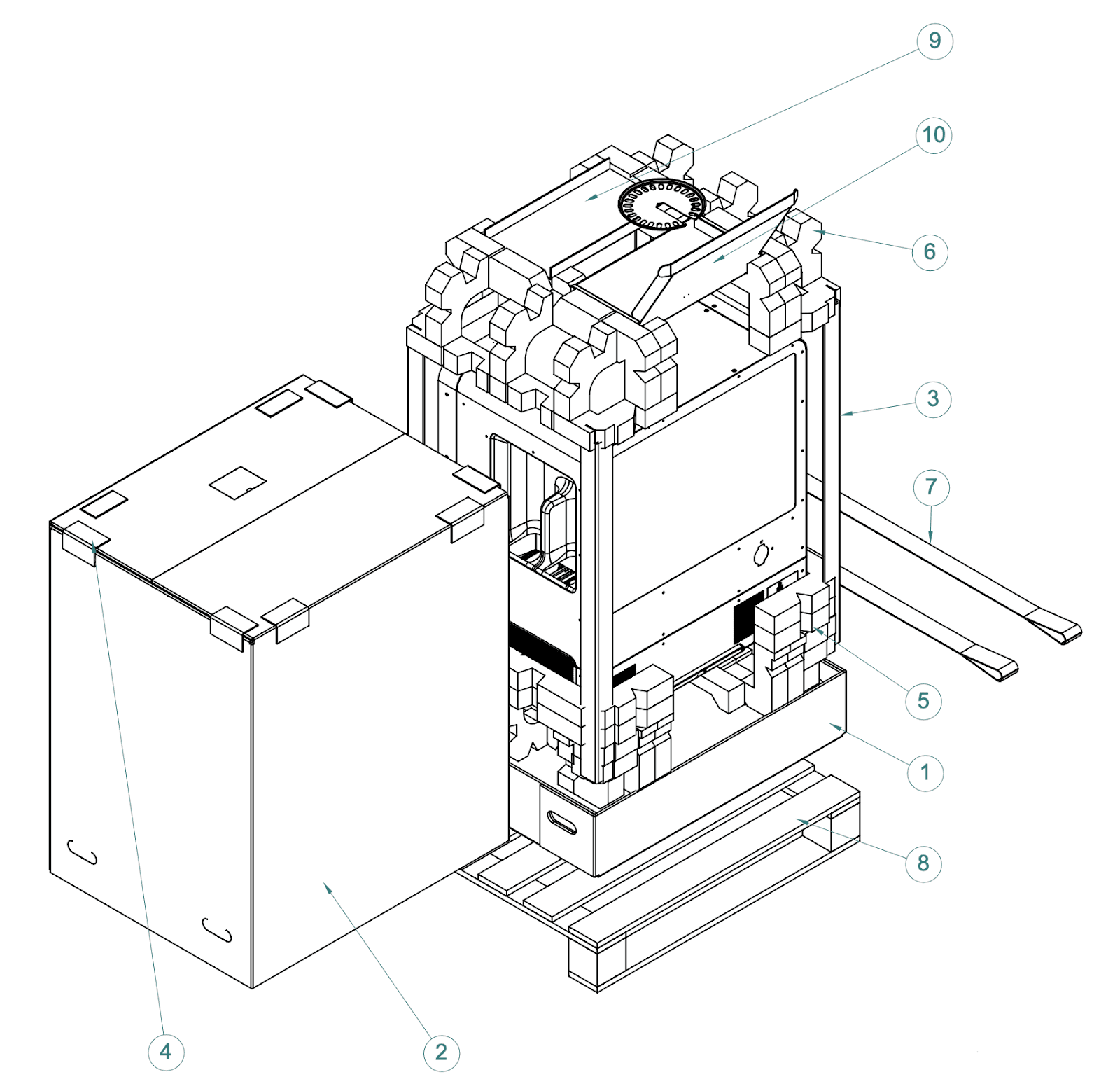
Your printer’s packaging materials are designed to be kept and reused for transporting the machine. The printer’s complete packaging kit consists of:

  1. Lower box, cardboard (1x)
  2. Outer box, cardboard (1x)
  3. Internal edge supports, cardboard (4x)
  4. External edge protector, cardboard (8x)
  5. Lower foam insert, foam (2x)
  6. Upper foam insert, foam (2x)
  7. Lifting straps (2x)
  8. Pallet, wood (1x)
  9. Upper tray, cardboard (1x)
  10. Accessories box, cardboard (1x)
Form 4L packaging components

Preparing to ship

  1. Remove the build platform, mixer, resin tank, and cartridges before moving or packaging the printer.
  2. Turn the printer off using the power switch at the back of the unit.
  3. Disconnect the printer from power.
  4. Unscrew and remove the Wi-Fi antenna.
  5. Wipe any liquid resin off the build platform and store it away from sunlight.
  6. Store the resin tank with its cover in place.
  7. Store the cartridges with the vent caps closed.

Notice:

If you are shipping a printer to Formlabs for service, do not ship the build platform, resin tank, power and USB cables, and other accessories. These items will not be returned after service.

Inspecting and reassembling packaging

  1. If the printer’s outer box has been collapsed, start by reassembling and securely taping the box.
  2. Place the two lower foam inserts into the lower box.

Packing the printer

  1. Tilt one side of the printer up and slide a lifting strap underneath, running front to back under the printer. Repeat with a second sling under the other side of the printer.
  2. Use the provided handles on the lifting straps to lift the printer onto the lower foam inserts.

Caution:

Lifting hazard: The Form 4L is a heavy object. A two person lift is required to prevent injury and avoid damage to the machine.

  1. Place one internal edge support vertically in each corner of the lower box.
  2. Place the two upper foam inserts on the top edges of the printer.
  3. Place the upper tray and accessories box in the cutouts in the upper foam inserts.
  4. Lower the outer box onto the printer.
  5. Seal each edge of the opening with adhesive packing tape.
  6. Place the eight external edge protectors on the top of the outer box, two on each edge, for your carrier to strap the box to a pallet.