

Replacing the Fuse Sift's sifter mesh
Replacing the Fuse Sift's sifter mesh
Clumps of nylon can accumulate in the mesh screen below the surface grate, eventually preventing reclaimed powder from passing through to be collected. Formlabs recommends replacing the sifter mesh after every 200 hours of use. For reference, the sifter automatically turns off after 30 minutes by default, so 200 hours of use represents at least 400 full sifting cycles.
Removing and replacing the sifter mesh
Remove the surface grate and turn the turnbuckles to release the sifter mesh for replacement.
Step 1: Remove the surface grate
Remove the surface grate to gain access to the sifter mesh beneath.
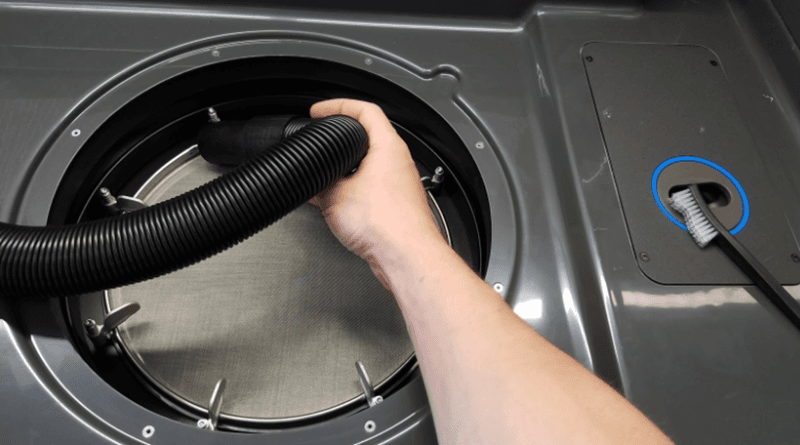
Step 2: Vacuum the cavity
Before removing the sifter mesh, vacuum the cavity concentric to the mesh to remove clumps and hardened material that can collect on top of the mesh. This step prevents debris from entering the sifted powder and eventually clogging the printer's hopper and causing underdosing.
Step 3: Remove the mesh
Turn the turnbuckles to release the sifter mesh.
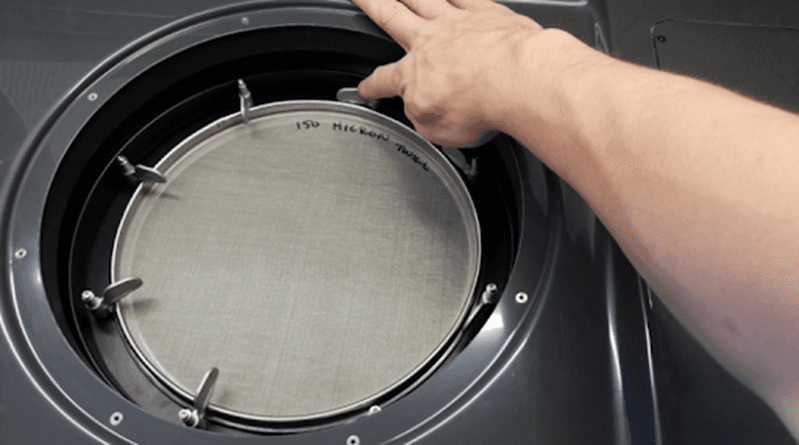
Step 4: Install the new mesh
Place the new sifter mesh within the Fuse Sift and refasten all the turnbuckles.
Step 5: Reinstall the grate over the mesh
Place the surface grate back over the sifter mesh.