

WHITE PAPER
Formlabs Logo

Using the Motor Moves menu (Fuse 1 generation printers)

Using the Motor Moves menu (Fuse 1 generation printers)

With Motor Moves, Fuse 1 generation printers allow users to manually move components such as the recoater, flippers, doser, and Z-drive at their discretion. You need to manually control the motors when cleaning out the powder handling assembly, between prints on some powders, or when troubleshooting motor errors.

Caution:

Do not select any of the options in the Motor Moves menu while the print enclosure door is open or any objects are in the path of the powder handling mechanisms at the top of the print enclosure. Moving parts present a crushing or tangling hazard. If necessary, tap the Stop button on the touchscreen to stop a motor movement.
Formlabs recommends using caution when in the Motor Moves menu, as it is possible to damage components accidentally. Motors are permitted to move without restrictions when in the Motor Moves menu. For example, it is possible to navigate the hopper flipper into a position where it can damage the doser without any deviation errors.

Notice:

If you need to move a component while the printer is idle, always use the Motor Moves menu. Manually moving a flipper or recoater by hand while the printer is idle may damage the component.

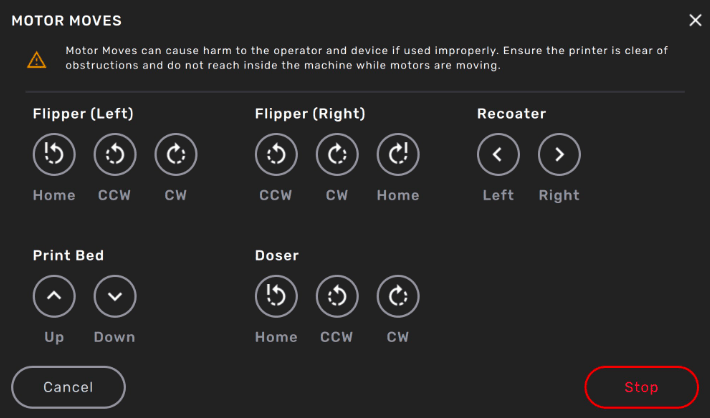
Motor Moves touchscreen

To use the Motor Moves menu:

  1. On the touchscreen, tap the wrench icon. The Maintenance menu appears.
  2. Tap Motor Moves. The Motor Moves screen appears.
  3. Read and acknowledge the warning message.
  4. To move any of the components, touch and hold any of the controls.
    • Stop: Use this control to stop all motors and release their holding torque.
    • Home: Sends the component to its home position. For the buffer and hopper flippers, this is 9 o'clock and 3 o'clock, respectively. The Z-drive and recoater do not have defined home positions.
    • CCW: Rotates the flipper or doser counter-clockwise.
    • CW: Rotates the flipper or doser clockwise.
    • Left: Moves the recoater towards the buffer.
    • Right: Moves the recoater towards the hopper.
    • Up: Moves the Z-drive (and thus the print bed if a build chamber is inserted) upwards or turns the bevel gear clockwise.
    • Down: Moves the Z-drive (and thus the print bed if a build chamber is inserted) down or turns the bevel gear counter-clockwise.
  5. To stop moving any components, release the control or tap Stop.