

What information do the diagnostic logs include?
What information do the diagnostic logs include?
Formlabs printers and accessories maintain diagnostic logs to provide detailed information about the machine's functionality. Include these diagnostic logs with other relevant observations and details when contacting Formlabs Support or your authorized reseller to speed up resolution.
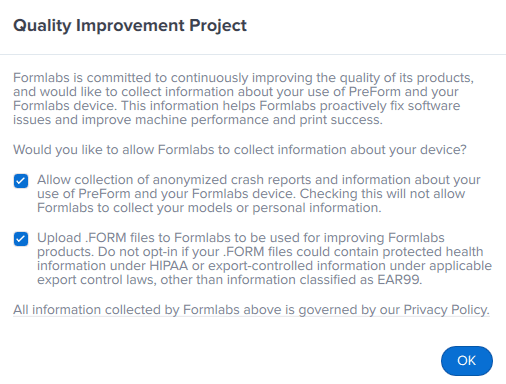
In general, logs include information about each print, such as print settings and printer activity, as well as overall printer status and history. Logs do not include FORM files or original model files. If you opt into the PreForm Quality Improvement Project, your FORM files will be sent to Formlabs and may be used internally to test and improve Formlabs products. Do not opt in if your files could contain protected health information under HIPAA or export-controlled information under applicable export control laws, other than information classified as EAR99. To change your Quality Improvement Project preferences, click Help > Help Improve PreForm.
For more information about specific types of information included in the diagnostic logs, see the section for your machine below.
Form 4 and Form 4L generation
- Software
- Latest PreForm version used with the printer
- Latest firmware version
- Print metadata
- Print name
- Start time
- Status
- Success/failure vote
- Preview thumbnail (as shown on Dashboard)
- Material and print setting used
- Layer thickness
- Layers printed
- Resin volume used
- Print time
- Printer odometry
- Number of prints
- Number of layers printed
- LPU usage
- BLU usage
- Heater usage
- Mixer usage
- Z-axis usage
- Dispense actions
- Time powered on
- Lifetime error types and counts
- Resin tank odometry
- Number of prints
- Number of layers printed
- Number of materials used
- Print activity
- PreForm version
- Firmware version
- Pre-print debris detection activity
- Build platform detection photo at print start
- End of print picture (if enabled)
- Timelapse video (if enabled)
- Errors and notifications encountered
- Z-axis force data
- Mixer position
- Resin level
- Resin pump activity (when using Resin Pumping System)
- Internal component voltages
- Internal component temperatures
- Printer leveling data
Form 3 and Form 3L generation
- Software
- Latest PreForm version used with the printer
- Latest firmware version
- Remote print enabled/disabled
- Priming status
- Print metadata
- Print name
- Start time
- Status
- Preview thumbnail (as shown on Dashboard)
- Material and print setting used
- Layer thickness
- Layers printed
- Resin volume used
- Print time
- Form Auto status (Form 3 generation only)
- Form Auto harvest video (Form 3 generation only)
- Printer odometry
- Number of prints
- LPU laser power over time
- LPU replacement history
- Resin tank odometry
- Resin tank type
- First fill time
- Active printing hours
- Days since first fill
- Print activity
- PreForm version
- Firmware version
- Errors and notifications encountered
- LPU calibration images
- Z-axis force data
- X- and Z-axis motor activity
- Resin level
- Resin pump activity (when using Resin Pumping System)
- Internal component voltages
- Internal component temperatures
- Tensioner activity
- Resin cartridge load cell data (Form 3L generation only)
Form 2
- Software
- Latest PreForm version used with the printer
- Latest firmware version
- Print metadata
- Print name
- Start time
- Status
- Preview thumbnail (as shown on Dashboard)
- Material and print setting used
- Layer thickness
- Layers printed
- Resin volume used
- Print time
- Z offset used
- Open Mode used
- Printer odometry
- Number of prints
- Print activity
- PreForm version
- Firmware version
- Errors and notifications encountered
Fuse 1 generation
- Software
- Latest PreForm version used with the printer
- Latest firmware version
- Remote print enabled/disabled
- Print metadata
- Print name
- Start time
- Status
- Success/failure vote
- Preview thumbnail (as shown on Dashboard)
- Material and print setting used
- Build chamber used
- Gas mode (air or nitrogen)
- Layer thickness
- Layers printed
- Powder volume used
- Print time
- Temperature offsets applied
- Motor position offsets applied
- Printer odometry
- Last upload time
- Total print hours
- Print hours since each cleaning-related tracked maintenance item
- Laser power over time
- Materials used
- Build chamber odometry
- Number of prints
- Number of layers printed
- Number of materials used
- Print activity
- PreForm version
- Firmware version
- Lasing and recoating videos (if enabled)
- Errors and notifications encountered
- Internal component temperatures
- Ambient temperature
- Heater activity
- Motor movements
- Internal pressure (air or nitrogen)
- Fan activity
- Last 10 camera frames if a print is stopped by PrinterWatcher
Fuse Sift
- Machine settings
- Current material
- Refresh rate
- Mix time
- Sifting time
- Glovebox mode enabled
- Load cell taring offsets
- Firmware version
- Machine odometry
- Lifetime button presses
- Total amount of powder dispensed
- Total dispense actions
- Usage hours since each tracked maintenance item
- Total sifting time
- Total sifter starts
- Total fan usage time
- Total fan starts
Fuse Blast
- Machine settings
- Custom blast cycles
- Current blasting media
- Polishing System installation
- Firmware version
- Machine odometry
- Basket motor usage time
- Basket revolutions
- Blast solenoid open time
- Blast solenoid openings
- Blower on time
- Chamber light on time
- Media hopper light on time
- Waste hopper light on time
- Chamber rinse solenoid open time
- Chamber rinse solenoid openings
- Part rinse solenoid open time
- Part rinse solenoid openings
- Ionizer usage time
- Ionizer starts
- Lifetime pedal presses
- Usage hours since each tracked maintenance item
- Recent pressure readings
PreForm
The PreForm log file is stored on your computer as plain text. To access the log file, see PreForm software issues and troubleshooting.
- Errors and notifications encountered
- Printer connections
- Print queue information
- Dashboard connection information
- Update information
- Dialog box activity
- Print settings update activity
- System metadata