

Messaggi di errore della generazione Fuse 1: Error 180/1-8 - Tensione dell'elemento riscaldante troppo bassa
Messaggi di errore della generazione Fuse 1: Error 180/1-8 - Tensione dell'elemento riscaldante troppo bassa
Error 180 indica che la potenza di uno o più elementi riscaldanti è inferiore a quella prevista.
Nelle stampanti con firmware versione 1.18.0 e successive, i codici di errore hanno un sottocodice che corrisponde all'elemento riscaldante interessato:
| Errore 180/1 | Riscaldatore dell'aria |
| Errore 180/2 | Riscaldatore della parete superiore della camera di stampa |
| Errore 180/3 | Riscaldatore della parete inferiore della camera di stampa |
| Errore 180/4 | Riscaldatore della scanalatura del buffer |
| Errore 180/5 | Riscaldatore della scanalatura del serbatoio |
| Errore 180/6 | Riscaldatore del pistone della camera di stampa |
| Errore 180/7 | Riscaldatore al quarzo (lato serbatoio) |
| Errore 180/8 | Riscaldatore al quarzo (lato buffer) |
Sintomi:
- Sulla stampante compare il messaggio di errore Error 180/1 a 180/8, dove il sottocodice corrisponde all'elemento riscaldante interessato
Cause comuni
- Guasto dell'elemento riscaldante
- Guasto del termometro
- Connessione scadente tra la scheda di controllo dell'elemento riscaldante della stampante e l'elemento riscaldante
- Guasto dei componenti della scheda di controllo dell'elemento riscaldante
Passaggi per la risoluzione dei problemi
Error 180/1
Error 180/1 indica un problema con l'elemento riscaldante ad aria della stampante o con il relativo sensore di temperatura RTD e richiede ulteriore assistenza per essere risolto. Contatta l'Assistenza Formlabs o il tuo fornitore di servizi certificato. Includi i registri di diagnostica della stampante con altre osservazioni e dettagli pertinenti.
Error 180/2, Error 180/3 o Error 180/6
- Premi la piastra di plastica nera sulla spina della camera di stampa per scoprire tutti i perni della spina.
- Controlla la spina per verificare che non ci siano perni piegati o affondati. Se un perno è affondato, tiralo delicatamente con un paio di pinze. Se il perno non rimane in posizione, l'alloggiamento del connettore potrebbe essere rotto. Contatta l'Assistenza Formlabs o il tuo fornitore di servizi certificato. Includi i registri di diagnostica della stampante per velocizzare la risoluzione.
- Se nessun perno è danneggiato, pulisci i perni e la spina con un detergente per contatti elettrici. Lascia asciugare i perni prima di riposizionare la spina della camera di stampa.
Se il problema persiste, contatta l'Assistenza Formlabs o un fornitore di servizi certificato. Allega i registri di diagnostica della stampante e una foto della presa della camera di stampa danneggiata per velocizzare la risoluzione.

Spina della camera di stampa della generazione Fuse 1 con pin affossato
Error 180/4 o Error 180/5
La versione firmware 1.21.0 o più recente non dovrebbe generare questo errore. Aggiorna il firmware alla versione più recente.
Se dopo l'aggiornamento del firmware compare Error 374/4 o 374/5, leggi l'articolo di assistenza su questi errori per i passaggi di risoluzione dei problemi.
Error 180/7 o Error 180/8
Il messaggioError 180/7 indica un malfunzionamento dell'elemento riscaldante del tubo di quarzo sul lato del serbatoio (destro). Error 180/8 indica un malfunzionamento dell'elemento riscaldante del tubo di quarzo sul lato cuscinetto (sinistro).
Ispeziona l'alloggiamento del telaio del tubo al quarzo, dove quest'ultimo si inserisce nella stampante. Se l'alloggiamento è danneggiato, potrebbe essere necessario sostituire il telaio del tubo al quarzo. Contatta l'Assistenza Formlabs o il tuo fornitore di servizi certificato. Allega i registri di diagnostica della stampante e una foto dell'alloggiamento del telaio del tubo al quarzo danneggiato per accelerare la risoluzione.
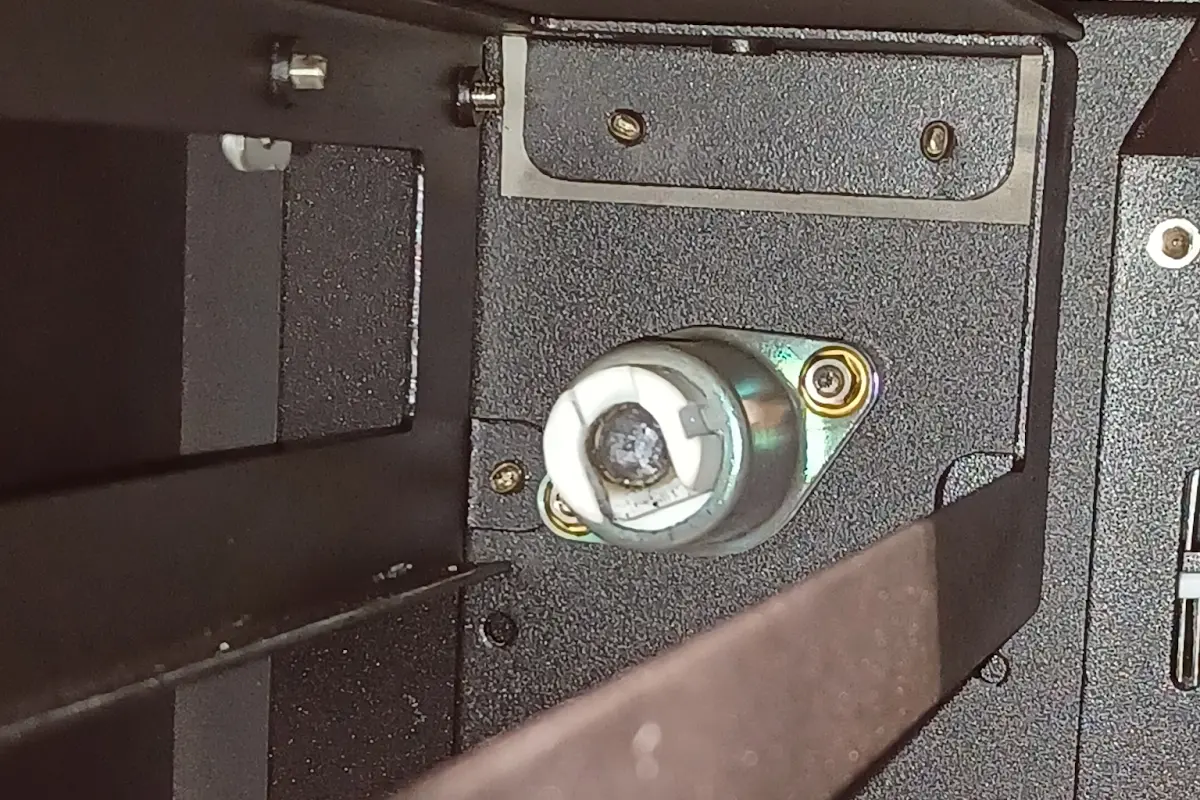
Se la presa del telaio del tubo al quarzo non è danneggiata, sostituisci il tubo al quarzo interessato seguendo le istruzioni della guida alla riparazione Sostituzione dei tubi al quarzo della Fuse 1 [EN] [DE] [ES] [FR] [IT] [JA] [ZH]. I tubi al quarzo di ricambio possono essere acquistati sul negozio online di Formlabs. Se le prese del telaio del tubo al quarzo non sono danneggiate, ma la sostituzione dell'elemento riscaldante interessato non risolve l'errore, controlla che l'elemento riscaldante non sia danneggiato durante la spedizione o l'installazione prima di contattare l'Assistenza Formlabs o un fornitore di servizi certificato.