

How Packing Density Drives Cost per Part: Fuse X1 vs. HP Jet Fusion 5600
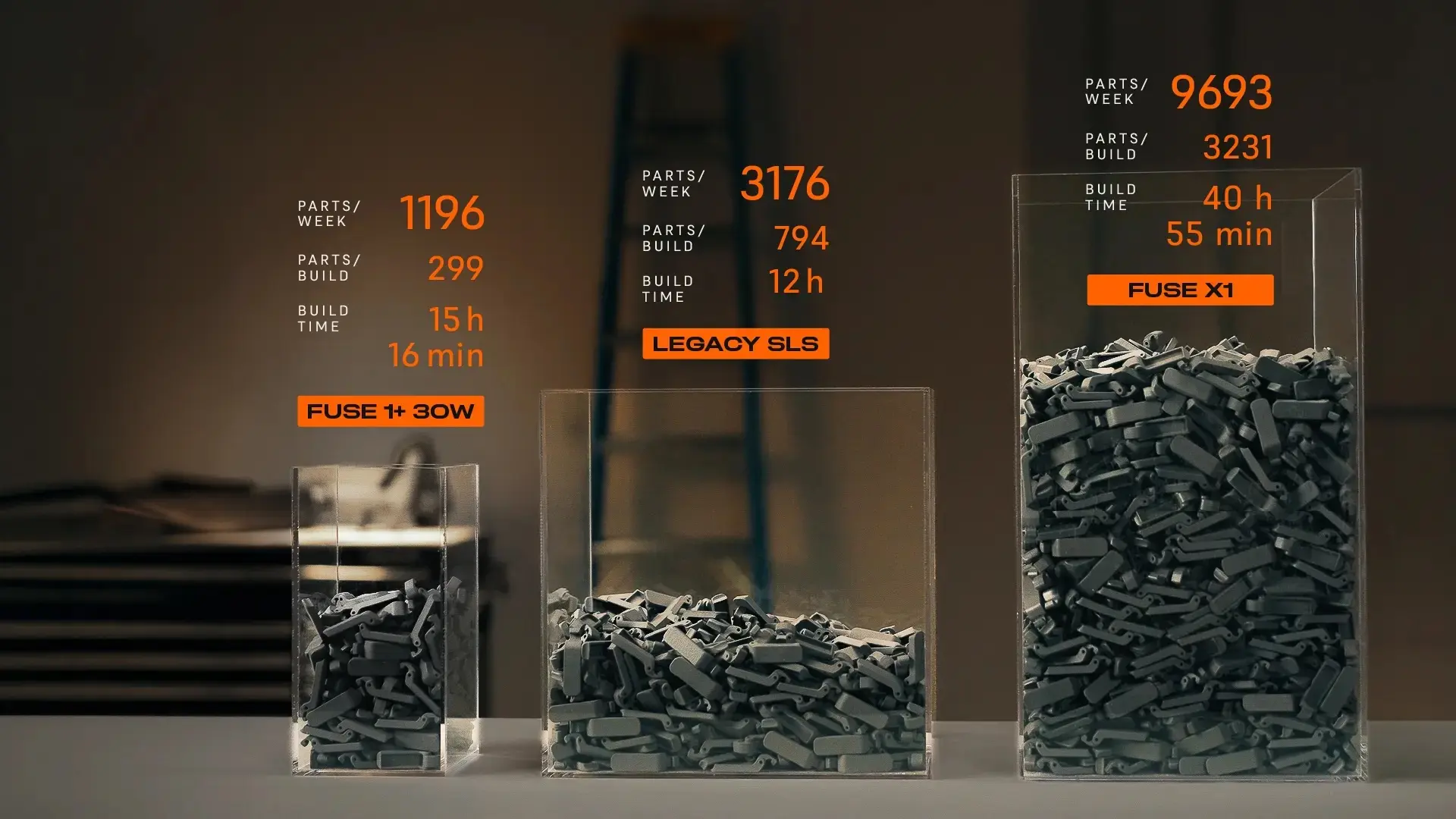
At Tesla's Giga Nevada factory, a single Fuse X1 build came off the printer carrying 17.9 kilograms of parts in 33 hours — a packing density of 49% by mass. According to HP, builds like that are not supposed to be possible. HP argues that its Multi Jet Fusion (MJF) customers have already reached a practical ceiling on packing density, one set by the geometry of the parts themselves rather than by the printer. Using fleet data from Formlabs selective laser sintering (SLS) and HP MJF 3D printers, this article shows that the ceiling is real, but that it is not a property of powder 3D printing. It is a limitation of MJF.
Key Takeaways
-
Formlabs SLS printers are packed more densely than MJF printers in the field. By volume, average packing density is 10.9% on Fuse 1+ and 11.3% on Fuse X1, compared with about 7% on MJF in HP’s own published data. Fuse 1+ outpacks MJF despite a build volume more than four times smaller and a user base weighted toward prototyping, the conditions that make dense packing hardest.
-
Measured by mass, the gap widens further. Mass packing density accounts for all the powder in the build chamber, including the buffer zone around the parts. By this measure, average packing density is about 70% higher on the Fuse 1+ than on MJF, and nearly twice as high on the Fuse X1.
-
MJF printers generate substantially more waste powder. Waste is the gap between how densely a build is packed and how much fresh powder the next one needs. At the same 20% refresh rate, an average MJF build discards 53% of the fresh powder it consumes, against 20% on Fuse 1+ and 8% on Fuse X1 — a difference driven entirely by packing density. Even on materials requiring 30% fresh powder, Fuse Series builds still waste less than MJF does at 20%, and the densest builds reach zero waste.
-
MJF's maximum packing density is driven by thermal constraints. MJF heats the full layer on every pass, so denser builds retain more heat, risking warping and yellowing. SLS uses a laser to heat only the powder that becomes the part. Fuse Series printers also use a nitrogen atmosphere and other proprietary technologies to enable high packing densities.
-
Fuse X1 beats MJF on every major driver of cost per part. An HP Jet Fusion 5600 Series ecosystem costs three times as much as Fuse X1. Fuse X1 delivers roughly two to three times the throughput, with changeovers of about 5 minutes versus 30 minutes or more on HP. Lower powder waste and no agents or printheads to replace keep material costs down too. Try our interactive calculator to compare cost per part and throughput with your own parts.
A recent HP article discusses the relationship between packing density and part economics. Its central claim is that MJF customers have already reached the practical packing limit, because most geometries can’t be nested any more densely. That is an argument about parts. The sections below test it against fleet data, against the thermal behavior of each process, and against the economics that follow. We also touch on mass versus volume packing density below; the topic is covered in more depth in our white paper, SLS Powder Usage and Packing Density in Formlabs PreForm.
What Fleet Data Shows About Packing Density
In a LinkedIn article titled “Let’s Talk about Packing Density”, HP asserts that “neither SLS nor MJF can inherently achieve a higher packing density than the other,” and that packing density depends instead on a user’s parts. The article includes the charts below, which show how densely HP users pack their builds, reflecting each industry’s production demands and the nesting constraints of its part geometries.
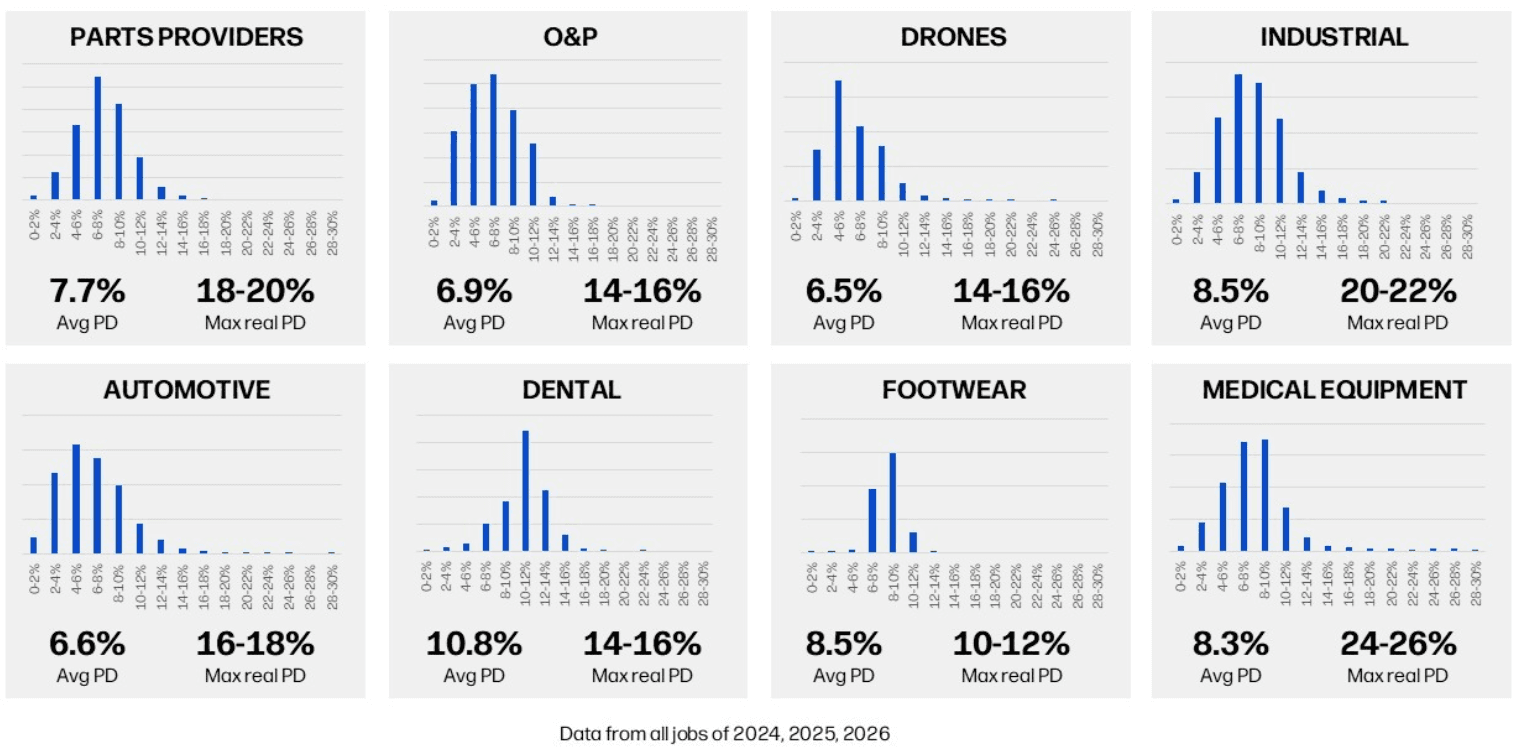
Source: “Let’s Talk about Packing Density” published by HP on LinkedIn on July 16, 2026.
We averaged the data HP published above to compare the volume packing density of HP MJF prints with that of Formlabs SLS customer prints on Fuse 1+ 30W and Fuse X1 3D printers (below).
2024-2026 Volume Packing Density of Customer-Only Prints on Fuse 1+, Fuse X1, and HP MJF
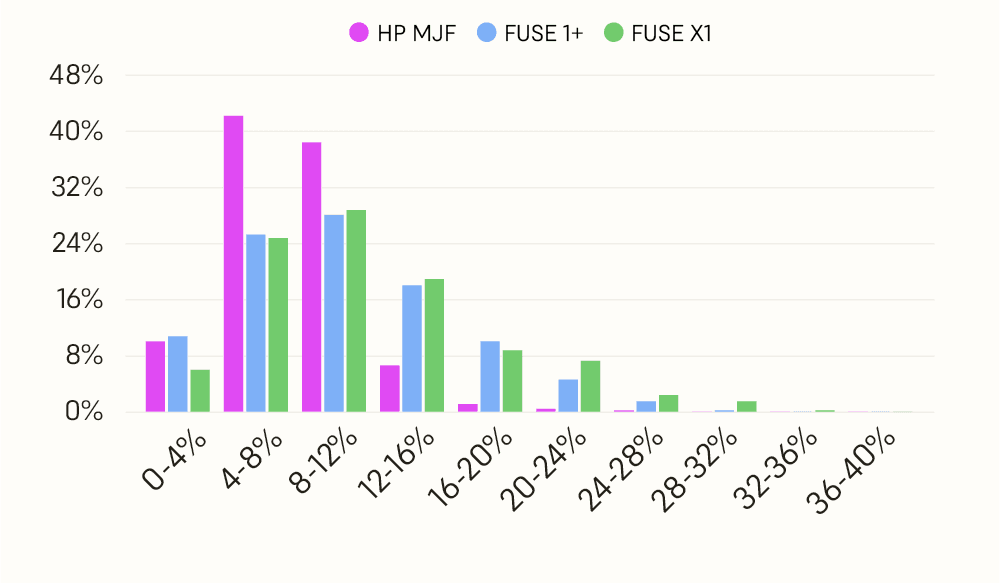
This is where HP's argument comes under strain. If part geometry set the ceiling, two fleets printing broadly comparable types of parts would converge on similar packing densities no matter which technology sat underneath. They do not converge. And the gap is wide even on the Fuse 1+, the Formlabs printer where geometry should be a bigger constraint.
The build volume of Fuse 1+ is more than four times smaller than the HP Jet Fusion 5200 Series and 5600 Series, which makes efficient packing harder rather than easier, since there is less room to nest parts around one another. It is also used more often for prototyping, where parts tend to be larger, and builds are less optimized for production. By HP's own reasoning, it should sit among the least densely packed printers in the field. Instead, Fuse 1+ printers are packed more densely than large-format MJF printers on every measure.
Three years of fleet data are not yet available for the Fuse X1, but the early picture is consistent. Beta testers and the first production customers are already pushing the X1 past the Fuse 1+, with volume packing densities reaching 30%. We expect that distribution to climb higher still: the larger build volume is easier to pack, and X1 users skew toward manufacturing applications and service bureaus printing end-use parts, which tend to be smaller and easier to nest.
Volume packing density, however, is not the best unit for this comparison. HP publishes volume packing density: the total CAD volume of the printed parts divided by the printer’s addressable build volume. Mass packing density is more useful: the mass of the final sintered parts divided by the total mass of all powder loaded into the build chamber, including the parts, the unsintered powder, and any buffer or shell powder surrounding them. Mass packing density is what determines refresh rate, and with it how much powder can be reused and how much is wasted. This is where the gap between HP MJF and Fuse Series SLS printers widens, because MJF requires a much larger buffer zone around the edges of the build.
|
HP Multi Jet Fusion Printers |
Fuse 1+ |
Fuse X1 |
|
|---|---|---|---|
|
Build Volume |
380 × 284 × 380 mm 41 L |
165 × 165 × 300 mm 8 L |
330 × 330 × 565 mm 61.5 L |
|
Chamber Size |
451 × 349 × 419 mm* 66.0 L |
185 × 185 × 318 mm 10.9 L |
350 × 350 × 597 mm 73.1 L |
|
Printable / chamber volume |
62.1% |
75.0% |
84.1% |
|
Average Packing Density (Volume) |
~7% |
10.9% |
11.3% |
|
99th Percentile Packing Density (Volume)** |
~26% |
26% |
30% |
|
Average Packing Density (Mass) |
9.5% |
16.1% |
18.4% |
|
99th Percentile Packing Density (Mass) |
31% |
34.3% |
42.1% |
* Approximate build volume based on internal measurements.
** Defined by HP as the maximum real packing density, the threshold above which only 1% of jobs in that segment are printed. Builds like the Tesla example in the intro of this article fall into that top 1%. For MJF, we have used medical equipment, the highest-packing segment HP reports; averaged across all eight of its segments, the figure is closer to 17%.
If we convert the stats to mass packing density, we can see that the average packing density is about 70% higher on the Fuse 1+ than on MJF, and nearly twice as high on the Fuse X1. The practical effect is straightforward. Higher packing densities mean more parts per build, which means higher throughput and less labor spent changing the printer over, and less waste.
That last point is an important consequence of the lower packing densities. Waste is the difference between how much powder a build consumes and how much fresh powder the next one needs: whatever is left over has nowhere to go. The less densely a build is packed, the bigger that surplus, which is why MJF generates more of it. At a 9.5% average mass packing density against a 20% refresh rate, an MJF customer discards 52.5% of every batch of fresh powder they buy.
Fuse Series printers narrow that gap from both sides. On materials requiring a 30% refresh rate, an average Fuse 1+ build discards 46% of its fresh powder and an average Fuse X1 build 39% — 6 and 14 percentage points better than MJF, even though MJF is credited here with the lower 20% rate. On materials requiring 20%, the gap widens sharply: 19.5% for an average Fuse 1+ build, 8% for an average Fuse X1 build.
Waste as a Share of Fresh Powder at Average Mass Packing Density*
| Refresh Rate |
HP MJF** |
Fuse 1+*** |
Fuse X1*** |
|---|---|---|---|
|
20% |
52.5% |
19.5% |
8.0% |
|
30% |
68.3% |
46.3% |
38.7% |
* Waste is shown as a share of fresh powder purchased. Every printer is calculated the same way, counting all powder in the build chamber, including the buffer. HP’s published figures count only the printable volume, so they aren’t directly comparable.
** Refresh rate varies by material. HP publishes powder reusability ratios from 60% to 90%, equivalent to refresh rates of 40% down to 10%; its baseline PA 12 is listed at 80% reusability, or a 20% refresh rate. HP also notes that its highest reusability figure applies only to builds that do not exceed 4% packing density.
*** Refresh rate varies by material: Nylon 12 Powder requires 30% on both Fuse 1+ and Fuse X1; Fuse 1+ additionally runs materials at 20%, and 20% materials are in development for Fuse X1. For Fuse Series printers, refresh rate is constant regardless of packing density.
HP has published the break-even points itself. In the same article, it sets out the packing density at which a build stops producing surplus powder: 5–6% for a 90/10 material, 11–12% for an 80/20 material like PA 12 enabled by Evonik, and 19–20% for a 70/30. Set those against HP's own segment data, and none of it comes close. Dental, its densest-packing application, averages 10.8%, and the remaining seven segments run from 8.5% down to 6.5%. Every MJF application HP measures is throwing powder away, most of them by a wide margin. Fuse Series builds produce a surplus at average densities too; the difference is how much, which is what the figures above measure.
One correction is worth making here. HP characterizes SLS as typically requiring 30–50% fresh powder, which would put the zero-waste point out of reach. Across the Formlabs powder portfolio, the requirement is 20–30%, with one exception: Nylon 12 GF, a glass-filled material, at 50%. HP's upper bound therefore describes a single powder rather than the technology, and its lower bound is 10 points too high. Nylon 12 Powder sits at 30%, and Fuse 1+ runs materials at 20%.
Density is what shrinks that surplus. Why Fuse Series printers can be packed densely in the first place comes down to how each process handles heat.
Technology and Packing Density
A printer’s underlying technology can either limit or expand how densely it can be packed, and the deciding factor is heat.
To form parts, Multi Jet Fusion printers jet a fusing agent from an array of small nozzles onto the powder wherever the part should form, along with a detailing agent around its edges. An infrared energy source then passes over the entire layer. The powder treated with fusing agent absorbs more of that energy and fuses; another layer of powder is spread, and the process repeats.
MJF printers put more thermal energy into the powder bed because they heat the entire layer with each pass. The more densely packed the build, the more of that heat is retained. Retained heat leads to thermal buildup and non-uniform cooling, which shows up as warping, shrinkage, surface defects, yellowed parts, and subpar mechanical properties.
MJF also depends on contrast: the difference between how much energy the powder absorbs where the fusing agent is jetted and how much it absorbs everywhere else. That contrast is far less sharp than what a laser achieves by targeting only the powder that needs to melt.
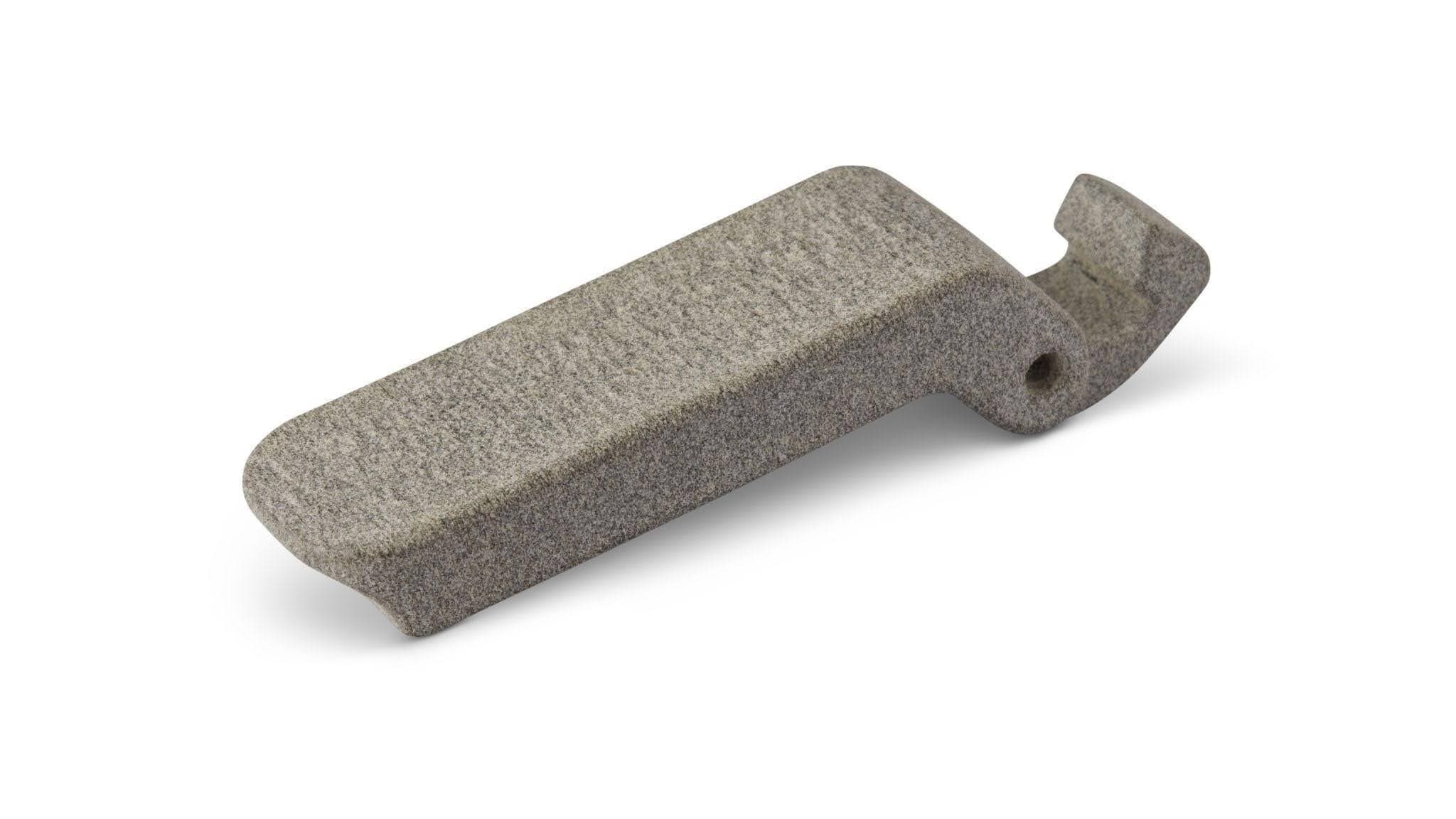
Mixer latch printed on an HP MJF 3D printer. The yellowing and rough surface finish are a consequence of inadequate thermal control at high packing densities.
HP’s own MJF Handbook describes an inherent trade-off in the process, with no simple setting that eliminates it: hotter parts sinter more completely but suffer from thermal bleeding and sink marks, while colder parts look better but give up mechanical performance. Packing more densely pushes a build toward the hot end of that range. That is why the guidance is to stop packing rather than to adjust the process: the limit is in the MJF process, not in the parts.
The same handbook puts that guidance in numbers: “A good compromise between throughput and part quality is a [volume] packing density range between 8% and 12%. When optimizing mechanical properties, a good compromise between throughput and part quality is a packing density range between 8% and 10%.”
Densely packed builds can also require a higher refresh rate, which drives up cost significantly. As a result, few customers pack builds that tightly in day-to-day production.
This explains why HP customers’ average packing density is so much lower, even though their maximum isn’t far below that of Fuse Series printers. On MJF 3D printers, higher packing density works only for a narrow range of designs, and it lowers print quality while raising costs. As a result, most customers print at lower densities, within HP’s recommended range
SLS handles heat differently. A laser sinters only the powder that forms the part, so the bed is heated selectively rather than layer-wide. Less energy bleeds into places where it is not intended to go, making it possible to pack parts closer together.
Nitrogen is another major factor, and it answers a specific objection. HP argues that because an SLS laser has to scan more area as packing density rises, denser builds run longer, hold the powder at temperature longer, and degrade it further. The longer exposure is real; the damage does not have to be. Fuse X1 prints every powder in a nitrogen atmosphere, and Fuse 1+ requires nitrogen for some powders, such as Nylon 11. An inert atmosphere prevents the powder from oxidizing when held at high temperature for long periods of time and helps enable high packing densities.
HP MJF printers don’t use nitrogen. They move a large volume of air to cool their sensitive components, and replacing that much air with nitrogen would be impractical, so their process chambers are limited to air. That becomes a problem as packing density rises, because the powder in heat-affected zones needs protection from oxidation to avoid being damaged.
Beyond the process itself, Formlabs Fuse Series SLS 3D printers include additional technologies that help achieve high packing densities:
-
Surface Armor, available on Fuse 1+ and Fuse X1, is a semi-sintered shell that minimizes thermal inconsistencies that could otherwise affect your parts, ensuring a good surface finish without orange peel. This technology is proprietary to Formlabs and only possible on laser-based systems.
-
Adaptive Thermal Control technology on Fuse X1 enables densely packed builds without surface defects by monitoring and adjusting 13 thermal zones during printing. A 768-point infrared camera, scaled up from the single-point infrared sensor on Fuse 1+, makes this possible.
These technologies enable consistent printing throughout the build chamber, so a part in the center meets the same accuracy and quality tolerances as one at the edge.
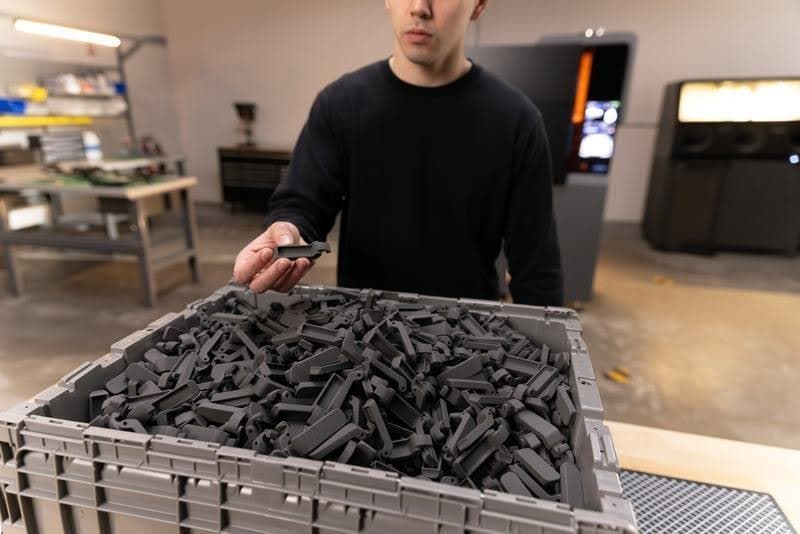
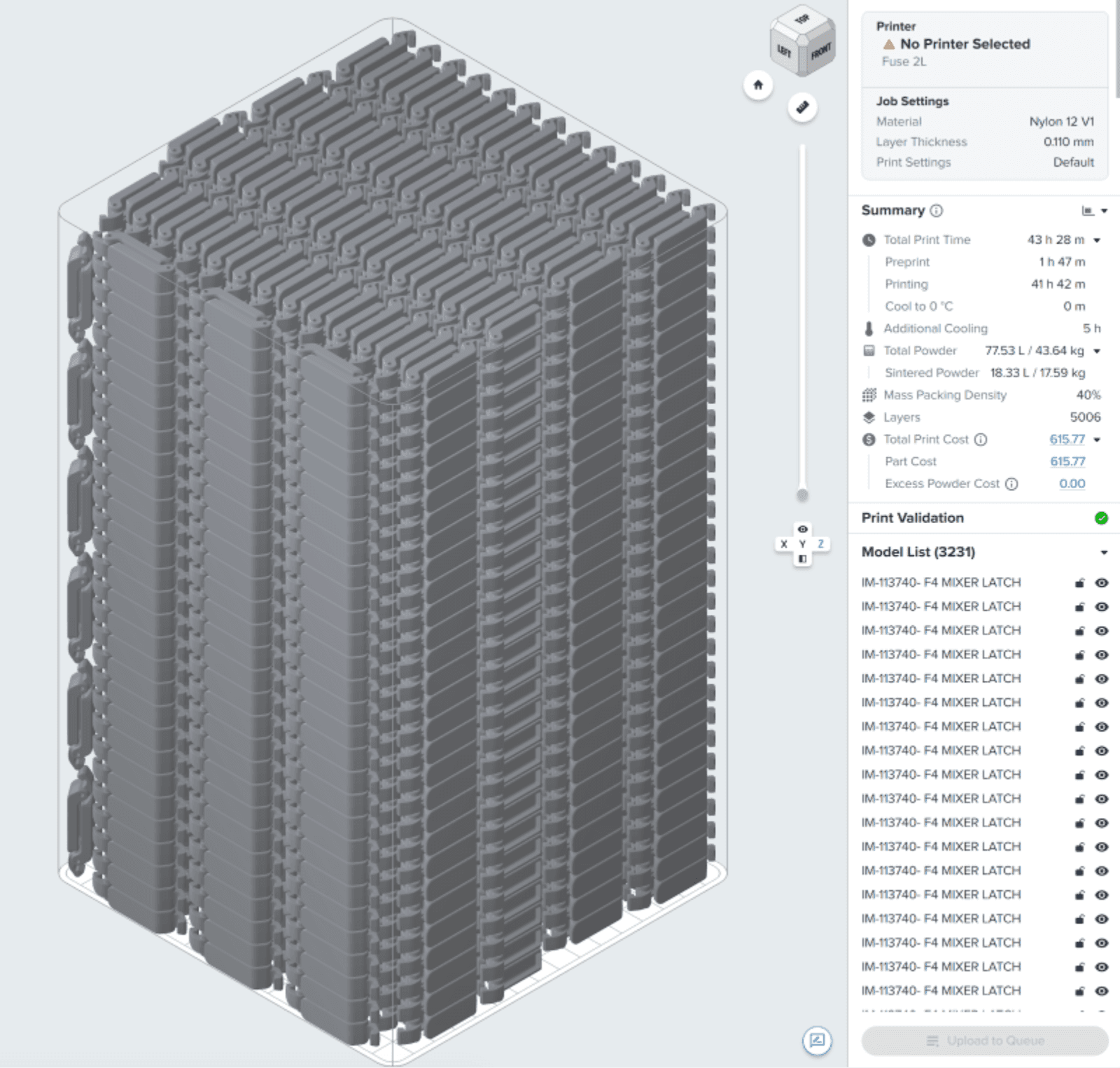
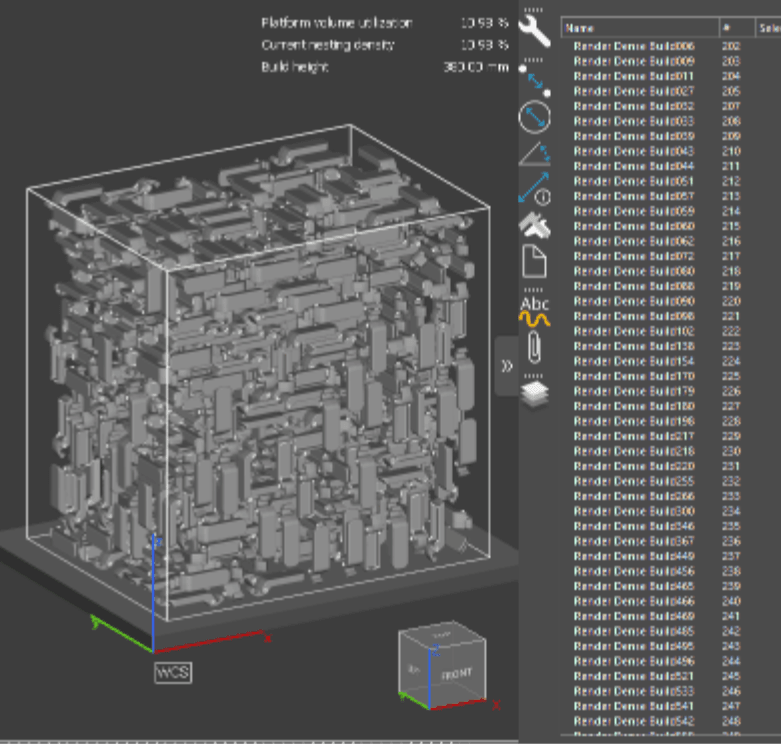
A single Fuse X1 build produced 3,231 Form 4 mixer latches. Adaptive Thermal Control, Surface Armor, and an inert atmosphere ensure quality parts wherever they sit in the build.
Clearance Is a Printer Spec, Not a Part Property
Among the factors HP lists as setting achievable packing density, the distance between parts is described as mostly independent of the process you use. The implication is that neither technology can inherently pack denser than the other. Both companies' published design guides say otherwise.
HP recommends leaving at least 5 mm of powder between parts on MJF, and 10–15 mm between dense, thick-walled parts, which hold more heat. On Fuse Series printers, the recommendation is 2 mm.
|
HP Multi Jet Fusion Printers |
Fuse Series SLS 3D Printers |
|
|---|---|---|
|
Recommended Part Clearance |
5 mm |
2 mm |
|
Recommended Part Clearance for Dense, Thick-Walled Parts |
10-15 mm |
2 mm |
|
Margin Required Inside the Printable Build Volume |
10-20 mm |
None |
Source: Fuse Series SLS Design Guide and HP MJF Handbook. Clearance values are the gaps between part surfaces. HP applies its 10–15 mm figure to dense parts with walls thicker than about 15 mm. On Fuse Series printers, the powder boundary sits outside the printable build volume shown in PreForm — 10 mm on Fuse X1 — so no further margin is needed inside it. On MJF, the 10–20 mm margin must be left inside the stated build volume.
That difference limits packing density, whatever the parts look like. Powder-bed fusion 3D printers can nest parts inside one another’s bounding boxes, so what really determines how tightly a build can be packed is the minimum gap allowed between any two parts. A simple example shows how much that gap matters. Take a 10 mm cube, a shape where nesting doesn’t help: once clearance is added, each part effectively takes up a cell 15 mm across on MJF, against 12 mm on a Fuse Series SLS printer. That works out to nearly twice as many parts in the same volume on Fuse.
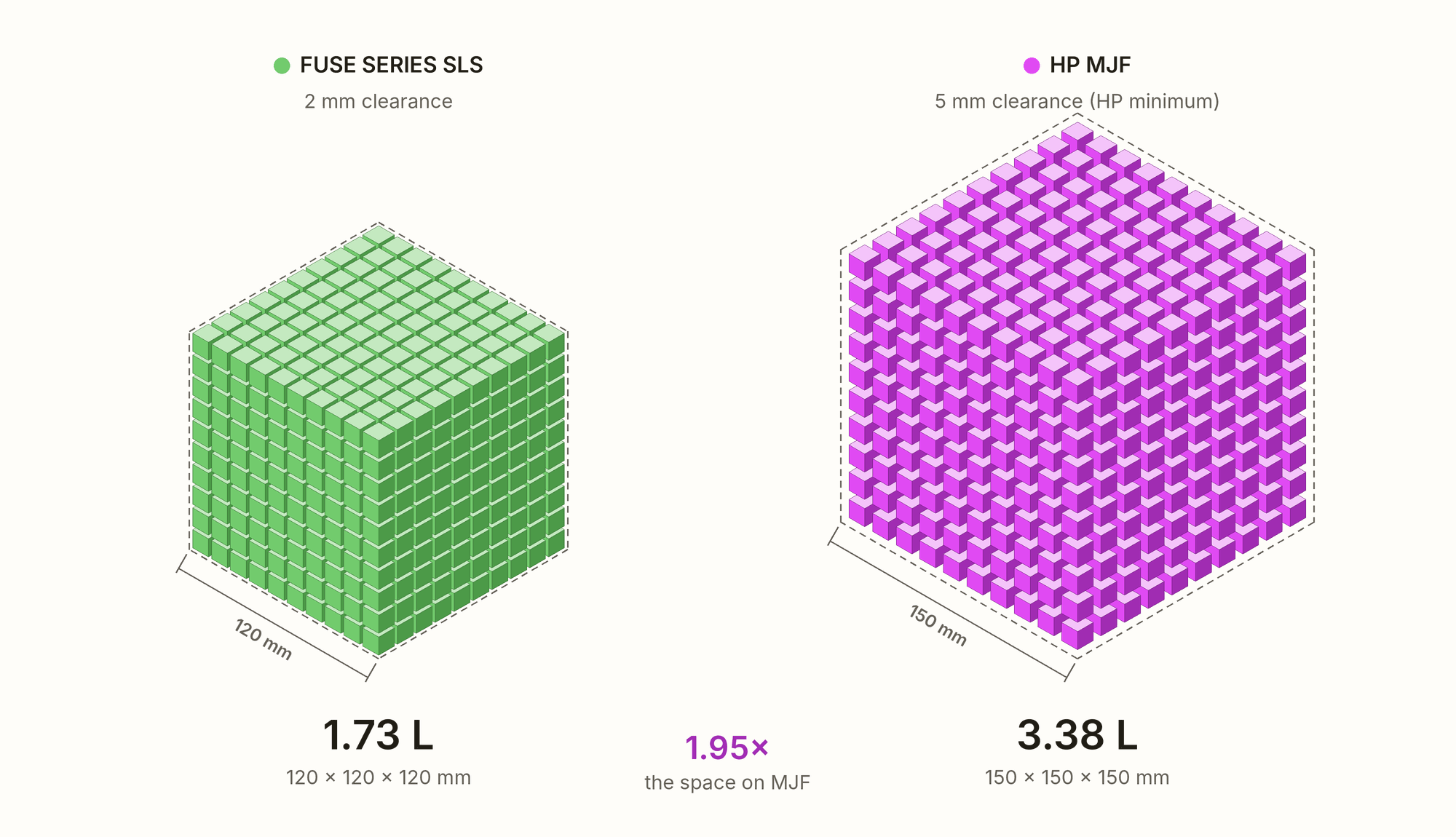
* 1,000 parts, each a 10 mm cube, in a 10 × 10 × 10 grid. Each part takes up its own size plus one clearance gap, as it would inside a larger build: 2 mm on Fuse Series printers, and HP’s 5 mm minimum on MJF.
Real builds mix shapes and nest them, so this is a simplification, but it shows how much space the clearance requirement alone takes up before part geometry comes into play. With real parts, the gap holds up: our fleet data shows 11.3% average volume packing density on Fuse X1 against roughly 7% on MJF, a ratio of about 1.6. Clearance is one reason for that gap; the thermal limits covered above are another.
The advantage is largest exactly where HP's geometry argument is supposed to bite hardest. Clearance is a fixed distance, so it costs proportionally more on small parts than on large ones. At HP’s 5 mm minimum, Fuse Series printers fit about 1.5 times as many 20 mm parts into the same volume, and about 1.15 times as many 60 mm parts. Around thick-walled parts, where HP asks for 10–15 mm, the advantage grows again: 1.4 to 1.8 times as many 60 mm solid blocks fit on Fuse.
Build perimeters compound it. MJF leaves 35, 33, and 20 mm of unusable powder on each axis, so only 62.1% of the powder loaded into the chamber sits inside the printable volume. On Fuse X1, thermal control holds the powder boundary to 10 mm, and everything inside it — shown in PreForm as the printable build volume — prints reliably, leaving 84.1% usable. The space MJF customers cannot use is not taken up by their parts. It is reserved by the printer.
That reserved space also shows up in mass packing density. Because a larger share of the powder in an MJF chamber sits outside the printable volume, the same parts make up a smaller share of all the powder loaded. The chart below shows the effect: at 30% volume packing density, a Fuse X1 build reaches about 40% by mass, against about 34% on MJF. Since mass packing density is what determines waste, the chamber design widens the gap even when the parts are packed equally densely.
Mass vs Volume Packing Density at Full Build Volume*
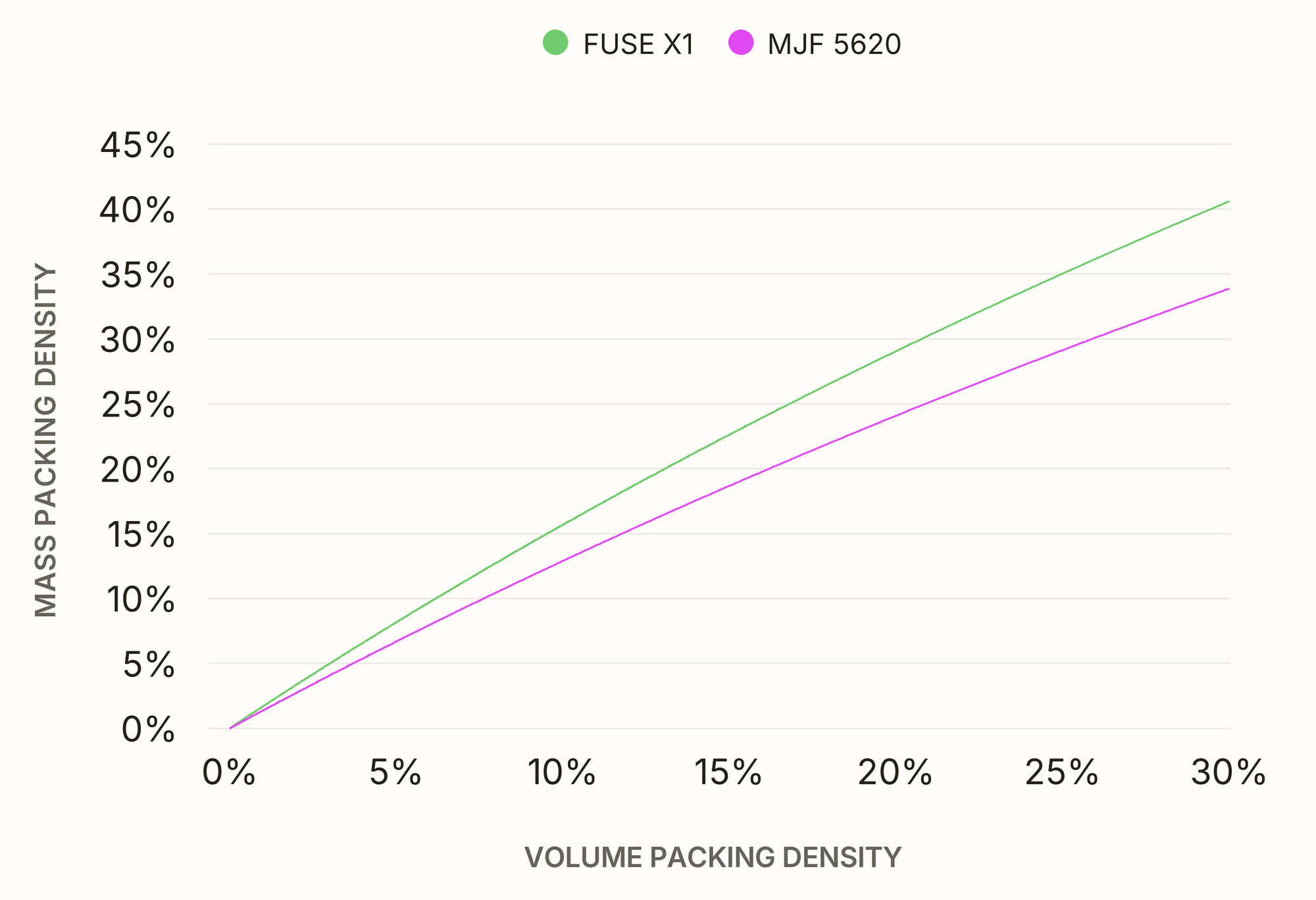
* Mass packing density = Part mass / all powder in the chamber. Volume packing density = parts volume / printable volume.
The Economics of Packed Builds
A number of metrics impact cost per part:
-
Ecosystem costs: The more parts in a build and the more builds a user can run, the lower the per-part cost, as the ecosystem costs are distributed across more parts.
-
Labor: The more parts in a single build, the less labor is required to change over the printer.
-
Material costs and material waste: When packing density is limited, builds are less likely to reach the zero-waste refresh rate, so powder has to be discarded.
Start with ecosystem costs. Fuse X1 printers start at $84,999, while an HP Jet Fusion 5600 Series printer costs around $400,000. With the full ecosystem included, an HP 5600 setup costs about 3 times as much as Fuse X1, as our Fuse X1 vs. HP Jet Fusion 5600 Series comparison shows. The lower entry price also makes it easier to add capacity as demand grows, one printer at a time.
Labor is where the build volume pays off. The 50% larger build volume, combined with the higher packing density, means a Fuse X1 delivers roughly two to three times the throughput of an HP 5600 Series system, with far fewer builds to turn over. In the example below, Fuse X1 printed 3,231 mixer latches in a single build, while the same parts take four builds on an HP 5600 Series system. The exact multiple depends on the build.
Fuse X1
3,231 mixer latch parts | One build*
~43 parts/hr | Print Turnovers: 1
Total Production Time: 75 hours
Printing: 40 hours | Cooling: 25 hours
HP 5600 Series
3,232 mixer latch parts | 808 parts per build X 4*
~19 parts/hr | Print Turnovers: 4
Total Production Time (Print and Cool): ~170 hr*
Printing: 11.5 hours | Cooling: 40 hours
* Estimates based on standard print settings, using Nylon 12 Powder at a 30% refresh rate on Fuse X1 and PA 12 at a 20% refresh rate on HP MJF.
** Assuming one daily shift and two build units.
Fuse X1 Build Volume Utilization
Fuse X1 users do like to leverage the larger build volume. Out of 399 builds, 74% exceeded 80% build volume utilization.
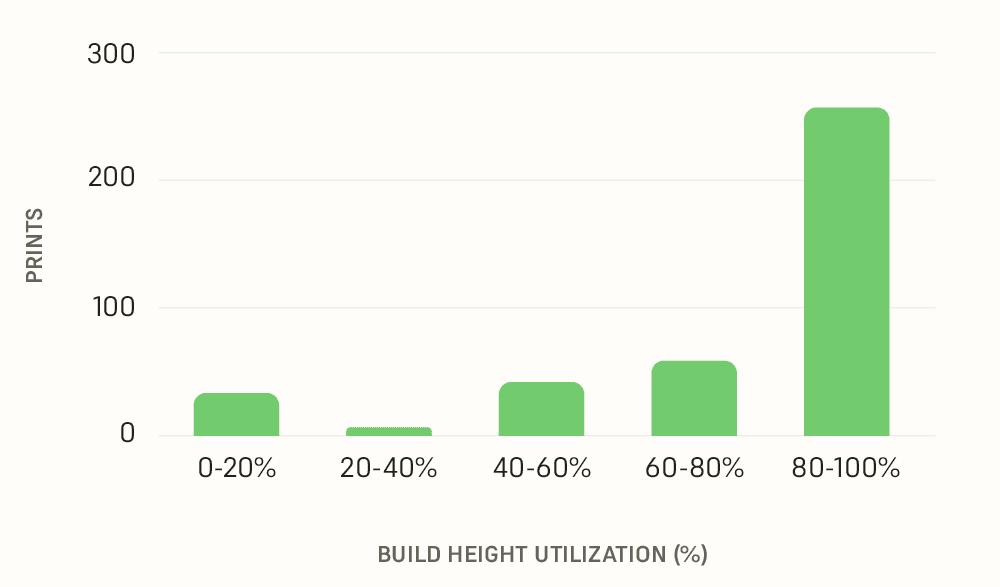
But on a tight timeline, a Fuse X1 build can also be packed to a lower height so it finishes overnight, delivering the same number of parts in the same time frame as MJF.
On Fuse X1, high-mix builds are a good way to maximize packing density and reach the zero-waste refresh rate. For a high-mix build, pack small parts around large ones. Depending on part orientation, a high-mix build can fill the build volume. For an overnight print, orient and pack parts to a lower height instead.
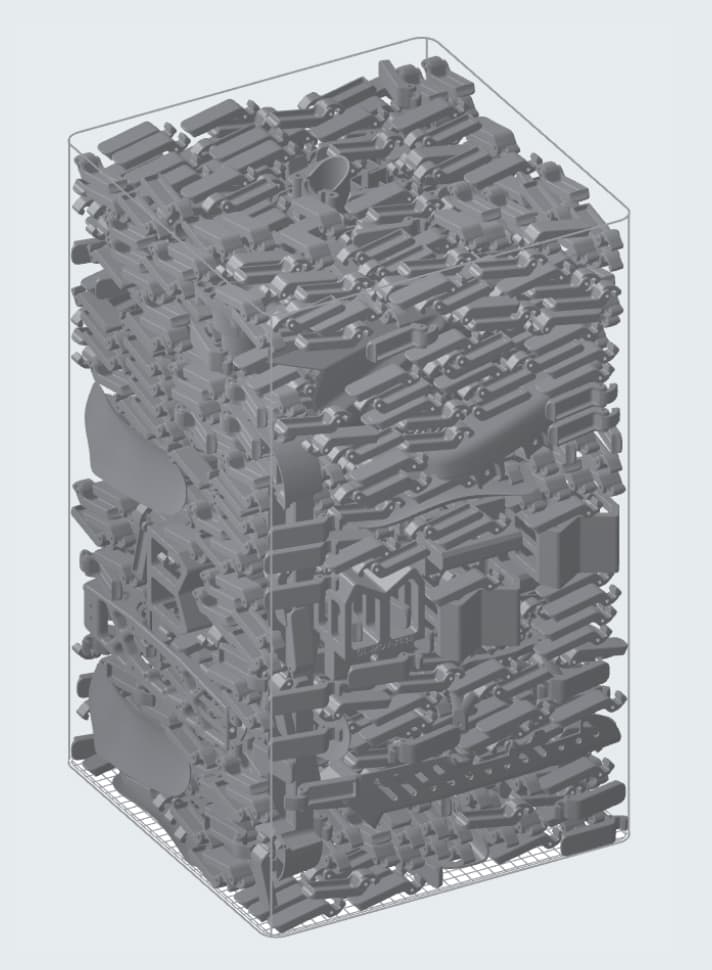
High Mix
1176 parts
Print time: 30.5 hours
25% mass packing density
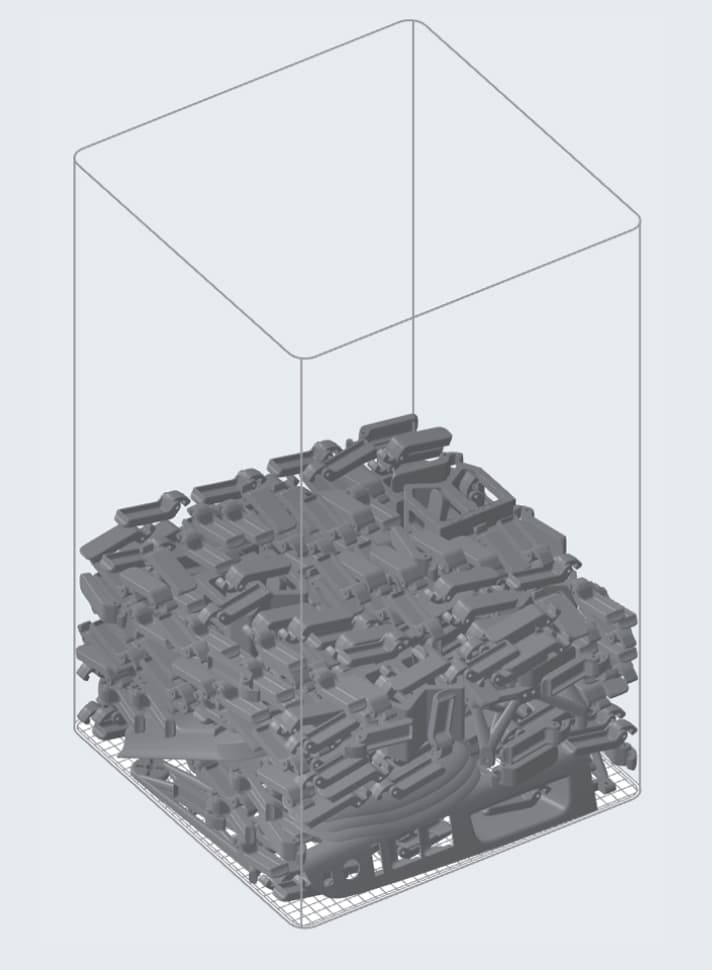
High Mix Overnight
336 Parts
Print time: 13 hours
27% mass packing density
Changeovers are faster, too. Turning a Fuse X1 over between prints takes about 5 minutes, while HP systems need more maintenance between builds, which can easily take more than 30 minutes.
Powder prices are broadly comparable, and both companies offer lower-priced tiers with bulk pricing. To unlock HP’s lowest material prices, however, customers have to pay for a $125,000 upgrade, which costs more than a Fuse X1 printer. MJF printers also use fusing and detailing agents and printheads as consumables, which add roughly $20–30/kg of finished part.
Waste widens the gap further. Powder that can’t go back into the next build is powder paid for and thrown away, and how much there is comes down to packing density. At a 20% refresh rate, an average MJF build discards 53% of the fresh powder it consumes, against 8% on an average Fuse X1 build — so the comparable powder prices above translate into very different real costs per kilogram of finished part. Even on materials requiring 30% fresh powder, Fuse Series builds waste less than MJF does at 20%, and the densest builds reach zero waste.
Taken together, Fuse X1 comes out ahead of the HP Jet Fusion 5600 Series on every major driver of cost per part: lower ecosystem costs, less labor, and lower material costs and waste, consumables included. Try our interactive calculator to compare cost per part and throughput with your own parts.
Start Printing With Formlabs SLS
The Tesla Giga Nevada build this article opened with — 17.9 kilograms of parts at 49% packing density by mass — is not a stunt run under lab conditions. It is where the fleet data points. Across thousands of prints, Formlabs SLS builds average roughly double the mass packing density of MJF builds. They get there because the process does not fight back: a laser sinters only what needs sintering, so density does not turn into heat.
That is what changes the economics. More parts per build, less labor per changeover, and builds that can actually reach the zero-waste refresh rate rather than discarding powder to stay under a thermal ceiling. The ceiling MJF users run into is not in their parts. It is in the printer.
Fuse X1 is an accessible large-format industrial SLS 3D printer that can deliver up to three times as many parts as competitors, with overnight builds at half the cost. Explore SLS 3D printers to learn more, build your quote, or contact sales.