
Tip:
You need to create an account and register a printer to that account in order to track print events in Form Mobile.

Form Mobile tracks printer activity and displays it in real time. Use the app to check on a print in progress or your printer’s status.
Tip:
You need to create an account and register a printer to that account in order to track print events in Form Mobile.
Tracking print progress
A printer syncs with Form Mobile after you register the printer to an account. Log in to see what layer you are currently printing, if you are low on resin, and when your print is due to complete.
To view a printer’s status, open the Form Mobile app. The app opens to the status page for the most recent printer you viewed. If you have registered multiple printers to your account, you can view the status of another printer by tapping the top status bar in the app. The My Printers drawer opens. Tap a different printer’s name to view its status.
Tip:
If you are having trouble detecting a printer, troubleshoot your connection to the app.
Print information
During a print, the printer status screen shows the following information:
You can also pause or abort the print job from this screen.
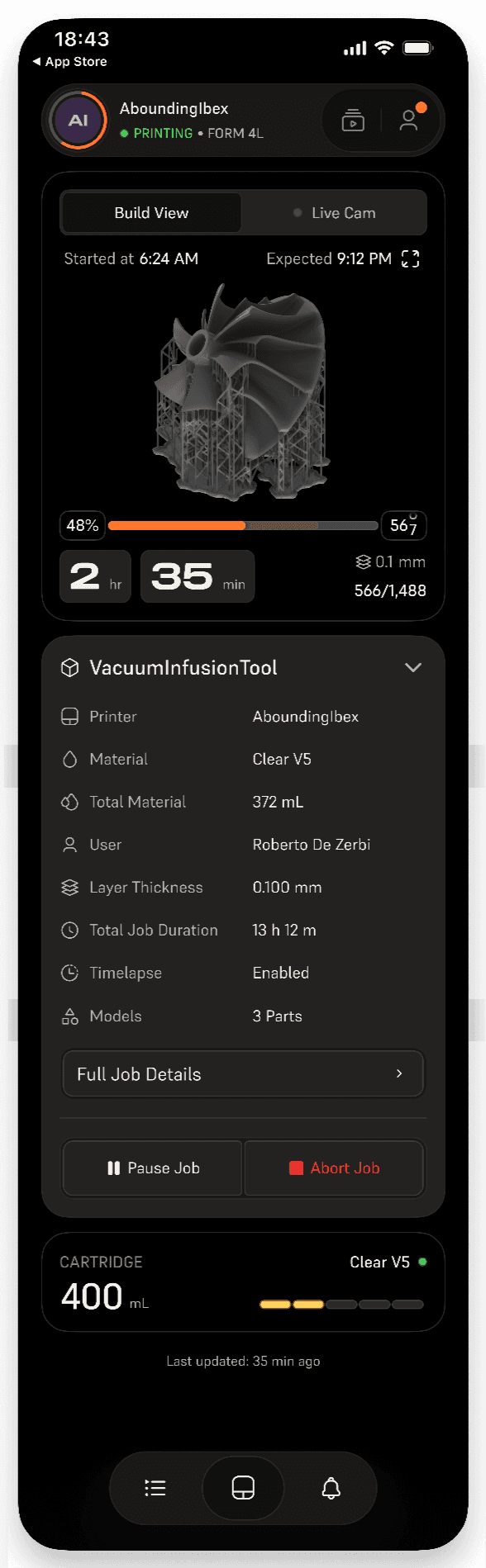
Print details
If you tap the print name on the status screen, the Print Details screen appears, showing additional information about the current print job:
Tracking device status
Your printer can show several different statuses on the status screen or in the My Printers drawer. These are similar to the statuses shown in PreForm: