

WHITE PAPER
Formlabs Logo

Using High Temp Resin

Using High Temp Resin

High Temp Resin is designed for functional prototyping in high heat applications. Understand the technical specifications and best uses.

NOTICE:

To avoid damage to equipment, check the resin tank compatibility table in Choosing the right material to confirm you are using a resin tank that is compatible with this material.

Form 2: Avoid storing this material for longer than one month in a standard resin tank or two months in a Resin Tank LT to prevent resin leaks and subsequent damage.
The most notable property of this material is its Heat Deflection Temperature, which is the temperature at which a material will deform under a specified load. For High Temp, the heat deflection temperature is 238 °C @ 0.45 MPa for V2 (FLHTAM02) and 289 °C @ 0.45 MPa for V1 (FLHTAM01).

High Temp is ideal for applications requiring the part to stand up to high temperatures with minimal loading. The material has almost no flex, however, so snap fits and living hinges are not suited for printing with High Temp Resin.

Note:

To learn more about the performance or specific material properties of High Temp Resin, please refer to the Safety Data Sheet (SDS) and Technical Data Sheet (TDS). Always consult the SDS as the primary source of information to understand safety and handling of Formlabs materials.

Recommended for

  • Hot air, gas, and fluid flow
  • Heat resistant mounts, housings, and fixtures
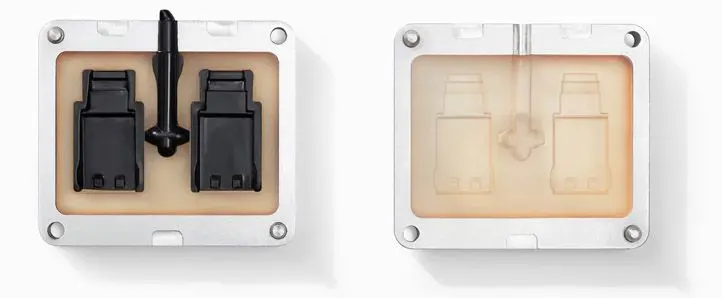
  • Molds and inserts
  • Vulcanization

Not recommended for:

  • Injection molding with industrial equipment
  • Parts that will be under load
  • Snap-fits and/or flexible parts

Comparison with other materials

For more information on High Temp's mechanical properties, please see the High Temp datasheet V2 (FLHTAM02) and V1 (FLHTAM01). To learn more about the performance properties of each Formlabs resin, refer to the library of material properties datasheets.

Printing with High Temp Resin

Notice:

When printing in High Temp Resin with a standard resin tank, regularly inspect the clarity of the tank’s elastic layer. High Temp Resin requires a higher peel force to print and shortens the tank lifespan as a result. Replace the resin tank as needed.

Install or update PreForm, then set up the next print job.

To prepare a model for printing in PreForm:

  1. Open a model.
  2. Select the resin, resin version, and the desired layer thickness.
  3. Orient to preserve fine details.
  4. Generate supports.
  5. Send the print job to the printer.

High Temp is available in 25, 50, and 100 micron layer heights. Reserve the 25 micron setting only for small objects that are the size of a piece of jewelry or smaller. The only difference between printing at 25 microns and printing at 50 microns is a slightly smoother surface finish. Otherwise, the print quality is the same.

NOTICE:

Do not mix V2 (FLHTAM02) with V1 (FLHTAM01).

Printing in High Temp Resin requires more laser power. Keep the prints small and move parts around the build platform, especially when printing at 25 microns.

Always print High Temp part with supports. Avoid printing parts directly on the build platform with High Temp Resin because adhesion issues can occur between the part and the build platform surface. When printing very large or very heavy objects, increase the support touchpoint size or density. If the support touchpoint size is too small, the model may separate from its supports.

Finishing

The finishing process for parts printed in High Temp varies slightly from the post-print steps for Formlabs standard resins.

  • The Form Wash agitates the solvent bath and removes parts from the bath after a set time. Wash parts according to the support article Form Wash time settings. Pay particular attention to information that affects mechanical properties or biocompatibility requirements.
  • When using a Finish Kit, wash in the first bucket for 5 minutes, then transfer to the second, cleaner bucket for 5 additional minutes.
  • Do not rinse High Temp Resin for more than 6 minutes in isopropyl alcohol (IPA), or the part will absorb IPA.
  • Remove parts from the rinse bucket and allow to fully air dry before post-curing. If the part does not dry thoroughly, it will crack with exposure to light and heat during post-curing.

Use the standard support removal and sanding techniques when post-processing parts printed with High Temp Resin.

Post-curing requirements

High Temp Resin requires post-curing to reach its optimal mechanical properties and high heat deflection temperature (HDT). Refer to the Form Cure time and temperature settings for post-curing requirements.

NOTICE:

There are several post-curing options for High Temp v2. To achieve the highest HDT, thermally post-cure the parts in a non-food oven after using Form Cure. Refer also to the technical data sheet to understand how different options affect mechanical properties, and choose the post-cure option that is best suited to the intended application.