LIVRE BLANC
Formlabs Logo

Resin care

Resin care

Warning:

  • Unless otherwise stated, Formlabs resins are not approved for use with food, drink, or medical application on the human body. Never ingest resin in liquid or solid form. If swallowed, immediately call a poison center or medical professional.
  • Always consult the safety data sheet (SDS) as the primary source of information to understand safety and handling of Formlabs materials. Resin may cause skin irritation or an allergic skin reaction. Wear gloves when handling liquid resin or resin-coated surfaces. Wash skin with plenty of soap and water. Do not use IPA or other solvents to remove resin from skin.
  • Always follow Formlabs recommended safety precautions. Do not eat, drink, or smoke in the printing work area.

Sécurité et manipulation

Formlabs designs its standard resins to be as safe as or safer to handle than common household chemicals or adhesives. When measuring potential acute health effects of inhalation or ingestion, there are no known significant effects or critical hazards. Always consult the SDS for appropriate safety and handling of Formlabs materials.

Warning:

Eye contact may cause eye irritation. Skin contact may cause an allergic skin reaction.

Use gloves

Wear chemically-resistant gloves like nitrile or neoprene (not latex) when handling liquid resin, printer components, or printed parts. Exposure to liquid resin can irritate sensitive skin.

Wash with soap and water

To remove resin from skin, wash thoroughly with soap and water. Do not wash skin with products containing alcohol, like hand sanitizer, or any other solvents.

First aid

In an emergency, refer to the safety data sheet and seek help from a medical professional. Contact ChemTel at +01-813-248-0585 with contract number MIS4707563 for global 24-hour assistance interpreting the SDS.

Resin storage

Formlabs materials require proper storage to maximize the usable lifetime. Light and temperature affect shelf life significantly. For optimal results, follow Formlabs guidelines for storing and handling resins.

Resin tanks

  • For the Form 2, print using Resin Tank LT for best results and a longer tank lifetime.
  • Use a different resin tank for each type of Formlabs resin. Cleaning the resin tank to change resins may lead to contamination and print failures.
  • When using a Formlabs resin for biocompatible applications, maintain separate accessories, including a dedicated resin tank, build platform, and finishing equipment to comply with biocompatibility standards.
  • For long-term storage, pour resin into a separate, opaque container from the resin tank. Formlabs recommends wide-mouth opaque HDPE or polypropylene bottles. Containers made of other materials may leak.
  • Follow Formlabs recommendations for storing, cleaning, and replacing resin tanks.

Resin

  • To avoid contamination, do not pour resin back into cartridges.
  • Store resin according to the SDS, away from direct sunlight in a dry, cool, and well-ventilated area.
    • For best performance and shelf life, store resin between 10–25 °C (50–77 °F).
    • Short-term freezing (e.g., during shipping) is generally not detrimental to shelf life. Thaw and shake the resin cartridge thoroughly before use.
    • High temperatures decrease shelf life. Transient high temperature conditions (e.g., during shipping) should have a minimal effect.

Before printing

  • Inspect resin for signs that it is past its recommended lifetime, like abnormally high viscosity and clumps.
  • Precision Model Resin contains pigments that settle during storage. Before each print, scrape the bottom of the resin tank to mix the resin and vigorously shake the cartridge.
  • Before starting a print, shake the resin cartridge and stir the resin in the tank.

Shelf life and lot number

A resin’s shelf life is the time within which the liquid resin in a cartridge is expected to perform as intended. Once the resin has expired, its photoreactivity decreases and its chemical composition changes. As a result, prints attempted with the resin may fail. A resin may print successfully for a longer period than indicated, depending on handling, use, and storage.

Note:

The lifetime of a resin varies from type to type. The support article Choosing the right resin lists the shelf life for each resin. Resin cartridges purchased from Formlabs will have at 25% of their shelf life remaining. For example, a resin with a shelf life of 24 months may be shipped until six months before the expiration date.

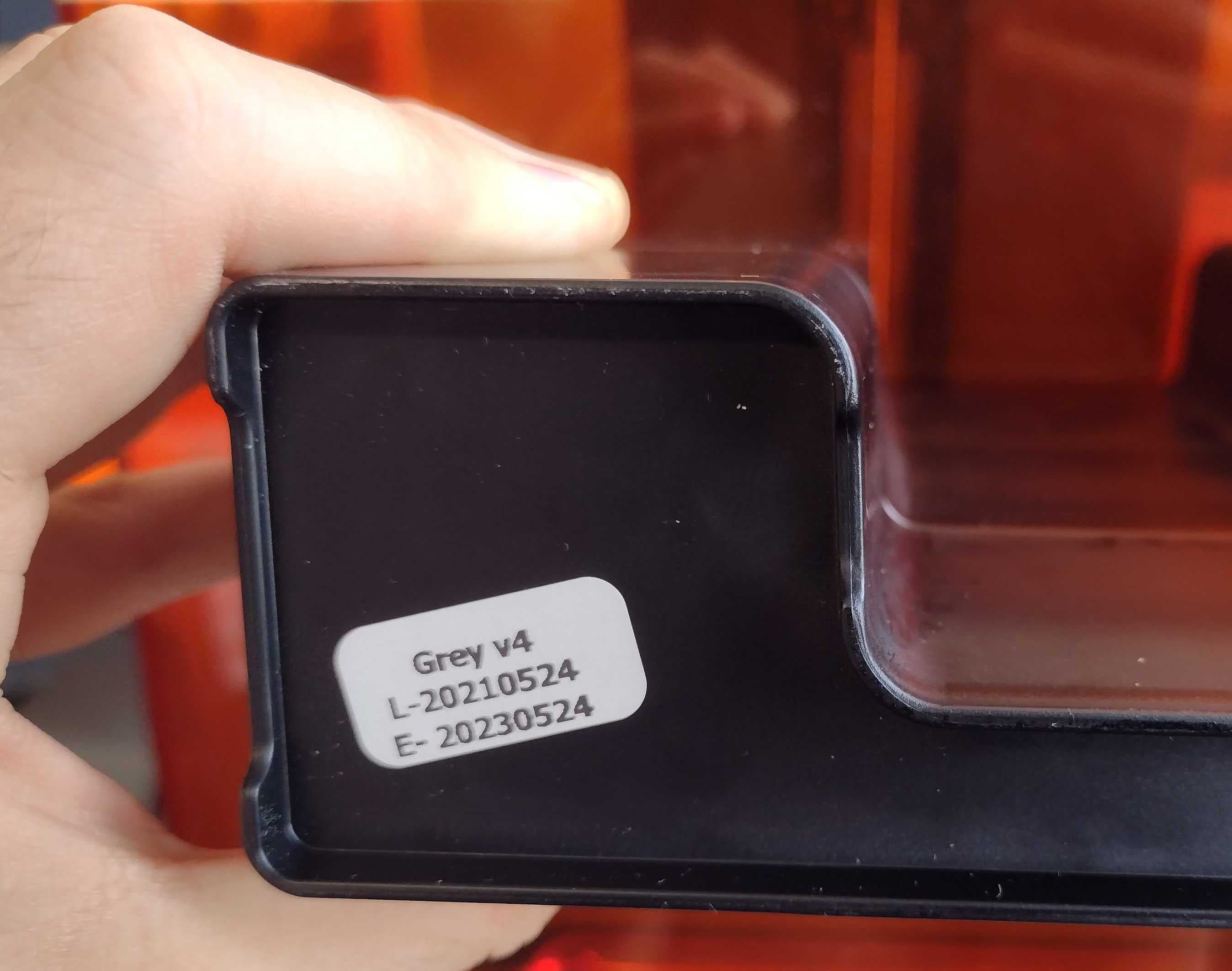
The lot number on older resin cartridges is formatted YYYYMMDD. If the lot number begins with 2020 or an earlier year, the resin is most likely past its recommended lifetime and may not print properly.

Lot number formatted YYYYMMDD on the skirt of a resin cartridge

The lot number and the recommended lifetime indicate how long a resin is estimated to print reliably. For example, if a cartridge of Clear Resin has the lot number 20190531, the resin should print successfully until at least 20210531, or May 31, 2021.

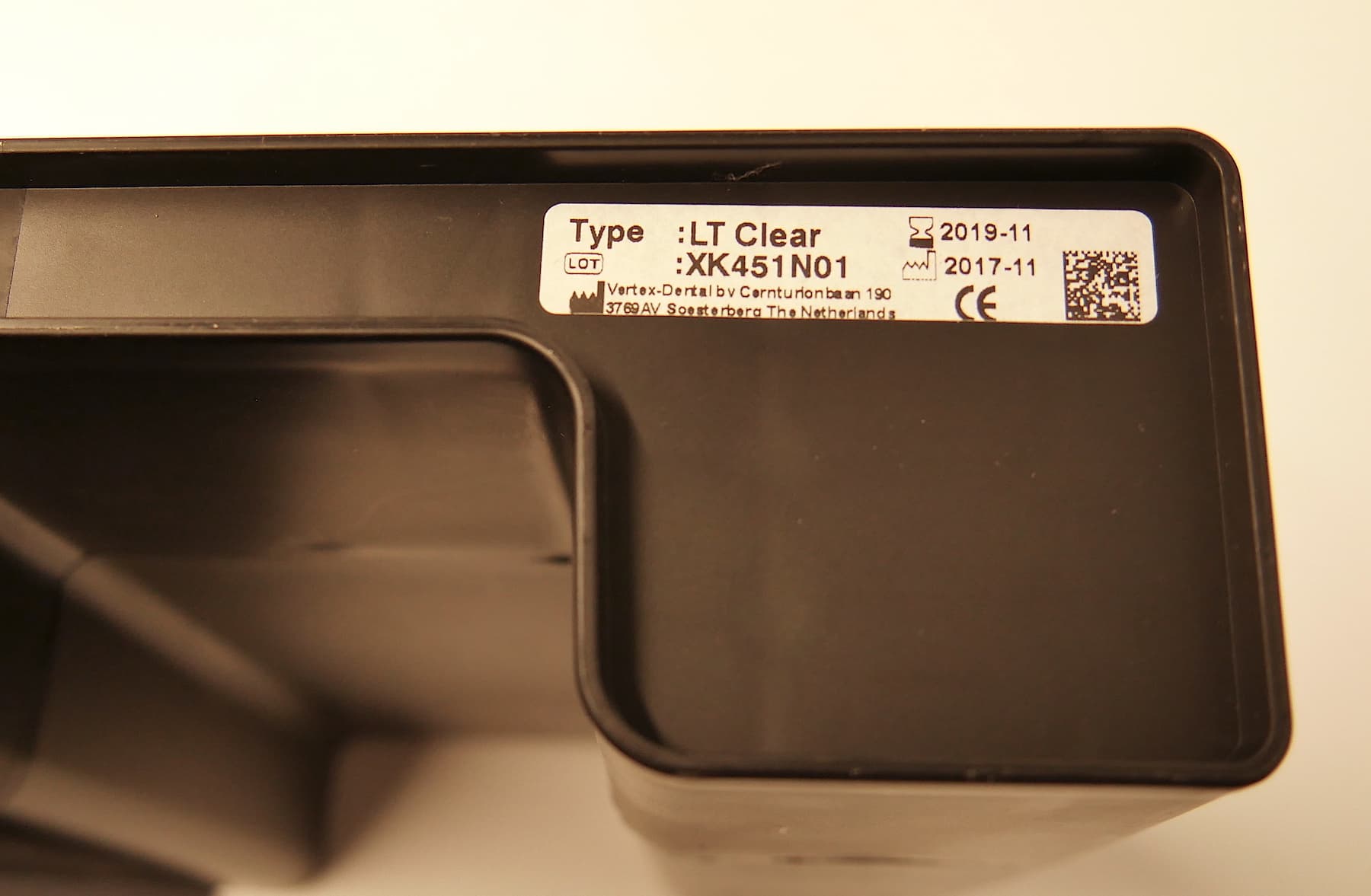
Some Formlabs resin cartridges may have a different sticker on the bottom. This sticker indicates the resin type and lot on the left. On the right side of the sticker, the expected lifetime of the resin is printed in YYYY-MM format.

Lot number formatted YYYY-MM on the bottom of a resin cartridge

Tip:

Each resin's lifetime is listed in the support article Choosing the right material.

Resin disposal

Dispose of liquid resin (whether liquid, dissolved in IPA, or partially cured) and anything contaminated with liquid resin according to environmental regulations.

Disposal instructions

Liquid or cured resinResin cartridgesResin tanks
Disposing of resinDisposing of resin cartridgesDisposing of resin tanks

Resin spills

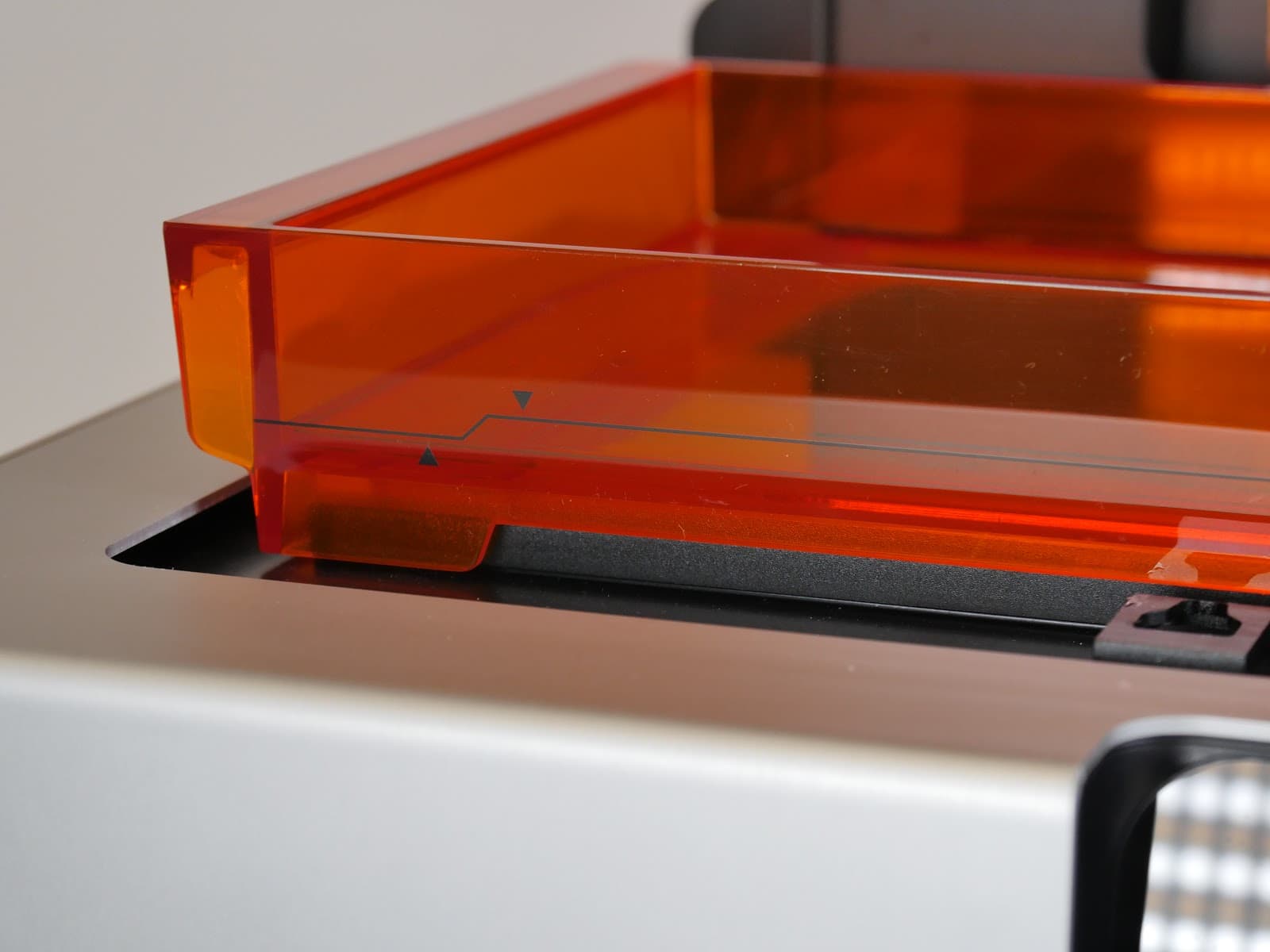
Minimum and maximum fill lines on a resin tank

Resin spills can damage the printer or workspace. Some resin tanks, such as those for Form 2 and Form 4 generation printers, have minimum and maximum fill lines printed on the tank. When manually filling the resin tank, do not exceed the height of the maximum fill line.

If resin spills inside the printer, follow the cleaning instructions linked below and contact Formlabs Support or your authorized reseller to report the spill.

If resin spills outside the printer, wash surfaces with soap and water. If using IPA or other solvents, spot test the cleaner on a small, inconspicuous area to determine whether the solvent will damage the material.