Anmerkung:
Der Ferndruck ist nur auf ausgewählten Formlabs-Druckern verfügbar. Weitere Informationen finden Sie in den folgenden Supportartikeln:


Dies ist ein Überblick über die Konnektivität und Sicherheit von Formlabs-Hardware und -Software. Ausführliche Einzelheiten zu den von Formlabs gesammelten Informationen finden Sie in der Formlabs-Datenschutzrichtlinie oder senden Sie etwaige Fragen per E-Mail an [email protected].
Formlabs betreibt mehrere Plattformen, die Daten austauschen:
Der Datenverkehr wird mit branchenüblicher 256-Bit-RSA-Verschlüsselung verschlüsselt.
Formlabs Website und Dashboard
Die Formlabs Website bietet Informationen über Produkte, den Online-Shop und Bildungsressourcen. Dashboard ist ein Online-Tool für Betreiber von Formlabs-SLA-Druckern, mit dem sie die Aktivitäten ihrer Drucker aus der Ferne überwachen können. Sobald die Verbindung hergestellt ist, liefert Dashboard nützliche Informationen über den Status aktueller und vergangener Druckaufträge, den Materialverbrauch im Zeitverlauf und andere nützliche Statistiken.
Um Dashboard zu aktivieren, muss jeder Nutzer ein Formlabs-Konto erstellen, ein Formlabs-Gerät mit dem Internet verbinden und jedes Gerät über die Touchscreen-Oberfläche in Dashboard registrieren. Bitte beachten Sie die Formlabs Datenschutzbestimmungen für weitere Auskünfte darüber, welche Informationen vom Dashboard gesammelt werden.
Konnektivität
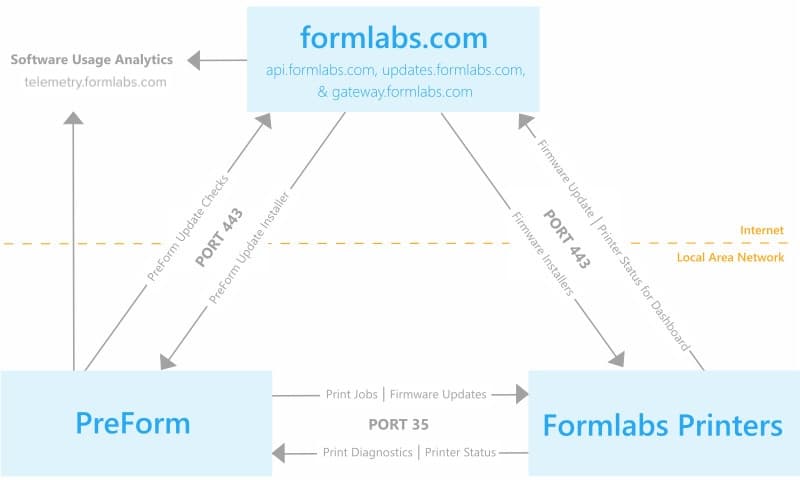
PreForm und Formlabs-Hardware kommunizieren mit Dashboard über Port 443 (HTTPS), api.formlabs.com und gateway.formlabs.com.
Sicherheit
Die Formlabs-Website und Dashboard nutzen beide HTTPS-URLs und werden mit einem 256-Bit-RSA-Schlüssel gemäß dem Industriestandard verschlüsselt.
Formlabs speichert Daten mithilfe von Amazon Web Services (AWS). AWS speichert Daten redundant auf mehreren Geräten in mehreren umgebungskontrollierten Anlagen. Die AWS-Infrastruktur und -Kontrollen unterliegen den jährlichen SAS-70 Typ II-Audits. Die AWS-Prozesse und -Kontrollen für das Management der Informationssicherheit sind nach ISO 27001 zertifiziert.
Bitte stellen Sie sicher, dass Sie diese Adressen nicht in Ihrer Firewall blockieren:
Formlabs-Geräte
Konnektivität
Es gibt drei Optionen für den Anschluss eines Computers an Formlabs-Geräte:
Erfahren Sie mehr über den Anschluss Ihres SLA- oder SLS-Geräts.
Wenn über die Touchscreen-Einstellungen aktiviert, sendet ein Formlabs-Gerät Leistungsdaten wie Laserkalibrierungen und Druckerfolgsraten, um uns bei der Fehlersuche zu helfen und die Funktionalität der Formlabs-Hardware zu verbessern.
Sicherheit
Die Formlabs-Hardware umfasst die folgende Sicherheitskonfiguration:
Der Drucker synchronisiert die Zeit über NTP (UDP-Port 123) mit den folgenden Servern. Bitte stellen Sie sicher, dass diese nicht von Ihrer Firewall blockiert werden:
Zusätzliche Sicherheitshinweise und Firewall-Anforderungen:
PreForm Desktop-Software
Connectivity
PreForm operates in the same three connectivity modes as Formlabs devices: without network access, via LAN, and via LAN with internet access. For network connected printers, PreForm communicates through port 35 and checks for updates on updates.formlabs.com via port 443.
PreForm includes the option to participate in a software quality improvement project which logs information for Formlabs to improve PreForm. Choose whether to contribute to the quality improvement project by accessing Help > Help Improve PreForm... in the PreForm menu bar. To contribute, PreForm must operate on an internet-connected computer.
If you opt to participate in PreForm quality improvement, PreForm sends usage data to Formlabs at the URL telemetry.formlabs.com. You can opt to send anonymized crash and usage information, which does not include 3D model data or personal information. You can also opt to upload FORM files to help improve Formlabs products, which may include protected information. Opt out of FORM file collection if your files could contain protected health information or information subject to export controls.
PreForm logs and reports three major events:
New versions of printer firmware can be uploaded to the printer via PreForm. If PreForm is on an internet-connected computer, the software checks for new firmware via updates.formlabs.com. The specific URL for Form 2 firmware is updates.formlabs.com/latest/update-check-form-2-firmware-v2. The specific URL for PreForm updates is updates.formlabs.com/latest/update-check-preform-v2. If PreForm cannot connect to the internet, a new firmware version must be saved on a local disk and selected within PreForm in order to update.
Security
PreForm is distributed via a signed installer (for Windows) and signed app bundle (for Mac OS).
Please make sure not to block these on your firewall:
Automatic updates
PreForm uses the Omaha Updater Service to automatically update the software, ensuring that users receive the latest features, improvements, and security patches. The Omaha service operates in the background to streamline the update process, allowing you to stay on the most up-to-date version of PreForm without manual intervention.
As part of this process, PreForm will make requests to the following URLs for update verification and download:
These URLs are used by the Omaha service to check for available updates and securely download the latest version of PreForm when necessary. It is important that the software can connect to this service to ensure that updates are applied promptly.
For network administrators and those with strict firewall policies, please ensure that outbound connections to these URLs are allowed for PreForm to function correctly and receive automatic updates.
Ferndruck
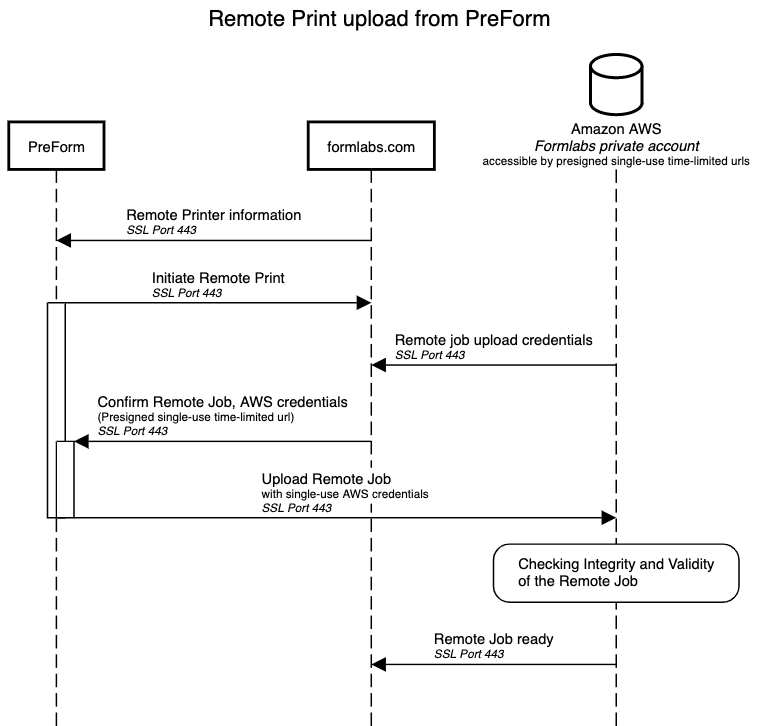
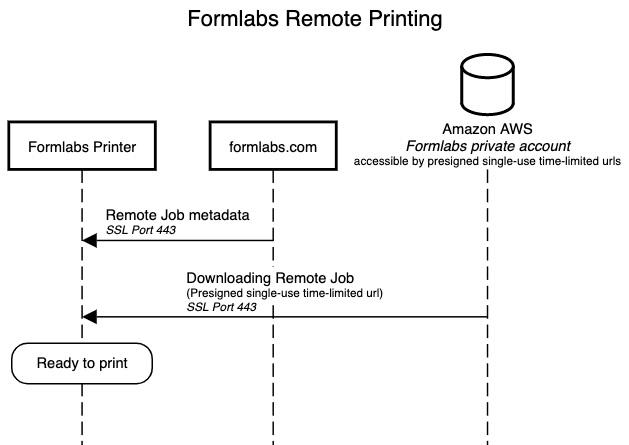
Formlabs-Drucker haben die Möglichkeit, einen Druckauftrag an einen Drucker zu senden, der nicht mit demselben Netzwerk verbunden ist.
Anmerkung:
Der Ferndruck ist nur auf ausgewählten Formlabs-Druckern verfügbar. Weitere Informationen finden Sie in den folgenden Supportartikeln:
Konnektivität
PreForm, Formlabs-Drucker, Formlabs.com und Amazon Web Services (AWS)-Server kommunizieren alle über Port 443 (HTTPS).
Sicherheit
Alle Ferndruckaufträge werden auf unserem privaten Formlabs-AWS-Konto gespeichert. Während der Übertragung werden die Informationen durch HTTPS SSL verschlüsselt, bevor sie unser privates Konto erreichen. Uploads und Downloads werden durch signierte, temporäre und einmalig verwendbare Upload-URLs gesichert.
Bitte stellen Sie sicher, dass diese Adressen nicht durch Ihre Firewall blockiert werden: