Hinweis:
Beim Zurücksetzen auf die Werkseinstellungen werden alle benutzerdefinierten Einstellungen und Diagnoseprotokolle gelöscht. Laden Sie Diagnoseprotokolle hoch bevor Sie einen Werksreset durchführen.


Der Touchscreen des Form Cure L V1 zeigt Fehlermeldungen an, wenn das Gerät auf Unregelmäßigkeiten stößt, und zeigt weitere Details zum Fehler an.
Diagnoseprotokolle
Der Form Cure L führt Diagnoseprotokolle, um detaillierte Informationen über die Funktionalität des Geräts bereitzustellen. Fügen Sie diese Diagnoseprotokolle zusammen mit anderen relevanten Beobachtungen und Details bei, wenn Sie den Formlabs-Kundenservice oder Ihren autorisierten Vertriebspartner kontaktieren, um die Lösung zu beschleunigen.
So laden Sie Diagnoseprotokolle über PreForm hoch:
Device currently active (Gerät derzeit aktiv)
Der Form Cure L zeigt die Meldung The device is currently active (Das Gerät ist derzeit aktiv) an, wenn das Gerät versucht, einen Nachhärtezyklus zu starten, während bereits ein Zyklus im Gange ist. Starten Sie das Gerät neu, indem Sie es von der Stromversorgung trennen und wieder anschließen.
Device state invalid (Gerätezustand ungültig)
Die Meldung The device state is currently invalid zeigt an, dass ein Firmware-Fehler aufgetreten ist. Starten Sie das Gerät neu, indem Sie es von der Stromversorgung trennen und wieder anschließen. Wenn diese Fehlermeldung wiederholt auftritt, wenden Sie sich an den Formlabs-Kundenservice oder einen autorisierten Vertriebspartner.
Invalid duty cycle (Ungültiger Arbeitszyklus)
Die Meldung The device's duty cycle is currently invalid (Der Arbeitszyklus des Geräts ist derzeit ungültig) zeigt an, dass ein Firmware-Fehler aufgetreten ist. Starten Sie das Gerät neu, indem Sie es von der Stromversorgung trennen und wieder anschließen. If you see this error message repeatedly, contact Formlabs Support or a authorized reseller.
Call to DBus failed (Anfrage an DBus fehlgeschlagen)
Die Meldung The call to DBus failed zeigt an, dass ein Firmware-Fehler aufgetreten ist. Starten Sie das Gerät neu, indem Sie es von der Stromversorgung trennen und wieder anschließen. Wenn diese Fehlermeldung wiederholt auftritt, wenden Sie sich an den Formlabs-Kundenservice oder einen autorisierten Vertriebspartner.
Invalid reply to DBus (Ungültige Antwort an DBus)
Die Meldung Die Antwort auf den DBus war ungültig zeigt an, dass ein Firmware-Fehler aufgetreten ist. Starten Sie das Gerät neu, indem Sie es von der Stromversorgung trennen und wieder anschließen. Wenn diese Fehlermeldung wiederholt auftritt, wenden Sie sich an den Formlabs-Kundenservice oder einen autorisierten Vertriebspartner.
Fan control failed (Lüftersteuerung ausgefallen)
Die Meldung The fan control failed zeigt an, dass ein Firmware-Fehler aufgetreten ist. Starten Sie das Gerät neu, indem Sie es von der Stromversorgung trennen und wieder anschließen. Wenn diese Fehlermeldung wiederholt auftritt, wenden Sie sich an den Formlabs-Kundenservice oder einen autorisierten Vertriebspartner.
Timer expired (Timer abgelaufen)
Der Form Cure L zeigt die Meldung The timer has expired an, wenn er über einen längeren Zeitraum keine Temperaturdaten erhält. Starten Sie das Gerät neu, indem Sie es von der Stromversorgung trennen und wieder anschließen.
Temperature fault (Temperaturfehler)
Der Fehler Temperaturfehler aufgetreten zeigt an, dass ein Problem mit dem Thermistor des Form Cure L aufgetreten ist. Starten Sie das Gerät neu, indem Sie es von der Stromversorgung trennen und wieder anschließen. Wenn das Problem dadurch nicht gelöst wird, schalten Sie die Stromversorgung ab. Entfernen Sie das Obergehäuse der Form Cure L, und überprüfen Sie, ob die Temperaturfühlerverdrahtung sicher ist. Wenden Sie sich an den Formlabs-Kundenservice oder einen autorisierten Vertriebspartner für weitere Informationen.
LED brightness error (LED-Helligkeitsfehler)
Der Form Cure L zeigt die Meldung The LED brightness encountered an error an, wenn das Gerät einen Fehler bei der Einstellung der Helligkeit der LEDs feststellt. Starten Sie das Gerät neu, indem Sie es von der Stromversorgung trennen und wieder anschließen. Wenn das Problem dadurch nicht gelöst wird, lösen Sie jedes der drei LED-Module (die von der Nachhärtekammer aus zugänglich sind), und prüfen Sie, ob die Verkabelung sicher ist. Contact Formlabs Support or a authorized reseller for more information.
Set duty cycle failed (Eingestellter Arbeitszyklus fehlgeschlagen)
Der Form Cure L zeigt die Meldung The set duty cycle failed an, wenn das Gerät einen Fehler bei der Einstellung der Helligkeit der LEDs feststellt. Starten Sie das Gerät neu, indem Sie es von der Stromversorgung trennen und wieder anschließen. Wenn das Problem dadurch nicht gelöst wird, lösen Sie jedes der drei LED-Module (die von der Nachhärtekammer aus zugänglich sind), und prüfen Sie, ob die Verkabelung sicher ist. Wenden Sie sich an den Formlabs-Kundenservice oder einen autorisierten Vertriebspartner für weitere Informationen.
Set limit failed (Eingestellte Begrenzung fehlgeschlagen)
Der Form Cure L zeigt die Meldung The set limit failed an, wenn das Gerät einen Fehler bei der Einstellung der aktuellen Temperaturgrenze feststellt. Starten Sie das Gerät neu, indem Sie es von der Stromversorgung trennen und wieder anschließen. Wenn das Problem dadurch nicht gelöst wird, lösen Sie jedes der drei LED-Module (die von der Nachhärtekammer aus zugänglich sind), und prüfen Sie, ob die Verkabelung sicher ist. Wenden Sie sich an den Formlabs-Kundenservice oder einen autorisierten Vertriebspartner für weitere Informationen.
Tür offen
Wenn Sie versuchen, einen Nachhärtezyklus zu starten, während die Tür des Form Cure L geöffnet ist, zeigt das Gerät die Meldung „Die Tür ist offen“ an. Please close. (Bitte schließen.) Schließen Sie die Gerätetür, bevor Sie fortfahren.
Device failed to reach required temperature (Gerät hat die erforderliche Temperatur nicht erreicht)
Der Form Cure L zeigt die Meldung The device failed to reach the required temperature (Das Gerät hat die erforderliche Temperatur nicht erreicht) an, wenn er seine Zieltemperatur nicht innerhalb von 30 Minuten erreicht. So beheben Sie dieses Problem:
Turntable error (Fehler am Drehteller)
Der Form Cure L zeigt die Meldung An error occurred with the device’s turntable (Ein Fehler ist mit dem Drehteller des Geräts aufgetreten) an, wenn sich der Drehteller aufgrund eines Problems mit dem Motortreiber oder dem Motorbefehl nicht richtig bewegen konnte. Starten Sie das Gerät neu, indem Sie es von der Stromversorgung trennen und wieder anschließen.
Board Not Operational error
The Form Cure L displays the message Board Not Operational Error if it encounters an issue with a device connected to the motherboard, such as a heater module or LED module fan. Download the machine’s diagnostic logs and send them to Formlabs Support for assistance identifying the faulty component.
Unbekannter Fehler
Der Form Cure L zeigt die Meldung An unknown error occurred (Ein unbekannter Fehler ist aufgetreten) an, wenn ein anderes, nicht näher spezifiziertes Problem auftritt. Starten Sie das Gerät neu, indem Sie es von der Stromversorgung trennen und wieder anschließen.
Anweisungen zum Zurücksetzen auf Werkseinstellungen
Bei einem ungewöhnlichen Verhalten des Form Cure L kann ein Zurücksetzen auf die Werkseinstellungen die Lösung sein. Von einem ungewöhnlichen Verhalten spricht man beispielsweise, wenn unbekannte Fehlermeldungen auftreten, Firmware-Aktualisierungen nicht abgeschlossen werden oder der Touchscreen nicht reagiert. Beim Zurücksetzen auf die Werkseinstellungen werden alle benutzerdefinierten Einstellungen und Netzwerkverbindungen gelöscht.
Hinweis:
Beim Zurücksetzen auf die Werkseinstellungen werden alle benutzerdefinierten Einstellungen und Diagnoseprotokolle gelöscht. Laden Sie Diagnoseprotokolle hoch bevor Sie einen Werksreset durchführen.
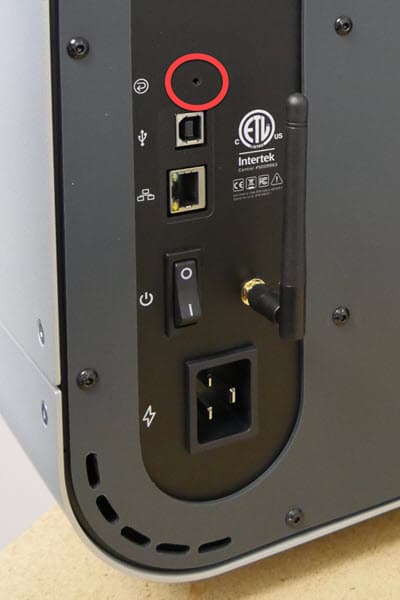
So setzen Sie das Gerät manuell auf die Werkseinstellungen zurück: