Anmerkung:
Nach dem Gruppieren von Modellen wird durch Klicken auf ein gruppiertes Modell in der 3D-Szene die gesamte Gruppe ausgewählt. Klicken Sie erneut, um das einzelne Modell auszuwählen.


Ab PreForm Version 3.43.0 für SLS-Drucker und PreForm Version 3.53.0 für SLA-Drucker können Sie mehrere Modellsets mit der Modellgruppierung besser verwalten. Für gruppierte Modelle gelten die gleichen Funktionen wie für mehrere ausgewählte Modelle, z. B. das Kopieren von Modellen, das Löschen von Modellen oder das Ändern ihrer Sichtbarkeit.
Ab PreForm Version 3.62.0 befindet sich die Modellliste auf der linken Seite des Bildschirms als Teil des Projekt-Panels. Andere Funktionen bleiben unverändert.
Die Gruppierung von Modellen kann besonders nützlich sein, wenn Sie mit mehreren Modellsätzen arbeiten, die eine Nachverfolgbarkeit erfordern oder getrennt verwaltet werden müssen, z. B. Bestellungen von Fertigungsdienstleistern oder zahnmedizinische Drucke.
Anmerkung:
Nach dem Gruppieren von Modellen wird durch Klicken auf ein gruppiertes Modell in der 3D-Szene die gesamte Gruppe ausgewählt. Klicken Sie erneut, um das einzelne Modell auszuwählen.
Erstellen einer Modellgruppe
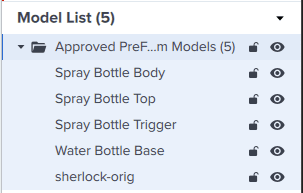
Gruppierte importierte Modelle in der Modellliste (PreForm 3.60.4 und früher)
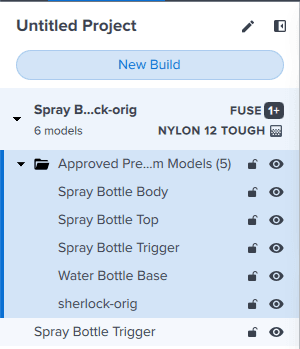
Gruppierte importierte Modelle im Projekte-Bedienfeld (PreForm 3.62.0 und höher)
Aufteilen eines Modells mit mehreren Körpern
Wenn Sie ein Modell mit mehreren Teilen oder Körpern importieren, können Sie diese Körper in PreForm in einzelne Modelle aufteilen. Wenn Sie dies tun, werden die getrennten Modelle zu einer Modellgruppe hinzugefügt:
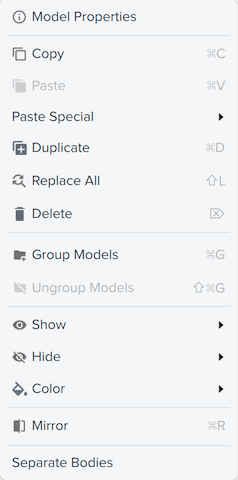
Modelle auswählen
Sie können Modelle auch gruppieren, indem Sie sie in der Liste der Modelle auswählen.

Gruppierung aufheben
Sie können innerhalb Ihrer Konstruktion eine Mischung aus gruppierten und nicht gruppierten Modellen verwenden. Um Modelle zu trennen, klicken Sie mit der rechten Maustaste auf den Gruppennamen oder ein beliebiges Modell innerhalb der Gruppe und wählen Sie Modelle entgruppieren. Die Modelle werden aus dem Ordner herausgelöst und einzeln aufgeführt.