WHITE PAPER
Formlabs Logo

Alumina 4N Resin Quick Start Guide

Alumina 4N Resin Quick Start Guide

Alumina 4N Resin has unique printing and post-processing requirements compared to other Formlabs resins.

To safely handle resin, follow Formlabs general safety and handling recommendations and read and understand the safety data sheet (SDS).

At room temperature, Alumina 4N Resin has a shelf life of three months. Formlabs recommends refrigeration at -25–4 °C to add up to twelve months of additional shelf life.

Required resources

Made by Formlabs:

Form 3 generation

  • Stainless Steel Build Platform or Build Platform 2
  • Alumina 4N Resin mixer

Form 4 generation

  • Build platform or Flex Build Platform

All compatible printers

Made by third parties:

  • Kiln capable of at least 1600° C
  • Alumina setter plates
  • Additional burnout kiln and refrigerator highly recommended

Preparing your model

Follow the instructions in the support article Design guidelines for Alumina 4N Resin. Alumina 4N Resin, like other ceramics, shrinks when fired. Design parts using CAD software to accommodate 21.8% horizontal shrinkage and 26% vertical shrinkage.

To prepare a model for printing in PreForm:

  1. Open a model.
  2. Select the resin, resin version, and the desired layer thickness.
  3. Orient to preserve fine details.
  4. Generate supports.
  5. Send the print job to the printer.

Printing with Alumina 4N Resin

Form 3 generation

Formlabs strongly recommends calibrating your printer's resin level sensor and Z-axis. Access these features by tapping Settings > Maintenance > Calibration.

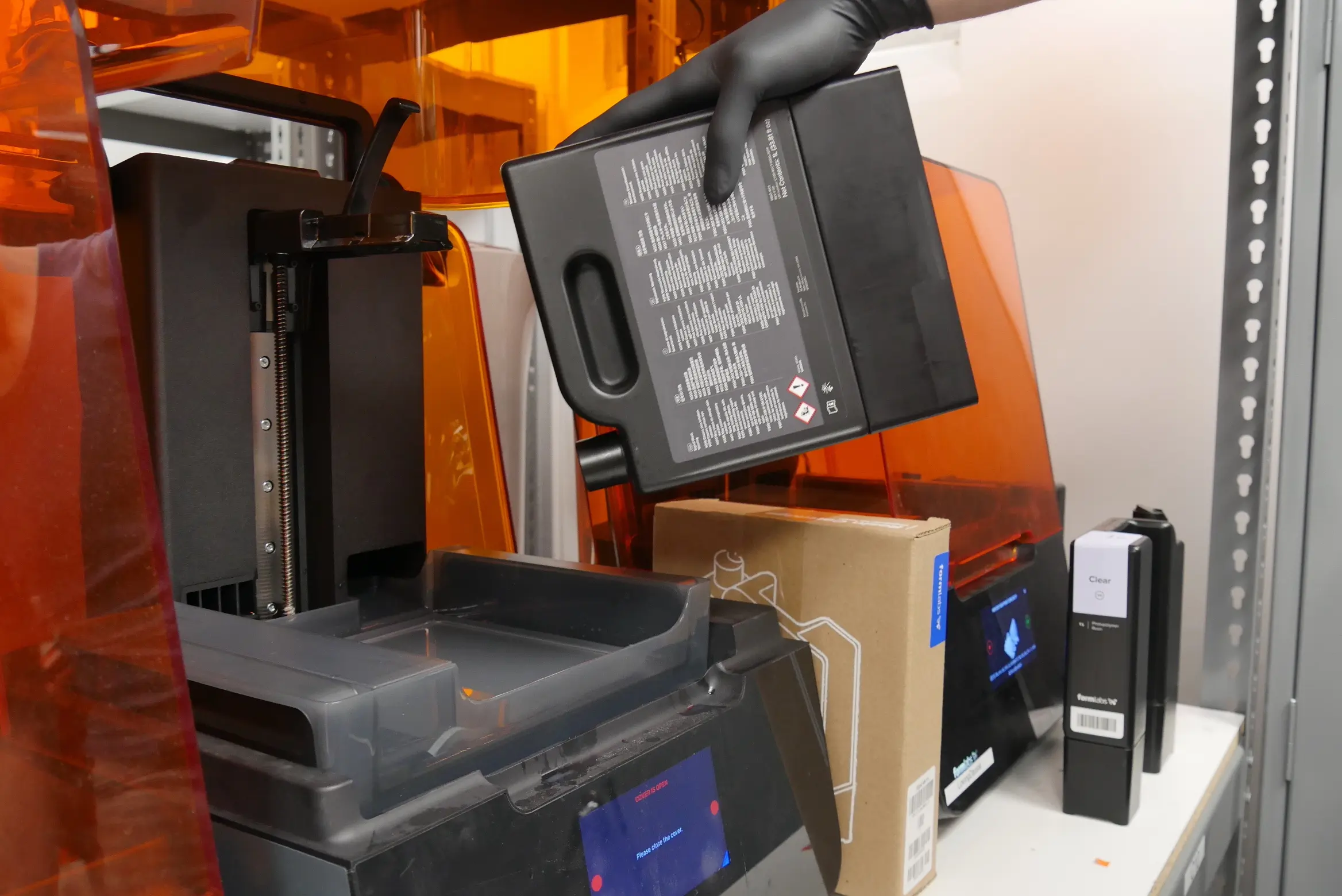
  1. Shake the Alumina 4N Resin cartridge for a few seconds to ensure the resin is mixed completely.
  2. Place the mixer that came with the cartridge in the resin tank following the process shown on the tank sticker.
  3. Prefill the tank with approximately 300 mL of Alumina 4N Resin.
  4. Monitor the printer during initialization for any issues until the printing screen appears. Note that print times for Alumina 4N Resin are considerably longer than the print times for other resins.

If there are any issues during the print, check the tank for any debris and remove it.

Form 4 generation

Printing with Alumina 4N Resin on a Form 4 generation printer requires no special calibration, checks, or additional hardware.

  1. Shake the Alumina 4N Resin cartridge for two minutes to ensure the resin is mixed completely.
  2. Insert the resin cartridge and press open the vent cap.
  3. Insert and secure a resin tank and mixer.
  4. Insert and secure a build platform.
  5. Start your print.
alttext

Post-processing

Wash the printed parts for 2 minutes in Ceramic Wash Solution. Do not allow Alumina 4N Resin parts to come into contact with water or IPA, as this will cause cracking. Use a separate wash bucket to prevent loose ceramic particles from adhering to non-Alumina 4N parts. Minimize the amount of time the printed part is covered in Ceramic Wash Solution to prevent cracking.

Gently blow dry parts with air, focusing the airflow on corners and crevices. Wipe accessible surfaces dry with a paper towel. Aggressive drying rates can cause cracking.

Once parts are removed from the build platform, the build platform and any peripherals can be cleaned with IPA or soapy water to remove liquid resin. Remove rafts using a spatula and a hammer. Take care to avoid injury from sudden movements, and wear safety glasses.

Parts printed with Alumina 4N Resin are easy to sand in their green state. Dry sand the parts or use the Ceramic Wash Solution as a lubricant.


Firing Alumina 4N Resin

Notice:

Read the support article Printing and firing Alumina 4N Resin for detailed instructions.

Dry parts for 24 hours prior to firing. Green parts can be stored or shipped as necessary.

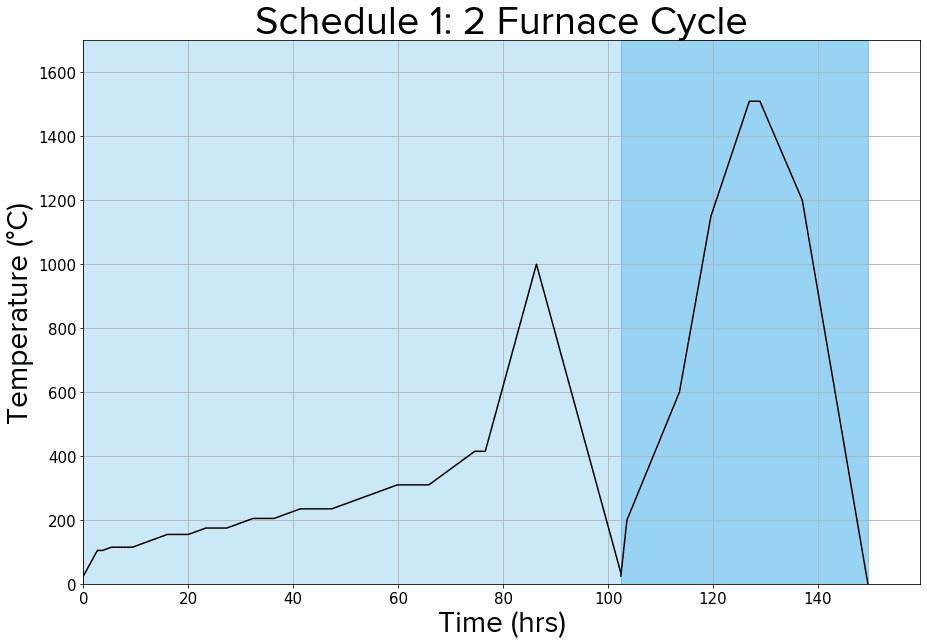
Fire parts on setter plates rated for a minimum of 1700 °C. Formlabs recommends the two furnace schedule below, but several options for firing exist.

Two furnace schedule (recommended)

Two furnace schedule for firing parts printed in Alumina 4N Resin

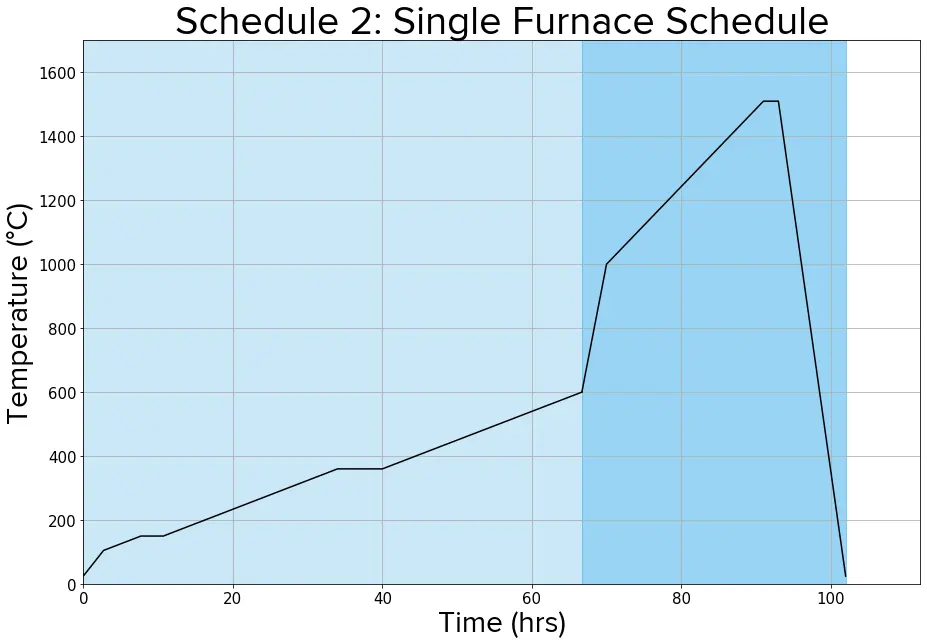
Single furnace schedule

Single furnace schedule for firing parts printed in Alumina 4N Resin

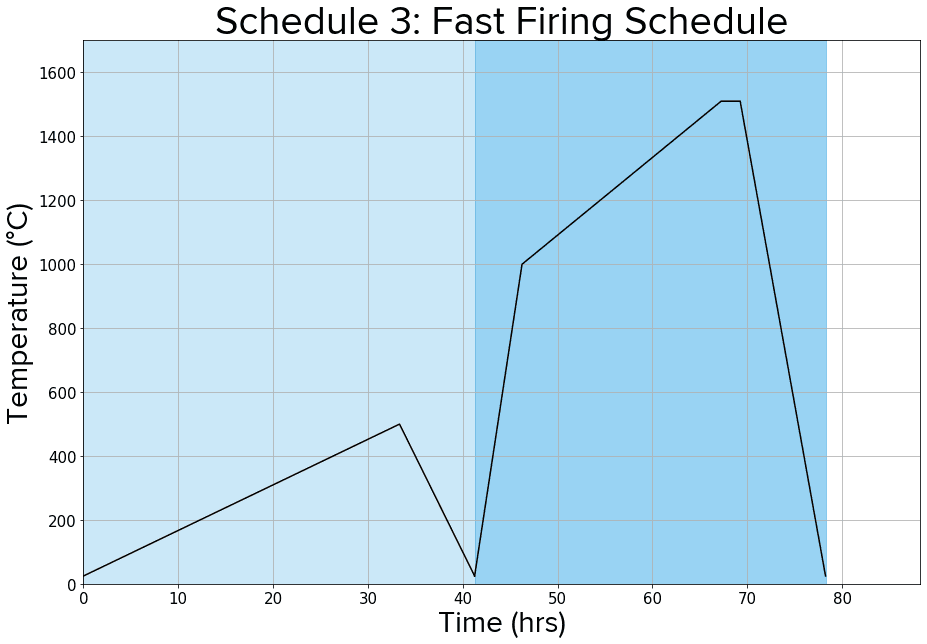
Fast firing schedule

Fast firing schedule for firing parts printed in Alumina 4N Resin

Additional resources