WHITE PAPER
Formlabs Logo

Setting up the Formlabs Powder-Safe Vacuum

Setting up the Formlabs Powder-Safe Vacuum

Cut the cost of keeping your Fuse Series ecosystem safe and clean with the Formlabs Powder-Safe Vacuum, a safety-compliant and simple integration vacuum for your SLS 3D printing.

This vacuum has been validated by Formlabs to comply with NFPA-652 when used as intended. It is only intended for use with Formlabs polymer SLS powders and the Fuse Ecosystem and is currently only available in North America. If you require Class II Div. II Environments compliance to operate in an electrically classified zone or are located outside North America, purchase our industrial vacuum option, compatible with the Fuse Sift.

Plan an appropriate location for the Formlabs Powder-Safe Vacuum. Purchase additional supplies to ensure you can start using the Formlabs Powder-Safe Vacuum when it arrives.

The Powder-Safe Vacuum is ready for use when its vacuum hose and grounding strap are attached, and it is connected to power.


Notice:

  • Ground the vacuum hose with the provided grounding strap before using. Only use while the hose is grounded.
  • Do not use with metal dusts, or other highly combustible materials (MIE < 30mJ).
  • Do not use in electrically classified locations.
  • Do not use in processes that generate embers or sparks, or involve flammable liquids, vapors, or gasses.
  • Contact Festool for product support. Reference Festool product manual for full product information.

Unboxing the Powder-Safe Vacuum

The Powder-Safe Vacuum ships in a cardboard carton. The accessories are located in a cardboard box above the unit. During unboxing, inspect the Powder-Safe Vacuum for any damage or missing items. In the case of damage or missing items, contact Formlabs Support or your authorized reseller.

To unbox the Powder-Safe Vacuum:

  1. Open the box from the top.
  2. Lift and remove the cardboard box containing the accessories.
  3. Lift the Powder-Safe Vacuum out of the box by its base.

Notice:

Remove all packaging material before connecting power. Retain all packaging and inserts for warranty service.

Powder-Safe Vacuum components

  1. Power supply: Provides power to the Powder-Safe Vacuum. Specifications: 24 V, 2 A.
  2. Vacuum hose mount: Holds the vacuum hose into position.
  3. Cable and accessory holder: A tray for containing the cable and accessories.
  4. Handle: A handhold for ease of transportation.
  5. Lock: Unlatch to access the cable and accessory holder.
  6. HEPA filter: Collects powder and debris.
  7. Locking clip: Unlatch to access the dirt trap.
  8. Air exhaust: Blows circulated air out of the Formlabs Powder-Safe Vacuum.
  9. Dirt trap: Collects powder and debris inside the filter bag.
  10. Power switch: Press to turn the unit ON and OFF.
  11. MAN button: Press to manually turn on the Formlabs Powder-Safe Vacuum when in standby mode.
  12. Suction power adjustment: Press the + and - buttons to adjust the vacuum suction power. The green light indicates standby mode. The red light indicates the dirt trap is full.
Formlabs Powder-Safe Vacuum components

Installing the Powder-Safe Vacuum

Place the Powder-Safe Vacuum on a clean, level surface with a nearby power source.

The Powder-Safe Vacuum is ready for use when its vacuum hose and grounding strap are attached, and the vacuum is connected to power.

Attach the grounding strap

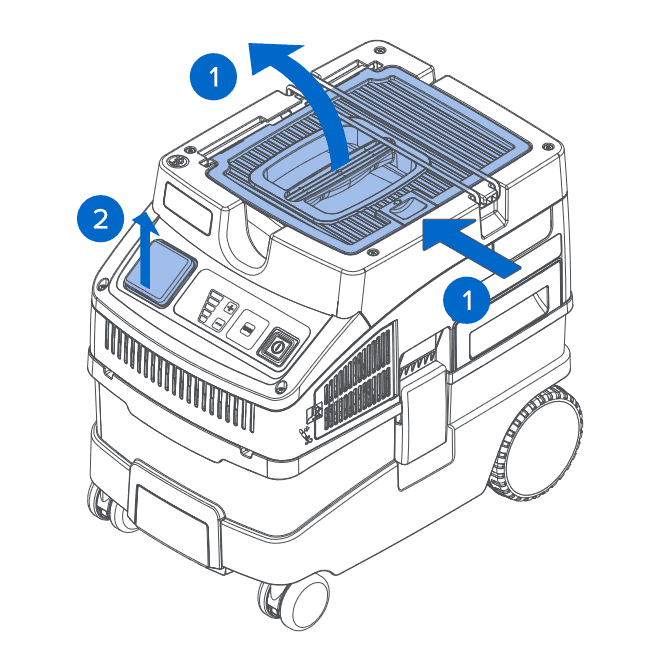
  1. Unlatch and lift the cover to access the vacuum hose connection.
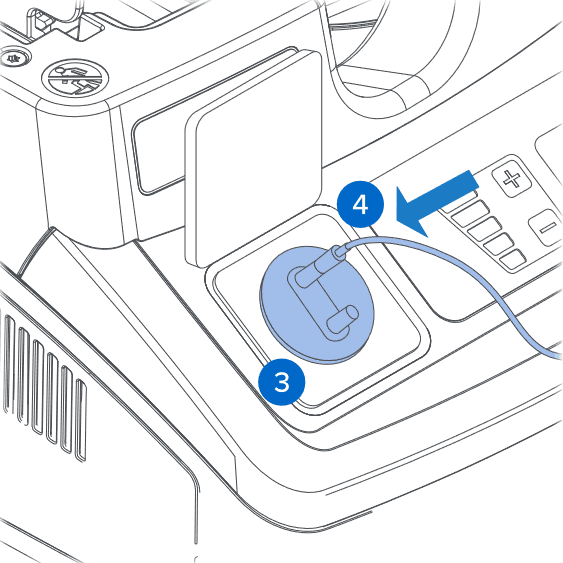
  2. Lift the cover on the power port.
Unlatch covers.
  1. Plug the grounding plug into the power port.
  2. Plug the anti-static strap into the grounding plug.
Handle the grounding plug.
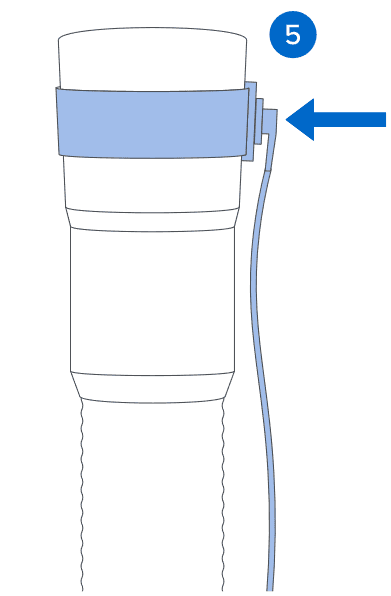
  1. Wrap the other end of the anti-static strap around the end of the vacuum hose that attaches to the unit.
Wrap the grounding strap around the end of the hose.

Mount the vacuum hose

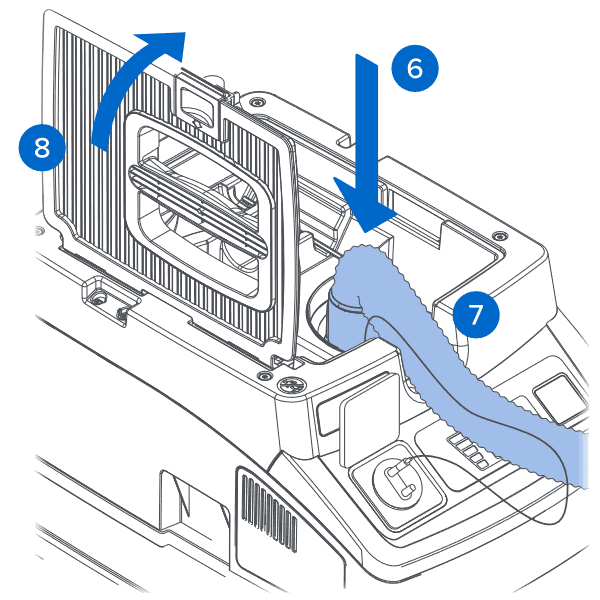
  1. Securely connect the vacuum hose to the vacuum.
  2. Lay the hose flat.
  3. Close and latch the cover.
Mount the vacuum hose.

Connect the power supply

  1. Plug the vacuum into a grounded wall outlet.
  2. For use with the Fuse Sift: Connect the hose to the port on the left side of the machine.
  3. Use the buttons on the vacuum to power it on or off as needed.

Maintaining the Powder-Safe Vacuum

Cleaning the HEPA filter

Inspect the HEPA filter regularly. Vacuum the filter when it is saturated with debris to prolong its lifetime and ensure proper operation.

To inspect the HEPA filter:

  1. Turn off the Powder-Safe Vacuum.
  2. Pull out the HEPA filter drawer.
  3. Vacuum the filter when it is saturated with debris. If the HEPA filter remains visibly dirty after cleaning, replace it with Festool Main Filter HEPA-HF-CT COMP (204201).
  4. Insert the HEPA filter.

Cleaning the dirt trap

The red LED on the control panel illuminates when the dirt trap is full. Inspect the dirt trap regularly and empty when full.

To empty the dirt trap:

  1. Turn off the Powder-Safe Vacuum.
  2. Unlatch the locking clips.
  3. Remove the top section of the machine. Set it aside.
  4. Pull the tab on the filter bag until the filter bag opening is fully closed.
  5. Remove the filter bag from the dirt trap.
  6. Empty the filter bag. If the filter bag remains visibly dirty after cleaning, replace it with Festool SELFCLEAN Filter Bag SC-FIS-CT (204308).
  7. Insert the filter bag.
  8. Fit the top section of the machine onto the base.
  9. Latch the locking clips.

Additional supplies

Purchase the following additional supplies:

  • Filter bag: Inspect the filter bag regularly and empty when full. If the filter bag remains visibly dirty after cleaning, replace it with Festool SELFCLEAN Filter Bag SC-FIS-CT (204308), supplied by Festool USA.
  • HEPA filter: Inspect the HEPA filter regularly. Vacuum the filter when it is saturated with debris to prolong its lifetime and ensure proper operation. If the HEPA filter remains visibly dirty after cleaning, replace it with Festool Main Filter HEPA-HF-CT COMP (204201), supplied by Festool USA.
  • Personal protective equipment: Powder-free, chemical-resistant, disposable gloves (nitrile or neoprene).