

Fehlermeldungen der Generation Fuse 1: Fehler 180/1-8 Heizelement-Strom zu gering
Fehlermeldungen der Generation Fuse 1: Fehler 180/1-8 Heizelement-Strom zu gering
Fehler 180 zeigt an, dass die Leistung eines oder mehrerer Heizelemente niedriger ist als sie sein sollte.
Bei Druckern mit Firmwareversion 1.18.0 und neuer haben die Drucker-Fehlercodes einen Untercode, der dem Heizelement entspricht, das den Fehler gemeldet hat:
| Fehler 180/1 | Lufterhitzer |
| Fehler 180/2 | Konstruktionskammer-Oberwandheizung |
| Fehler 180/3 | Konstruktionskammer-Unterwandheizung |
| Fehler 180/4 | Pufferwannenheizung |
| Fehler 180/5 | Trichterwannenheizung |
| Fehler 180/6 | Konstruktionskammer-Kolbenoberseitenheizung |
| Fehler 180/7 | Quarzrohrheizung (Trichterseite) |
| Fehler 180/8 | Quarzrohrheizung (Pufferseite) |
Symptome
- Der Drucker zeigt die Fehlermeldung Error 180/1 bis 180/8 an, wobei der Untercode dem betroffenen Heizelement entspricht
Häufige Ursachen
- Heizelement-Fehler
- RTD-Fehler
- Schlechte Verbindung zwischen der Heizelementsteuerplatine des Druckers und dem Heizelement
- Komponentenfehler der Heizelementsteuerplatine
Schritte zur Fehlerbehebung
Error 180/1
Error 180/1 zeigt ein Problem mit dem Lufterhitzer des Druckers oder dessen RTD-Temperatursensor an und erfordert zusätzliche Unterstützung zur Behebung. Bitte wenden Sie sich an den Formlabs-Kundenservice oder Ihren zertifizierten Dienstleister. Fügen Sie die Diagnoseprotokolle Ihres Druckers mit anderen relevanten Beobachtungen und Details bei.
Error 180/2, Error 180/3, oder Error 180/6
- Drücken Sie die schwarze Kunststoffplatte auf den Stecker der Konstruktionskammer, um alle Pins des Steckers freizulegen.
- Überprüfen Sie den Stecker auf verbogene oder versenkte Pins. Wenn ein Pin im Stecker versenkt ist, ziehen Sie den Pin vorsichtig mit einer Zange heraus. Wenn der Pin nicht an seinem Platz bleibt, kann das Steckergehäuse gebrochen sein. Bitte wenden Sie sich an den Formlabs-Kundenservice oder Ihren zertifizierten Dienstleister. Fügen Sie die Diagnoseprotokolle Ihres Druckers bei, um die Lösung zu beschleunigen.
- Falls keine Pins beschädigt sind, reinigen Sie die Pins und die Steckdose für den Stecker der Konstruktionskammer mit einem elektrischen Kontaktreiniger. Lassen Sie die Pins vollständig trocknen, bevor Sie den Stecker der Konstruktionskammer wieder einstecken.
Wenn das Problem weiterhin besteht, wenden Sie sich an den Formlabs-Kundenservice oder Ihren zertifizierten Dienstleister. Fügen Sie die Diagnoseprotokolle Ihres Druckers zusammen mit einem Foto der beschädigten Konstruktionskammerbuchse bei, um die Lösung zu beschleunigen.

Stecker der Konstruktionskammer der Generation Fuse 1 mit versenktem Stift
Error 180/4 oder Error 180/5
Firmware-Version 1.21.0 oder neuer sollte diesen Fehler nicht auslösen. Bitte aktualisieren Sie Ihre Firmware auf die neueste Version.
Wenn Sie nach der Aktualisierung Ihrer Firmware den Fehler 374/4 oder 374/5 sehen, lesen Sie den Supportartikel zu diesen Fehlern für die Schritte zur Fehlerbehebung.
Error 180/7 oder Error 180/8
Fehler 180/7 zeigt an, dass das Quarzrohr-Heizelement auf der Einfülltrichterseite (rechts) defekt ist. Fehler 180/8 zeigt an, dass das Pufferseitige (linke) Quarzrohr-Heizelement defekt ist.
Überprüfen Sie die Quarzrohrrahmenfächer, an denen das Quarzrohr in den Drucker eingeführt wird. Wenn das Fach beschädigt ist, muss der Quarzrohrrahmen möglicherweise ausgetauscht werden. Kontaktieren Sie den Formlabs-Kundenservice oder Ihren zertifizierten Dienstleister. Fügen Sie die Diagnoseprotokolle Ihres Druckers zusammen mit einem Foto der beschädigten Quarzrohrrahmenbuchse bei, um die Lösung zu beschleunigen.
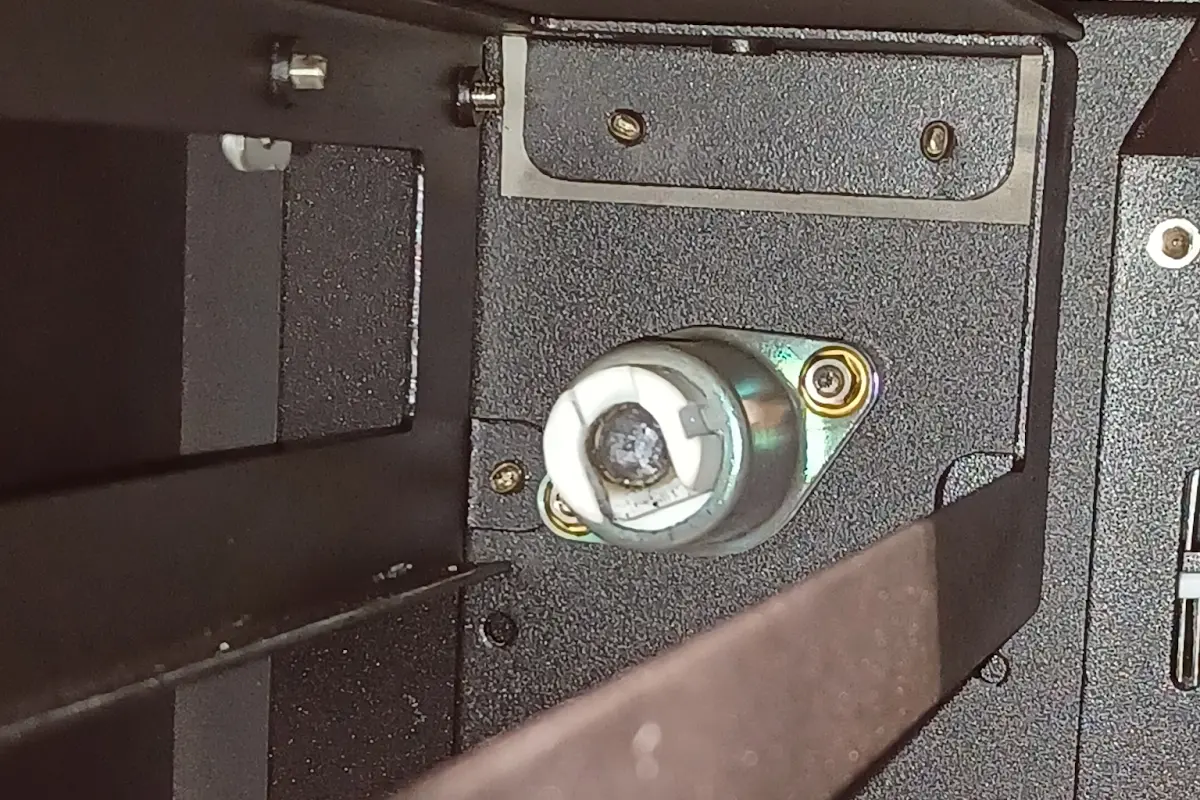
Wenn die Fassung des Quarzrohrrahmens nicht beschädigt ist, ersetzen Sie das betroffene Quarzrohr-Heizelement gemäß den Anweisungen im Reparaturleitfaden Ersetzen der Quarzrohr-Heizelemente des Fuse 1 [EN] [DE] [ES] [FR] [IT] [JA] [ZH]. Ersatz-Quarzrohre können im Formlabs-Webshop erworben werden. Wenn die Fassungen des Quarzrohrrahmens nicht beschädigt sind, aber der Austausch des betroffenen Heizelements den Fehler nicht behebt, überprüfen Sie das Heizelement auf Schäden, die während des Transports oder der Installation entstanden sein könnten, bevor Sie den Formlabs-Kundenservice oder Ihren zertifizierten Dienstleister kontaktieren.