

Troubleshooting the Fuse Blast Polishing System
Troubleshooting the Fuse Blast Polishing System
This article outlines initial troubleshooting steps to resolve common issues that have been seen or are expected during normal operation on Fuse Blast units with the Polishing System installed.
Fuse Blast Polishing System not detected
If the Fuse Blast cannot detect the Polishing System, the power cable connecting the Polishing Module to the Fuse Blast is likely disconnected or your Fuse Blast’s firmware is too old to recognize the Polishing Module.
- Check whether the machine is running the latest firmware. Update the firmware if needed.
- Remove the Polishing Module and ensure the power cable is correctly installed.
If the unit is still not detected, contact Formlabs Support or your certified service provider for additional guidance.
No water is flowing
If no water is flowing from the Polishing System while in use, you may not be able to clean your printed parts properly. The following could cause no water to flow:
- Water tank is empty
- Polishing is toggled off on the Fuse Blast touchscreen
- Water line is disconnected
- Injection needle or water line is clogged or seated improperly
- Water pump is not turning properly
To resolve the issue:
- Check whether the machine is running the latest firmware. Update the firmware if needed.
- Inspect the water tank. Check that the cap is fully tightened and that the water feed line is inserted.
- On the Fuse Blast touchscreen, tap Settings > Maintenance > Polishing. Check that the Polishing toggle is on. The toggle turns blue when enabled. Polishing Media must be selected to enable the Polishing toggle.
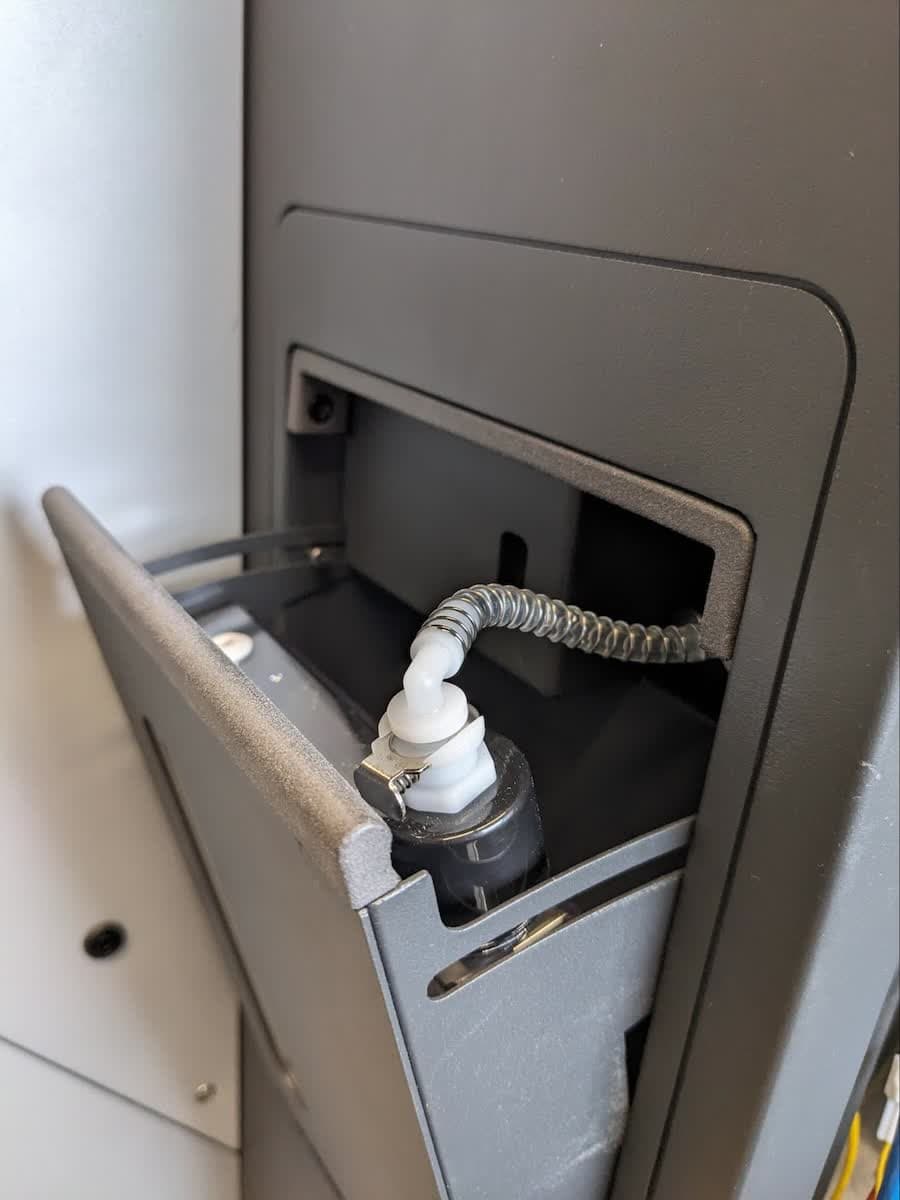
- Check that the water line in the blasting chamber is connected to the nozzle holder on the blast gun and the port in the right wall of the blasting chamber.

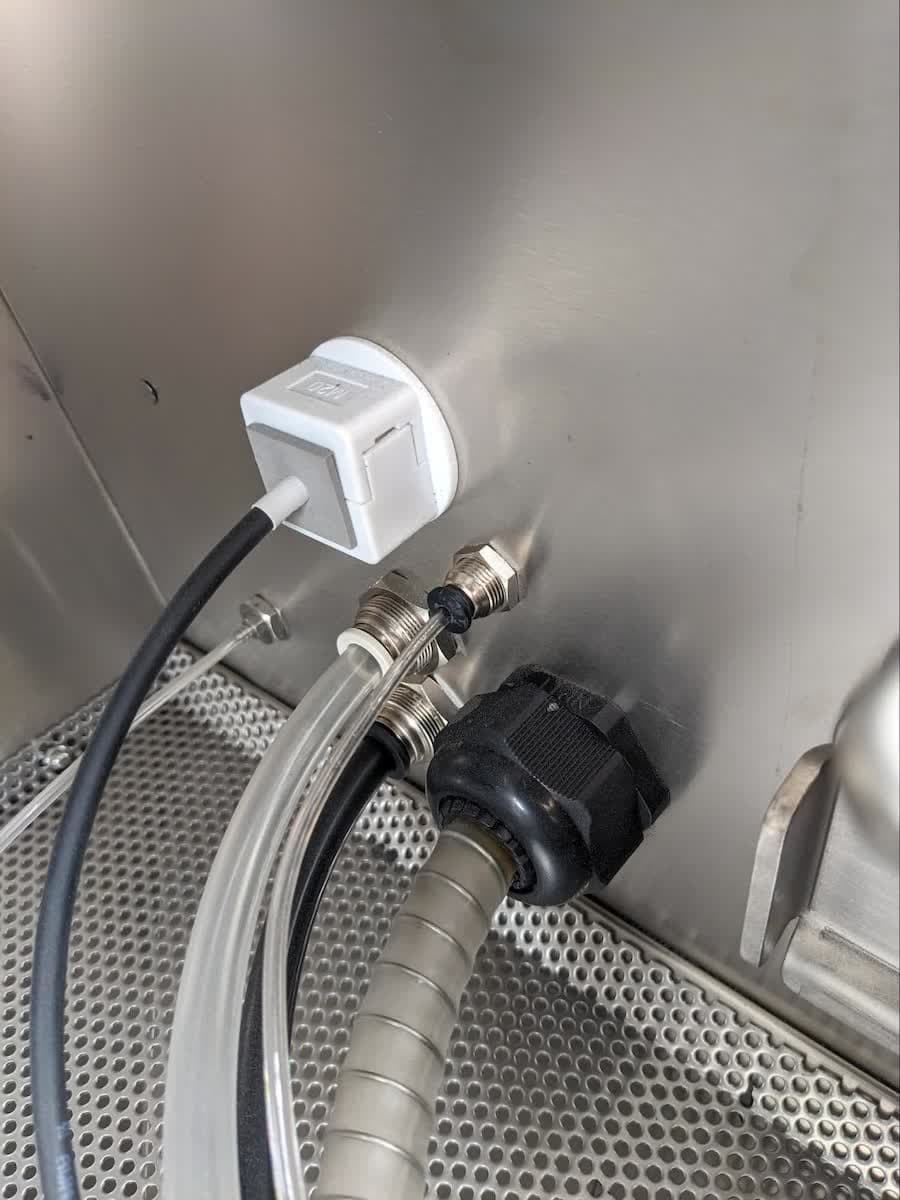
- Inspect the injection needle with a bright flashlight to check for media or powder obstructions. If there are any obstructions, unscrew the water line fitting, unscrew the needle, and clear it with compressed air or a small brush.


- Check whether the pump is turning. Open the Polishing Module door latch and examine the pump through the access window. If the pump is operating normally, you should be able to see it moving with the pump rollers traveling upwards. If you see no movement, check that a polish cycle is running and that the Polishing Module is plugged in.
If water is still not flowing, contact Formlabs Support or your certified service provider for additional guidance.
Polishing media accumulating in the blasting chamber
It is normal for some polishing media to accumulate in the Fuse Blast’s blasting chamber during use. If a significant amount of media accumulates on top of the work surface during use, it is likely that no water is flowing or no Polishing Agent was added to the water tank.

To resolve the issue:
- Between cycles, use the gloves and the blast gun in rinse mode to sweep media through the work surface.
- When refilling the water tank, make sure to add 7 mL of Formlabs Polishing Agent per tank.
- If excessive media accumulates during a blasting cycle and part quality is impacted, increase the water flow rate slightly. On the Fuse Blast touchscreen, tap Settings > Maintenance > Polishing. Drag the Water Flow Rate slider to the right.
- If no water is flowing at all, resolve that issue and try again.
If problems persist, contact Formlabs Support or your certified service provider for additional guidance.
Media not draining properly from the blasting chamber
Even if the humidity in the blasting chamber is at the proper level, polishing media may still accumulate in the chute. If it is unable to drain, there may be a clog in the system:
- Clog in the parts catcher
- High humidity or too much Polishing Agent causes media or powder to clump
- Too much blasting media added to the unit
To resolve the issue:
- With the fan running, open the blasting chamber door and look for a buildup of blasting media at the bottom of the chamber or the parts catcher.
- Scoop extra blasting media out of the blasting chamber. Vacuum near the air inlet, located below the work area grate, on the left side of the machine, to clear the clog.
- Clean the Fuse Blast’s HEPA air filter.
If the clog remains after trying these steps, contact Formlabs Support or your certified service provider for additional guidance.

Insufficient media flowing through the blast gun
The Fuse Blast draws blasting or polishing media from the media hopper when in use. If no media is flowing through the blast gun during a blasting cycle, the media hopper may be empty or the media hose may be clogged.
To resolve the issue:
- Check the media hopper window and ensure there is sufficient blasting media. Fill the media hopper if necessary.
- See our support article on decreased blast gun output for more information.
Water is leaking
During a polishing cycle, water flows from the water tank to the injection needle in the blast gun. The following conditions could cause a water leak:
- Clogged injection needle
- Clogged water hose
- Loose or disconnected water fitting
To resolve the issue:
- Inspect the injection needle with a bright flashlight to check for media or powder obstructions. If there are any obstructions, contact Formlabs Support or your certified service provider for additional guidance.
- Inspect the water tank. Check that the cap is fully tightened and that the water feed line is inserted.
- Inspect the water line with a bright flashlight for obstructions, such as powder or media. If it is not possible to clear the obstruction, replace the obstructed water line.
- Check for flow at a higher flow rate.
- On the Fuse Blast touchscreen, tap Settings > Maintenance > Polishing. Drag the Water Flow Rate slider fully to the right, to 6 mL/min. This makes the water flow easier to see during inspection.
- Close and latch the blasting chamber door and place your hands into the blast gloves.
- Remove the blast gun from the blast arm.
- Orient the blast gun so that it points away from the blasting chamber door but you can still see the nozzle. Step on the right foot pedal to activate the blast gun.
- Ensure that water is being injected into the water line. This can be done visually or by holding a glove up to the stream to watch it become damp.
- Inspect the fittings at the start and end of the water line for leaks or disconnections.
- If water is spraying into the blast stream and there are no leaks, the hose is working properly.
- If no water is observed, check for leaks or obstructions in the water path (needle and hoses).
- Reset the water flow rate to 2 mL/min or your previous preset.
- If it is impossible to clear the obstruction, replace the obstructed component (water line or needle).
- Determine the source of the leak. The most common locations are at the needle, water line fittings, or water pump.
Parts are not clean
Under normal circumstances, polishing your printed parts should result in clean parts with a smooth finish. The following could make it difficult to properly clean your parts:
- Insufficient blasting media
- Insufficient air pressure at the blast nozzle
- Malfunctioning ionizing air rinse
- Water flow rate or blasting chamber humidity is too high
- Full waste hopper
- No Polishing Agent was added to the water tank
- Too much Polishing Agent was added to the water tank
- Water flow rate set too high for a sustained period of time
To resolve the issue:
- Check the media hopper window and ensure there is sufficient blasting media. Fill the media hopper if necessary.
- Check the output pressure on your air compressor. Ensure the blast pressure is set to 60 psi for polishing media.
- Check the ionizer status. Close the blasting chamber door, press down on the left foot pedal, and look for a green LED light on the ionizer on the blast gun.
- Consider lowering the flow rate and restarting the cycle.
- Empty the waste hopper.
- Clean the media filter mesh.
- Inspect the blast chamber chute. If media is collecting in the chute, and has a clumpy or greasy feel to it, excessive Polishing Agent or too high a flow rate may have been used. Lower the water flow rate and toggle Polishing off for 5–10 blast cycles; loose or waste powder may absorb the excess Polishing Agent.
If problems persist, contact Formlabs Support or your certified service provider for additional guidance.
Part polishing quality has degraded
The following factors could cause the quality of your polished parts to degrade over time:
- Insufficient blasting pressure or time
- Flowrate or humidity too high
- Parts are not clean for other reasons
To resolve the issue:
- Ensure blasting pressure is set to at least 60 psi.
- Increase blasting time to 60 minutes to test improvement.
- Check for other factors that could cause your parts to not be fully cleaned.
Delicate parts are damaged
Small and delicate parts can be cleaned with the Fuse Blast Polishing System but may require extra care. The following could cause your delicate printed parts to be damaged during a polishing cycle:
- Pressure is too high
- Tumbler RPM is too high
- Parts should be manually cleaned
- Heavy parts mixed in with delicate parts
To resolve the issue:
- Ensure blasting pressure is not set above 60 psi.
- Test the part with manual blasting. If parts chip, lower the blasting pressure and compensate with higher processing time. Note that lower pressure will not polish parts as thoroughly.
- Consider removing heavy parts from the build.
Media is lodged in parts
Formlabs Polishing Media is larger than standard glass media and can get trapped in gaps, slots, or holes between 0.5 mm and 1.5 mm. Formlabs recommends avoiding designs with gaps of this size. Media stuck in these features may need to be removed by hand. See our article on Design specifications for the Fuse Blast Polishing System for more information about geometric features to avoid when working with the Fuse Blast Polishing System.