
WHITE PAPER
Delamination (SLS)
Delamination (SLS)
Delamination describes when layers of a print peel away, either partially or completely, from previous layers.
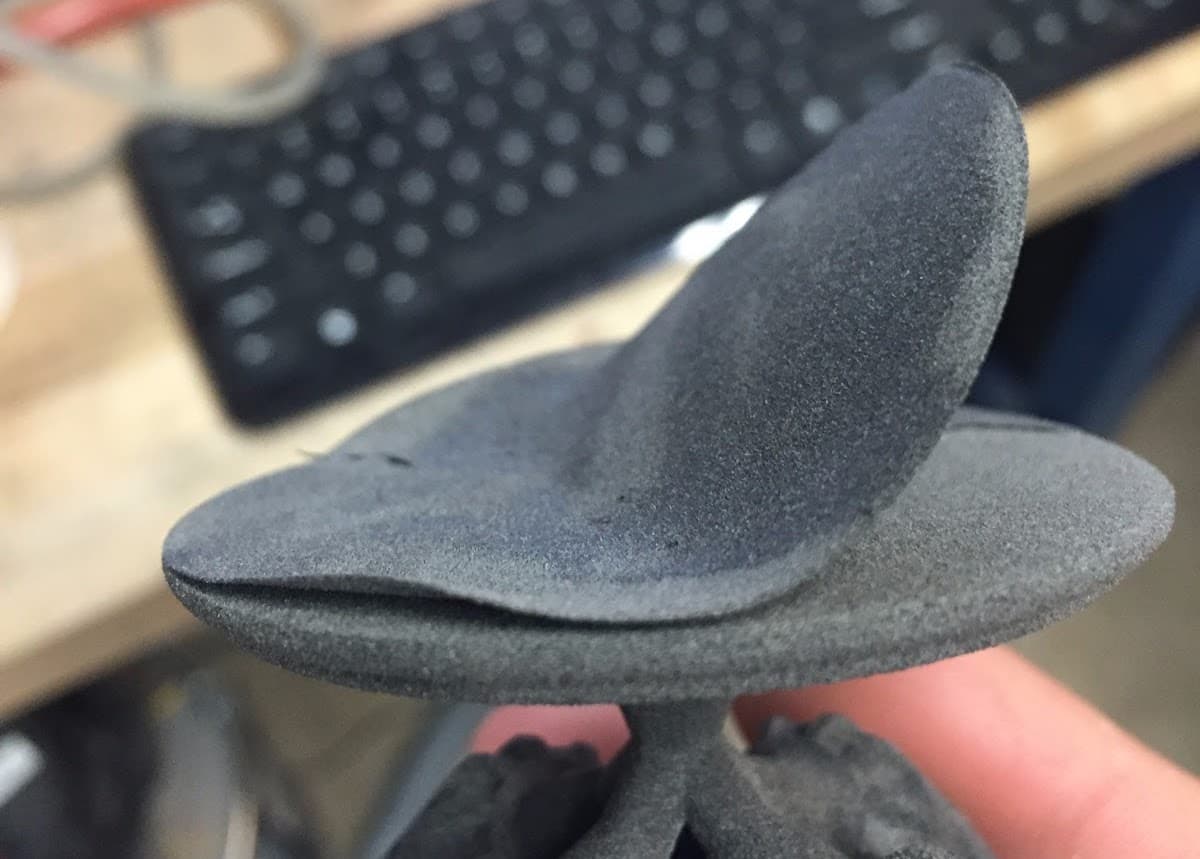
Visual symptoms
- Some layers are not fully sintered to previous layers
- Unexpected gaps between printed layers
- Delamination may be partial or total
Common causes
- Insufficient sintering due to reduced laser power, usually caused by dirty optics (e.g., upper laser window or optical cassette)
- Non-uniform temperature across the print bed causing layers to curl
- Significant powder cake shifts during the print
- Inconsistent Z-axis movement due to a worn build chamber lead screw or motor issues
- Non-manifold model geometry leading to gaps in parts
Troubleshooting steps
- Check your printer’s error history and printer history package for errors during the affected prints, especially those triggered by PrinterWatcher. Follow the troubleshooting steps for any errors that occurred.
- Inspect the windows in the optical cassette for contamination and, if necessary, clean both sides.
- Inspect the upper laser window for contamination and, if necessary, clean it.
- Inspect the IR sensor and IR sensor housing and, if necessary, clean both.
- Inspect your 3D models for any unintended gaps or other geometry issues. Follow Formlabs best practices for designing 3D models. If PreForm displays a Broken Models Detected error when you import your models, allow PreForm to repair them before setting up your print.
- Reorient parts or separate bulky parts that could affect print bed temperature into a separate print.
- Switch to a different build chamber if one is available.
- If not an option, inspect the build chamber lead screw and relubricate it, if necessary. Follow the instructions in the guide Cleaning and lubricating the build chamber lead screw (Fuse 1) [EN] [DE] [ES] [FR] [IT] [JA] [ZH].
- Check the powder in your printer and Fuse Sift or Fuse Depowdering Kit for contamination. If necessary, empty the printer hopper and retry the print with fresh powder.
If these steps do not resolve the print failures, contact Formlabs Support or a certified service provider and upload diagnostic logs.