
Note: To achieve an optimal refresh rate, target a mass-based packing density that is the same as the material refresh rate. In PreForm, optimal refresh rates can be viewed in the cost estimator.
WHITE PAPER
SLS Powder Usage and Packing Density in Formlabs PreForm
Packing density in selective laser sintering (SLS) 3D printing refers to how many parts can be printed in a single build. It is a critical parameter for understanding how to efficiently use space and powder to minimize costs and reduce waste. Different printer manufacturers will list different packing densities, some by volume and some by mass, which can lead to confusion. In PreForm, Formlabs’ free print preparation software, packing density is listed by both volume and mass. Below, we break down how packing density is calculated so that you can better determine productivity and part cost.
SLS Powder Usage and Packing Density in Formlabs PreForm
Packing density in selective laser sintering (SLS) 3D printing refers to how many parts can be printed in a single build. It is a critical parameter for understanding how to efficiently use space and powder to minimize costs and reduce waste. Different printer manufacturers will list different packing densities, some by volume and some by mass, which can lead to confusion. In PreForm, Formlabs’ free print preparation software, packing density is listed by both volume and mass. Below, we break down how packing density is calculated so that you can better determine productivity and part cost.
What Is Packing Density?
Packing density in SLS 3D printing is the percentage of fused powder in a build versus the total powder in a build. The fused powder is the parts printed. If you were to print an entire build as one sintered block, your volumetric packing density would be 100% and your mass packing density would be slightly lower (due to “buffer powder “around the addressable build). While few people ever have a reason to do this, Formlabs engineers have managed to print an entire, solid build during the stress-testing of Fuse SLS 3D printers.
Mass-based packing density, which is shown in PreForm, is the mass of sintered parts divided by the mass of all powder required. This includes all the powder required to complete the build, including “buffer” powder around the addressable build volume.
Volume-based packing density is the CAD volume of parts after they’ve been scaled to account for shrinkage*, divided by the addressable build volume. Volume-based packing density is most commonly used in packing software, including Materialise Magics, HP, and EOS. PreForm also includes volumetric packing density so that it’s easier to do a one-to-one comparison between Formlabs and competitors.
*PreForm scales models to account for shrinkage so that printed parts are dimensionally accurate.
How Does Packing Density Relate to Throughput?
The best way to determine throughput is the quantity of parts in a given time period. This relates to packing density because more parts packed into a build means more finished parts in a given time period, or higher throughput.
For example, packing a lot of small parts around large ones will maximize efficiency, making it possible to print more parts in the same amount of time. Therefore, a high packing density can increase throughput as more parts can be printed in the same amount of time.
Some manufacturers may obfuscate throughput by pointing to other metrics, such as the volume of powder processed per hour instead of the number of sintered parts. Powder processed doesn’t equal throughput, as not all powder is being sintered into parts in a build. Ultimately, the number of parts produced in a given time period is the best indicator of throughput.
What Is Refresh Rate?
Refresh rate is the ratio of fresh powder to used powder. Fresh powder is mixed with used powder and loaded back into the hopper of the printer, providing material for the next print. The used powder acts as the support for parts in a print batch and is reclaimed during sifting in Fuse Sift and Fuse Sift X1.
Mass is used for refresh rate calculations. Used powder is measured by mass, and fresh powder is added by mass. Powder cartridges, scrap, and reclaim are all tracked on a scale, with operators measuring mass. Volume-based density, therefore, doesn't connect to refresh weight and powder usage.
Book a Consultation
Get in touch with our 3D printing experts for a 1:1 consultation to find the right solution for your business, receive ROI analyses, test prints, and more.
Powder Usage and Packing Density Calculations in PreForm
PreForm calculates a number of useful statistics related to powder consumption and build volume utilization, displaying these values in the Summary flyout. Here, we clarify what these values represent and how they are calculated.

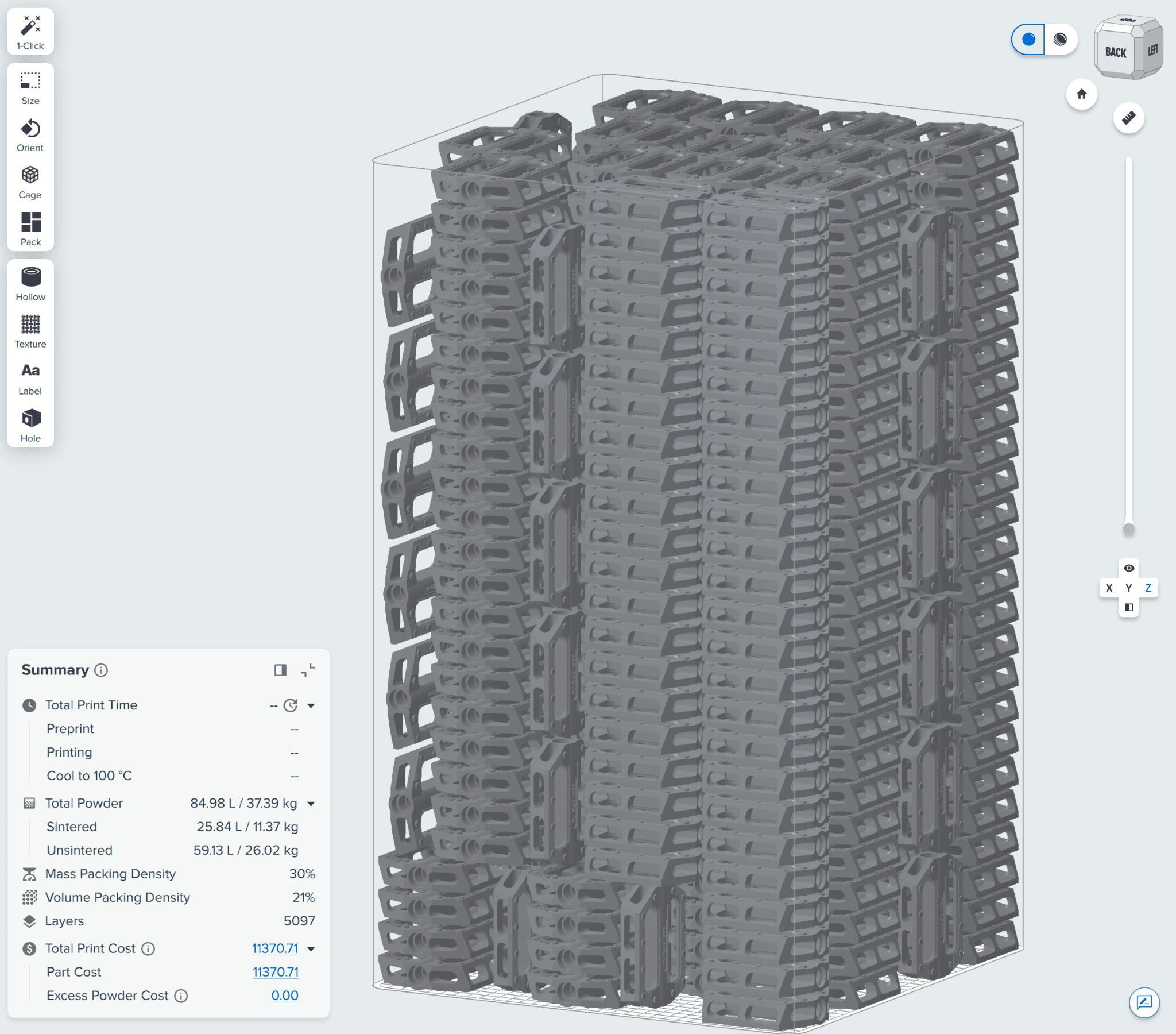
The PreForm summary flyout for Fuse SLS printers.
Summary Flyout Categories and Descriptions
|
Category |
Parameter |
Description |
Calculation |
|
Powder Usage |
Total |
The total volume in liters and the total mass of powder in kilograms required to complete your print |
mT = ms+mu,T VT = mT/⍴u |
|
Powder Usage |
Sintered |
The volume in liters and the mass of powder in kilograms consumed to create the sintered models (This is not the volume of the models) |
ms = Vs,post ∙ ⍴s Vs,use = ms / ⍴u |
|
Powder Usage |
Unsintered |
The volume in liters and the mass in kilograms of unused powder required for the print (Includes the build volume, precoats, postcoats,* and XY powder boundary) |
Vu,T = Vu,BV + Vu,BC mu,T = Vu,T ∙ ⍴u |
|
Packing Density |
Volumetric |
The pre-shrinkage volume of sintered models divided by the build volume (This excludes powder outside of the build volume to match competitor calculations) |
VPD = Vs,pre / Vu,BV |
|
Packing Density |
Mass |
The mass of sintered models divided by the total mass required for the print (This includes all powder for the print, so that mass estimates stay accurate) |
MPD = ms / mT |
*Precoats and postcoats are the powder laid down before and after printing. PreForm includes this powder in our powder usage metrics; most other packers excuse this from theirs, especially as the amount of powder used to precoat and postcoat varies per printer.
Mass and Volume Definitions
Sintered Powder
Given a sintered model density (⍴s), there are three key volumetric representations that can be used for sintered powder calculations, all of which serve different purposes. They include pre-shrinkage, post-shrinkage, and powder consumed. The mass is always consistent between these three representations.
Pre-Shrinkage Volume
The pre-shrinkage volume (Vs,pre) is defined based on the print-scale corrected models (or the models after PreForm compensates for the thermal shrinkage of a part). Pre-shrinkage volume is a key metric for determining how efficiently the build volume is used, as this volume is what’s used for volumetric packing density calculations. This is because all of the collisions, packing, etc. are calculated based on this print-scale correction representation.
Post-Shrinkage Volume
The post-shrinkage volume (Vs,post) is defined based on the final model volumes, but most importantly, it is used to calculate the mass of sintered powder. Note: this is the only volume representation that can be used with the specified sintered density (⍴s).
Powder Consumed or Powder Use Volume
The powder consumed or powder use volume (Vs,use) is defined as the volume of unsintered powder required to create the sintered models. This is a key metric for powder usage estimates, as this is the volume of powder you need to input into a printer to sinter into the models in the scene.
This is calculated based on the mass of sintered material and the unsintered powder density (⍴u):
Vs,use = ms / ⍴u
Mass
The mass of sintered material (ms) is relatively straightforward, with the only important caveat being that the sintered mass must be calculated using the post-shrinkage volume, since ⍴s is defined based on the final model volume.
ms = Vs,post ∙ ⍴s
Unsintered Powder
The unsintered powder is straightforward in terms of converting between masses and volumes, given the density of unsintered powder (⍴u). The only key distinction is powder contained within the build volume and powder contained within the build chamber.
Build Volume
The volume of unsintered powder contained within the build volume (Vu,BV) is used to calculate the volumetric packing density. This matches how other slicers, such as Materialise Magics and Autodesk Fusion with Netfabb, calculate volumetric packing density.

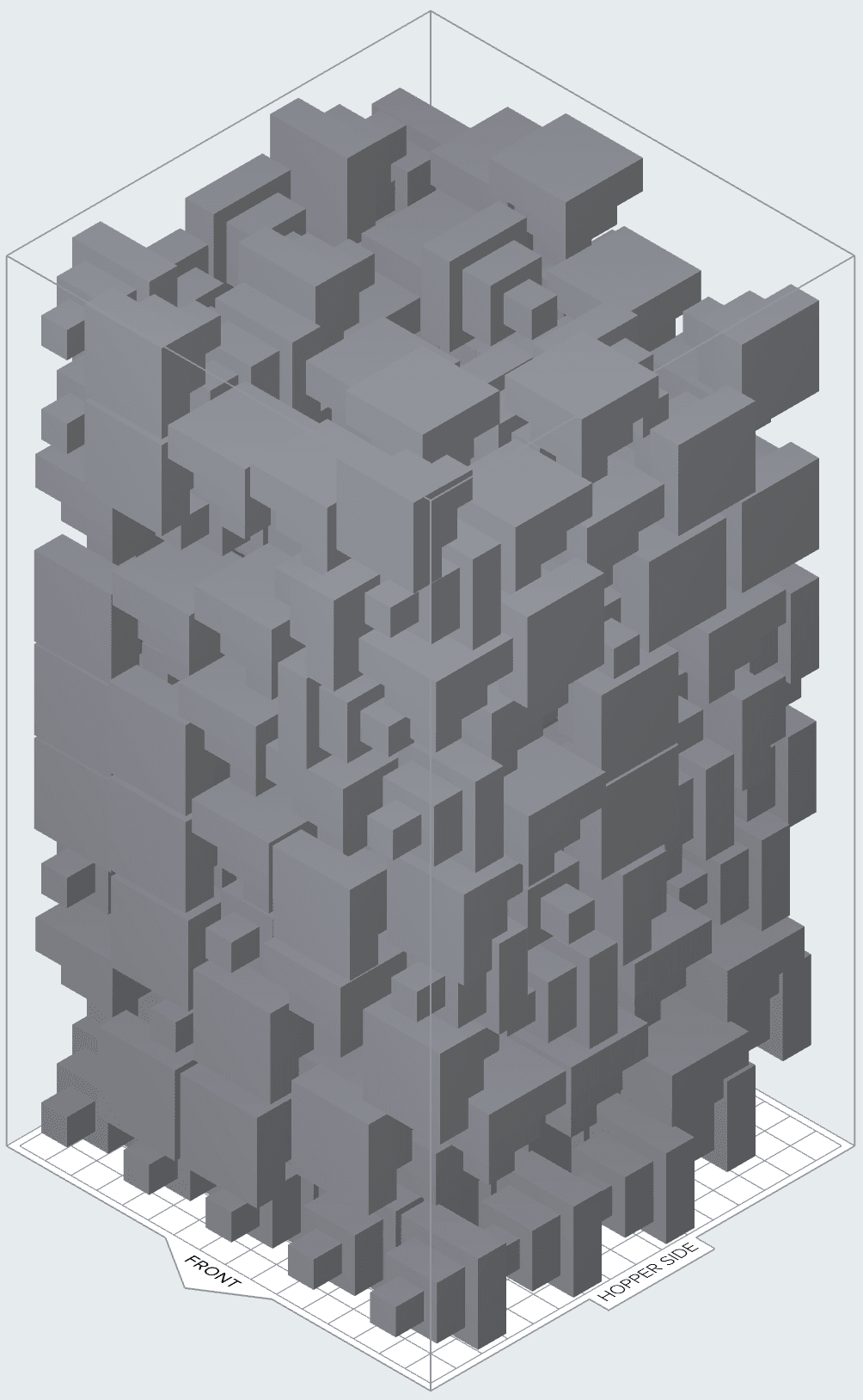
SLS build chambers have rounded corners (see above left) versus in the image at right. This affects the build volume as well as how parts can be placed. Rounded corners prevent powder from getting stuck in corners, where it can be difficult to clean and which can affect prints, potentially leading to print failures.
This is defined based on the build volume area where models can be placed (ABV) up to the active build height (hs), subtracting out the volume of the pre-shrinkage models:
Vu,BV = ABV ∙ hs - Vs,pre
Note that orange peel armor is included in the Build Volume sintered powder estimate.
Build Chamber Volume
The build chamber volume powder consists of the powder contained within the build chamber, but outside the usable build volume. This includes the volume of powder consumed in preprint (hpre), postprint (hpost), and around the edges of the build volume by the powder boundary (ABC):
Vu,BC = (ABC - ABV) ∙ hs + ABC ∙ (hpre + hpost)
Mass
All unsintered mass calculations are simply handled using the unsintered powder density (⍴u):
mu = (Vu,BV + Vu,BC) ∙ ⍴u
Using Mass Packing Density
Determining Cost Per Part
Cost per part is a mass calculation as powder is priced and consumed by the kilogram, not the cubic centimeter. In PreForm, users can enter their refresh rate and powder cost, as powder discounts are available for bulk orders. Once this information has been input and models added to a build, a cost per part will be calculated based on how much powder a part will require.
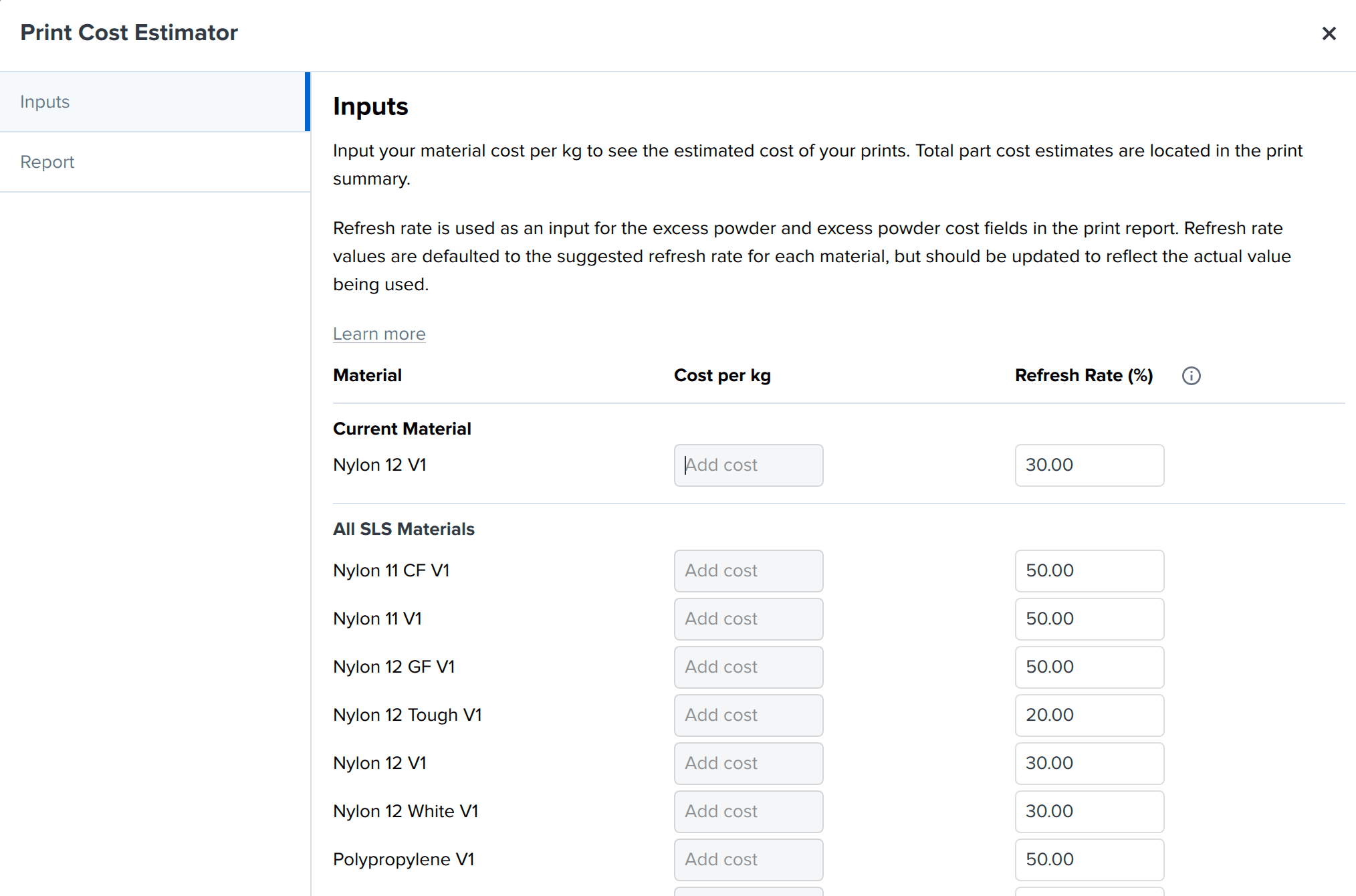
The Print Cost Estimator in PreForm uses cost per kilogram of powder, refresh rate, and the mass of powder required for a part to determine the cost per part. The refresh rates in the Print Cost Estimator are the recommended refresh rates for Formlabs materials.
Optimizing Refresh Rate
If the sintered parts removed from a build are the same percentage of mass as the refresh rate, it’s easy to replace them with new, unaged powder, as the mass of parts removed is equivalent to the mass of new powder that needs to be added. Powder management stations, Fuse Sift and Fuse Sift X1, monitor reclaimed powder and dispense and mix used and new powder automatically for easy workflows and reduced material waste.
Depending on parts in a build and how they are oriented, it may be desirable to age powder. In PreForm, this can be done by moving parts up in a build to create a buffer of what will be unsintered powder below the parts.
While volume-based packing density is often referenced in marketing materials and in packing software, using mass to determine packing density is more accurate and relevant when it comes to determining refresh rate, the amount of powder required for printing, and cost per part.
PreForm shows mass-based metrics in addition to volume-based ones, making it easier to determine how much powder is required for printing, ensuring print success, as well as delivering accurate refresh rate and cost per part information.