備考:
リモートプリントは、一部のFormlabsプリンタでのみ利用可能な機能です。詳細は以下のサポート記事をご参照ください:

ここでは、Formlabsのハードウェアとソフトウェアの接続性とセキュリティについて概説します。Formlabsが収集している情報の全容を詳しく知りたい場合は、Formlabsプライバシーポリシーを参照するか、[email protected]宛にお問い合わせください。
Formlabsは、データを交換する複数のプラットフォームを運営しています。
のトラフィックは業界標準の256ビットRSA暗号化で暗号化されています。
FormlabsのウェブサイトとDashboard
Formlabsのウェブサイトでは、製品情報、オンラインストアや教材を提供しています。Dashboardは、FormlabsのSLAプリンタを操作するユーザがそれぞれのプリンタの活動を遠隔地で監視できるようにするオンラインツールです。Dashboardは、接続されると、現在や過去のプリントジョブのステータス、時間の経過と共に変わる素材の使用量やその他の有用な統計情報を提供します。
Dashboardを有効化するには、各ユーザーがFormlabsアカウントを作成し、Formlabs製品をインターネットに接続し、タッチスクリーンインターフェースを介して各製品をDashboardに登録する必要があります。Dashboardが収集する情報について、より詳しく知りたい場合は、Formlabsプライバシーポリシーをご参照ください。
接続性
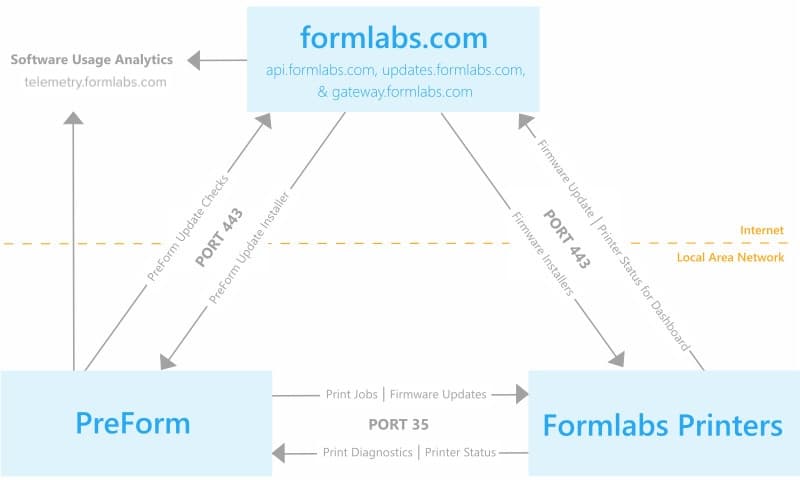
PreFormとFormlabsのハードウェアは、ポート443(HTTPS)、api.formlabs.com、およびgateway.formlabs.comを介してDashboardと通信します。
セキュリティ
FormlabsのウェブサイトとDashboardは共に、 HTTPS URLを使い、業界標準の256ビットRSA暗号を使って情報を暗号化しています。
Formlabsは、アマゾン ウェブ サービス(AWS)を使ってデータを保存しています。AWSは、複数の環境制御施設内の複数のデバイスに亘ってデータを冗長的に保存しています。AWSのインフラストラクチャと制御システムは毎年SAS-70 Type IIの監査の対象となっており、AWSの情報セキュリティー管理プロセスや制御システムはISO 27001の認証を受けています。
ファイアウォールで以下のURLをブロックしないようにご注意ください。
Formlabs製品
接続
コンピュータとFormlabsのデバイスの接続方法としては、次の3つのオプションが用意されています:
SLAまたはSLSデバイスの接続に関するより詳細な情報については、こちらをご参照ください。
Formlabsのデバイスの接続をタッチスクリーン上の設定で有効にしておくと、レーザ較正値やプリント成功率といったパフォーマンスデータをFormlabsが入手し、その情報をトラブルシューティングやFormlabsのハードウェアの機能性の向上に役立てられるようになります。
セキュリティ
Formlabsのハードウェアには、下記のセキュリティ対策が施されています:
プリンタはNTP(UDPポート123)を通じて以下のサーバーと時刻を同期します。ファイアウォールでこれらをブロックしないようにしてください:
その他のセキュリティに関する注意事項とファイアウォールの要件:
PreFormデスクトップソフトウェア
Connectivity
PreForm operates in the same three connectivity modes as Formlabs devices: without network access, via LAN, and via LAN with internet access. For network connected printers, PreForm communicates through port 35 and checks for updates on updates.formlabs.com via port 443.
PreForm includes the option to participate in a software quality improvement project which logs information for Formlabs to improve PreForm. Choose whether to contribute to the quality improvement project by accessing Help > Help Improve PreForm... in the PreForm menu bar. To contribute, PreForm must operate on an internet-connected computer.
If you opt to participate in PreForm quality improvement, PreForm sends usage data to Formlabs at the URL telemetry.formlabs.com. You can opt to send anonymized crash and usage information, which does not include 3D model data or personal information. You can also opt to upload FORM files to help improve Formlabs products, which may include protected information. Opt out of FORM file collection if your files could contain protected health information or information subject to export controls.
PreForm logs and reports three major events:
New versions of printer firmware can be uploaded to the printer via PreForm. If PreForm is on an internet-connected computer, the software checks for new firmware via updates.formlabs.com. The specific URL for Form 2 firmware is updates.formlabs.com/latest/update-check-form-2-firmware-v2. The specific URL for PreForm updates is updates.formlabs.com/latest/update-check-preform-v2. If PreForm cannot connect to the internet, a new firmware version must be saved on a local disk and selected within PreForm in order to update.
Security
PreForm is distributed via a signed installer (for Windows) and signed app bundle (for Mac OS).
Please make sure not to block these on your firewall:
Automatic updates
PreForm uses the Omaha Updater Service to automatically update the software, ensuring that users receive the latest features, improvements, and security patches. The Omaha service operates in the background to streamline the update process, allowing you to stay on the most up-to-date version of PreForm without manual intervention.
As part of this process, PreForm will make requests to the following URLs for update verification and download:
These URLs are used by the Omaha service to check for available updates and securely download the latest version of PreForm when necessary. It is important that the software can connect to this service to ensure that updates are applied promptly.
For network administrators and those with strict firewall policies, please ensure that outbound connections to these URLs are allowed for PreForm to function correctly and receive automatic updates.
リモートプリント
Formlabsのプリンタは、同じネットワークに接続されていないプリンタにもプリントジョブを送信することができます。
備考:
リモートプリントは、一部のFormlabsプリンタでのみ利用可能な機能です。詳細は以下のサポート記事をご参照ください:
接続性
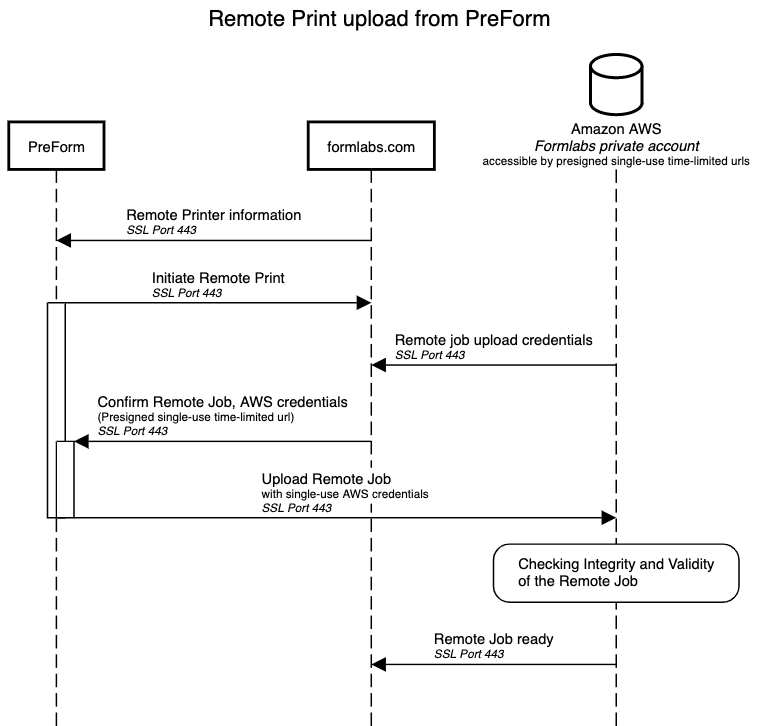
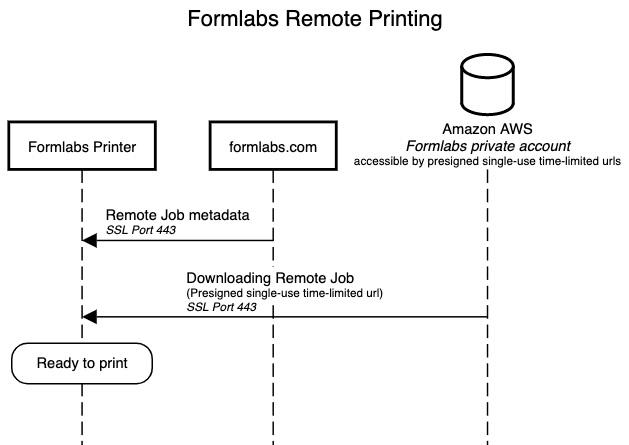
PreForm、Formlabsプリンタ、formlabs.com、Amazon Web Services(AWS)サーバーはすべてポート443(HTTPS)を介して通信します。
セキュリティ
リモートプリントジョブはすべて、FormlabsのプライベートAWSアカウントに保存されます。遠隔地から転送されるデータがFormlabsのプライベートアカウントに届くまでの間、情報はすべてHTTPS SSLを通じて暗号化されます。アップロードとダウンロードはいずれも、符号付き、一時的で、単一使用のアップロードURLによって保護されます。
ファイアウォールで以下のURLをブロックしないようにご注意ください: