
WHITE PAPER
Build chamber detection issues (Fuse 1 generation)
Build chamber detection issues (Fuse 1 generation)
On Fuse 1 generation printers and the Fuse Sift, the build chamber communicates with the machine via a plug in the front of the unit. If that plug is damaged or dirty or there is a firmware or hardware issue preventing this communication, the machine may not consistently detect the build chamber.
Causes
- Dirty or blocked build chamber plug
- Damaged build chamber plug
- Disconnected or faulty component within printer
- Firmware bug
- Supplied power does not meet machine requirements
Symptoms
- A specific build chamber is not detected by a Fuse 1 generation printer or Fuse Sift
- Multiple build chambers are not detected by a Fuse 1 generation printer or Fuse Sift
- Fuse Sift does not unpack a print cake, even if the build chamber is plugged into the machine and properly secured in place
- Fuse Sift does not display the print bed temperature of a connected build chamber
Troubleshooting steps
- Ensure the printer or Fuse Sift is on a dedicated AC circuit that meets the required specifications.
- Power the printer off using the switch in the back and leave off for at least 30 seconds. Power the printer back on.
- Test a second build chamber, if one is available.
- Update the printer’s firmware.
- Unplug the build chamber plug from the printer. Inspect the plug and socket and ensure they are free of debris. Clean with compressed air and contact cleaner if needed. Let the pins fully dry before reseating the build chamber plug.
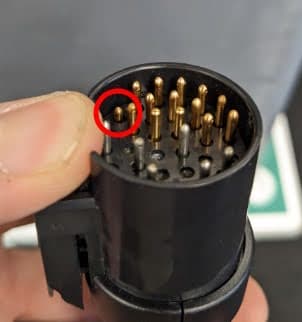
- Check the plug for any bent or sunken pins. If possible, carefully straighten any bent pins. If a pin sinks into the plug, gently pull on the pin with a pair of pliers. If the pin does not remain in place, the connector housing may be broken. If the issue can not be fixed, contact Formlabs Support or a certified service provider.
- Check if the build chamber plug housing is intact. The cable sheath should be firmly secured in the plug assembly, with no visible individual wires. Check that the housing is not loose, cracked, or detached from the build chamber plug.
- Fuse 1 generation printers only: The powder credit card reader RFID board also handles communication with the build chamber. If that board is damaged or disconnected, the printer may be unable to detect build chambers. Check whether the card reader can detect any powder cards. If not, remove the top cover and check the RFID board's connection. If powder cards are still not detected after reseating the connections, replace the RFID reader assembly. The part is available from the Formlabs Store. Follow the guide Fuse 1 - Replacing the RFID Board to replace the part.