Legacy firmware archive

Release notes from previous years are available to view. To find the most recent firmware, check the support article Firmware downloads and release notes.

Fuse 1

The following were recommended updates for Fuse 1 printers:

VersionWhat's NewDateDownload
1.21.0
  • Compatible with PreForm 3.26.0 and later
  • Fixed a bug that was causing the Build Chamber Maintenance print hours to not increment correctly
  • Added a feature to override the printer’s leveling calibration. This feature should be used in cases where the printer’s leveling sensor has drifted and is throwing errors despite the printer being level.
  • Added Flipper Calibration routine. This calibration routine should only be run if the flipper motor assembly has been replaced, or if an Authorized Formlabs Service Partner instructs you to run it.
  • Added the printer’s leveling status to the printer’s status screen. If the printer is out of level a red dot will appear on the printer status icon on the left side.
December 10, 2024Link
1.20.1
  • Compatible with PreForm 3.26.0 and later
  • Fixed a bug causing a long delay between priming and printing as well as false errors during priming
November 6, 2024Link
1.20.0
  • Compatible with PreForm 3.26.0 and later
  • New Materials: Added support for Nylon 12 White Powder, Nylon 12 Tough Powder, Open Material Mode and Supplier Certified Materials.
  • New Capabilities: Enable Open Material Mode on your Fuse 1 generation printer by purchasing and enabling it under Settings > System > Advanced Capabilities.
October 15, 2024Link
1.19.0
  • Compatible with PreForm 3.26.0 and later
  • User Friendly Logs: Download logs to help diagnose issues and track your maintenance using the Download Printer History tool in PreForm. The downloaded zip folder contains three CSV files and a folder containing images from prints that were stopped by Fuse Vision. The CSV files contain records of the printer's print history, maintenance history, and error history. This feature will be available in PreForm 3.41.0 and later.
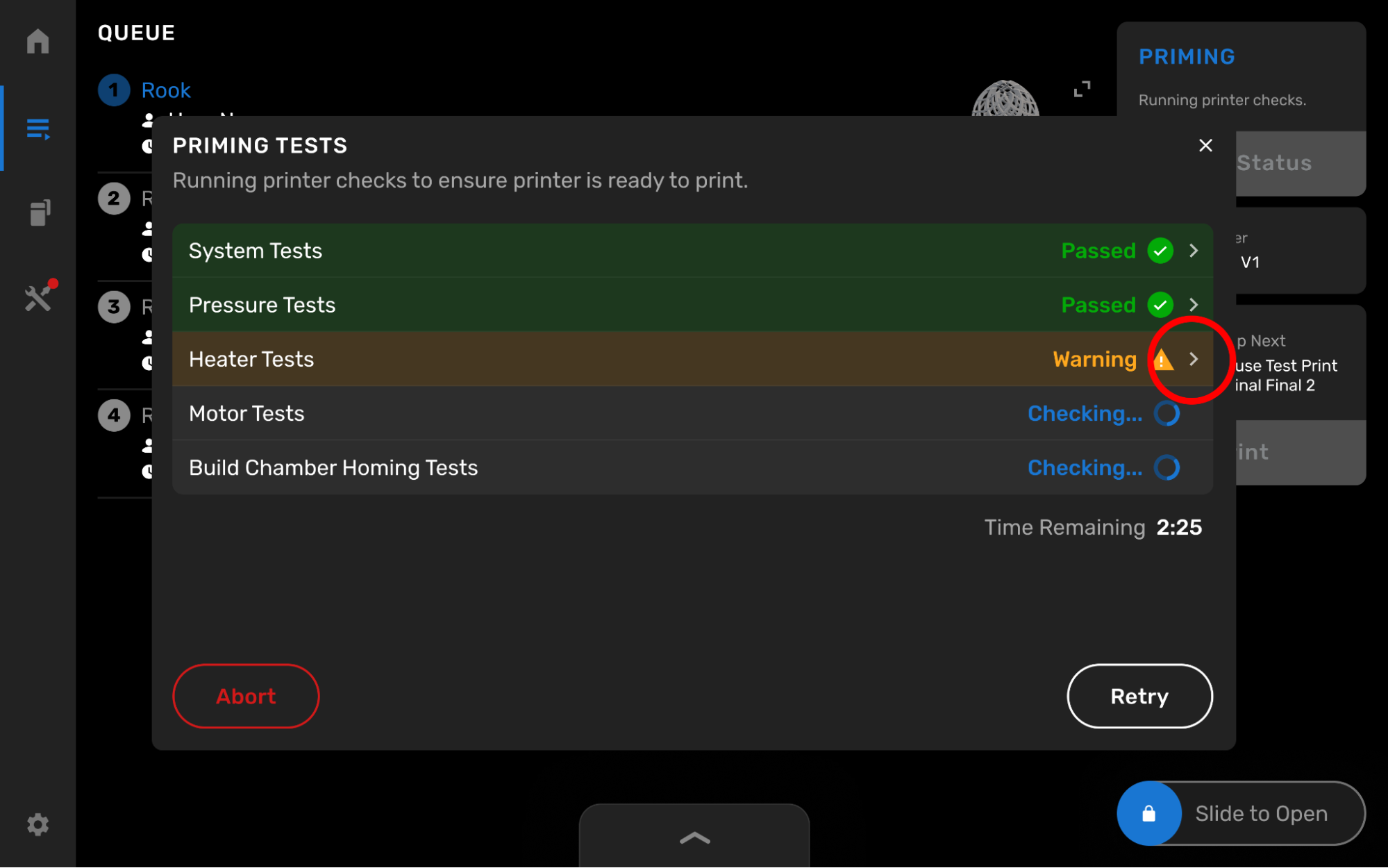
  • New Priming Routine: Start your prints knowing your Fuse is ready to go with the new priming routine. This new routine completes all preprint tests while you are present so you can address any issues and walk away knowing your print will start. Once primed, the next print will skip over the preprint tests and immediately start laying down powder and heating, saving you time and reducing the risk of a preprint error.
alttext
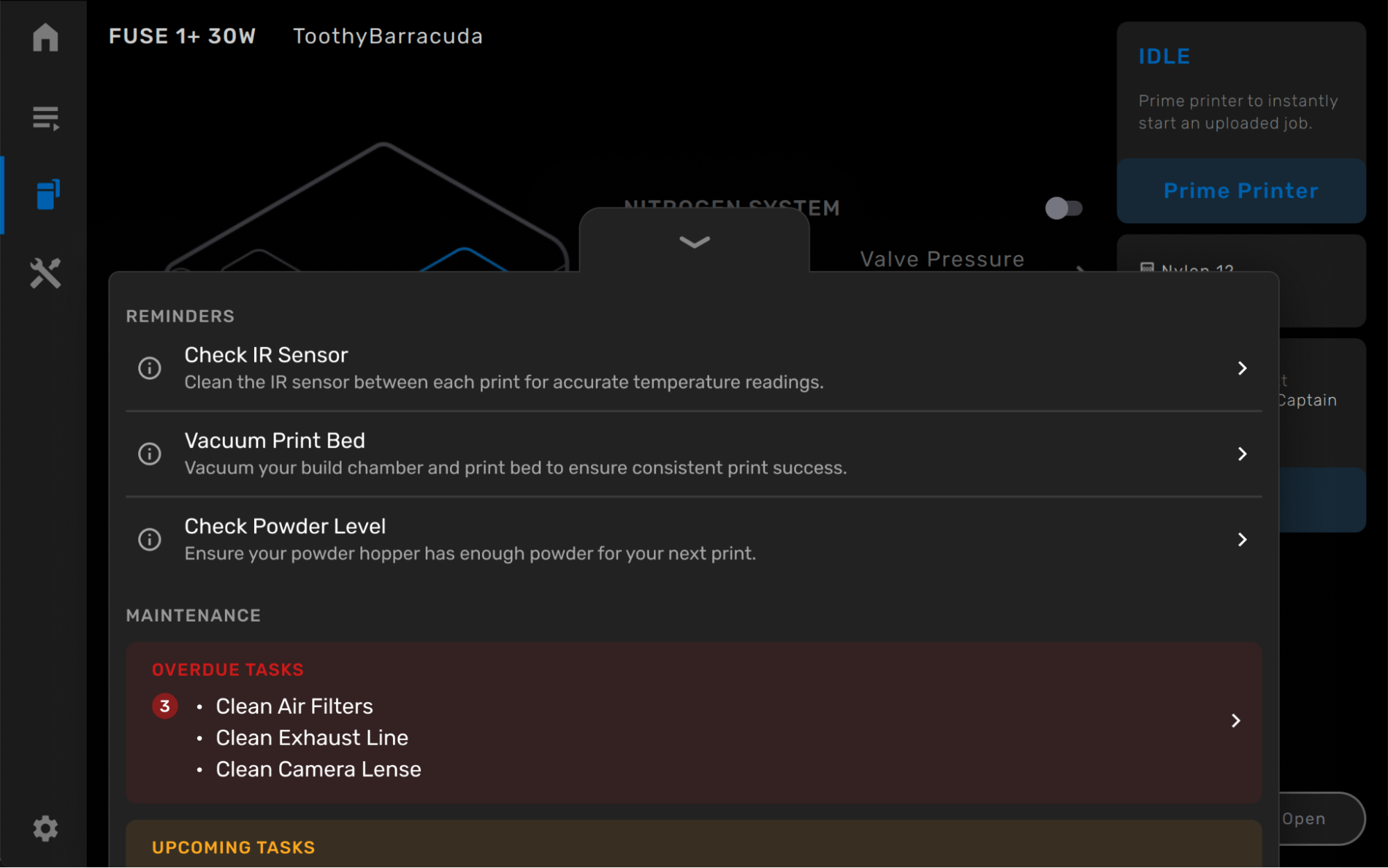
  • Task Sheet: Immediately see any recommended maintenance routines by opening the printer door or pressing the bottom tab on the touchscreen.
alttext
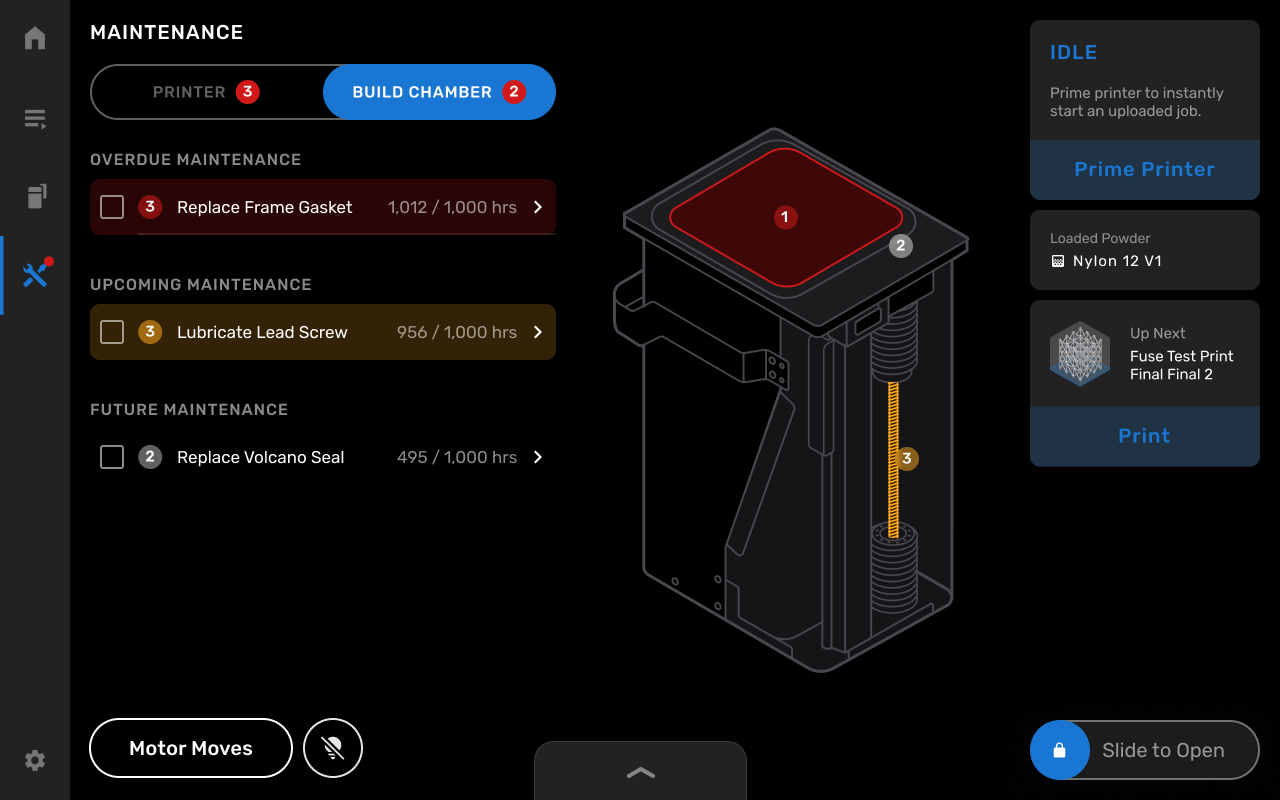
  • Build Chamber Maintenance: Track your build chamber's print hours and any necessary maintenance using the Build Chamber tab of the Maintenance page.
alttext
  • Translations: Translate the UI to Simplified or Traditional Chinese, Japanese, or Italian.
October 3, 2024Link
1.18.3 July 25, 2024Link
1.18.2 June 5, 2024Link
1.18.1 January 18, 2024Link

Fuse 1+ 30W

The following were recommended updates for Fuse 1+ 30W printers:

VersionWhat's NewDateDownload
1.21.0
  • Compatible with PreForm 3.26.0 and later
  • Fixed a bug that was causing the Build Chamber Maintenance print hours to not increment correctly
  • Added a feature to override the printer’s leveling calibration. This feature should be used in cases where the printer’s leveling sensor has drifted and is throwing errors despite the printer being level.
  • Added Flipper Calibration routine. This calibration routine should only be run if the flipper motor assembly has been replaced, or if an Authorized Formlabs Service Partner instructs you to run it.
  • Added the printer’s leveling status to the printer’s status screen. If the printer is out of level a red dot will appear on the printer status icon on the left side.
December 10, 2024Link
1.20.1
  • Compatible with PreForm 3.26.0 and later
  • Fixed a bug causing a long delay between priming and printing as well as false errors during priming
November 6, 2024Link
1.20.0
  • Compatible with PreForm 3.26.0 and later
  • New Materials: Added support for Nylon 12 White Powder, Nylon 12 Tough Powder, Open Material Mode and Supplier Certified Materials.
  • New Capabilities: Enable Open Material Mode on your Fuse 1 generation printer by purchasing and enabling it under Settings > System > Advanced Capabilities.
October 15, 2024Link
1.19.0
  • Compatible with PreForm 3.26.0 and later
  • User Friendly Logs: Download logs to help diagnose issues and track your maintenance using the Download Printer History tool in PreForm. The downloaded zip folder contains three CSV files and a folder containing images from prints that were stopped by Fuse Vision. The CSV files contain records of the printer's print history, maintenance history, and error history. This feature will be available in PreForm 3.41.0 and later.
  • New Priming Routine: Start your prints knowing your Fuse is ready to go with the new priming routine. This new routine completes all preprint tests while you are present so you can address any issues and walk away knowing your print will start. Once primed, the next print will skip over the preprint tests and immediately start laying down powder and heating, saving you time and reducing the risk of a preprint error.
alttext
  • Task Sheet: Immediately see any recommended maintenance routines by opening the printer door or pressing the bottom tab on the touchscreen.
alttext
  • Build Chamber Maintenance: Track your build chamber's print hours and any necessary maintenance using the Build Chamber tab of the Maintenance page.
alttext
  • Translations: Translate the UI to Simplified or Traditional Chinese, Japanese, or Italian.
October 3, 2024Link
1.18.3 July 25, 2024Link
1.18.2 June 5, 2024Link
1.18.1 January 18, 2024Link

Fuse Sift

Note:

Fuse Sift units that have had their motherboard replaced cannot run firmware versions earlier than 1.5.2. Any attempt to roll back the firmware to an older version on a Fuse Sift without its original motherboard will fail to complete.

The following were recommended updates for Fuse Sift powder recovery stations:

VersionWhat's NewDateDownload
1.6.1
  • Compatible with PreForm 3.26.0 and later
  • New Materials: Added support for Nylon 12 White Powder, Nylon 12 Tough Powder, Open Material Mode and Supplier Certified Materials
October 15, 2024Link
1.6.0
  • Compatible with PreForm 3.26.0 and later
  • Added Glovebox Mode to support the use of the new Sift Glovebox. This mode turns off the fan to reduce or eliminate powder clouding and improve visibility. Glovebox Mode can be turned on under Settings > System > Machine Details.
September 16, 2024Link
1.5.6 January 18, 2024Link

Fuse Blast

The following were recommended updates for Fuse Blast media blasting cabinets:

VersionWhat's NewDateDownload
1.1.0
  • Compatible with PreForm 3.34.0 and later
  • New:
    • Enable your new Blast Polishing System by simply inserting the Polishing System, changing your material to plastic (Settings > Maintenance > Media Change), turning on Polishing (Settings > Maintenance > Polishing toggle) and priming the polishing pump (Settings > Maintenance > Priming)
  • Features:
    • Save your own custom presets by pressing Save and adding a name
    • Change your pressure units between Imperial and Metric under Settings > System > Measurement System
September 17, 2024Link
1.0.2
  • Compatible with PreForm 3.34.0 and later
  • Added chamber rinse settings to set the duration and pressure of the chamber rinse portion of the rinse cycle. Cabinet rinse settings can be found under Settings > System.
  • Added the Adaptive Airflow feature, which automatically pauses the cycle if the intake pressure drops 5 PSI below the target pressure and allows your compressed air supply to recharge before resuming. This feature extends compatibility to more compressed air supplies by managing the cycle time instead of aborting the cycle. Timeout values can be accessed and adjusted in Settings > Maintenance.
June 13, 2024Link
1.0.1 March 27, 2024Link

Form 4B

The following were recommended updates for Form 4B printers:

VersionWhat's NewDateDownload
1.10.1
  • Compatible with PreForm 3.40.1 and later
  • Bug fixes:
    • Mitigates Error 1.1.23: Based on user reports of intermittent Error 1.1.23 occurrences, this release implements improvements aimed at reducing the error frequency.
December 6, 2024Link
1.10.0
  • Compatible with PreForm 3.40.1 and later
  • New features:
    • Smarter debris warnings: The printer will notify you of suspected debris in the tank even if the print completed successfully. Requires PreForm 3.43.0.
    • Resin tank maintenance prompt: Periodic inspection and maintenance of your resin tank can increase its lifetime and reduce print failures. The printer will alert you to inspect the resin tank after it has printed 75,000 layers. Learn more here.
    • Time-out screen: Easily check the printer status and consumables with the time-out screen. It will automatically turn on if the printer has been idle and not printing for more than five minutes. Enable or disable it from Settings > Configuration > Time-out screen.
    • Motor movement tool: Inspect and troubleshoot motor issues with the Move motors utility
  • Improvements:
    • Advanced network configuration: Specify a custom name server when connecting through Ethernet or Wi-Fi
    • Automatic disk space management: Printing jobs with Timelapse enabled requires disk space. The printer will automatically delete old jobs from history to clear up disk space.
    • Improved support for Resin Pumping System
    • Improved support for printing with Open Material Mode
    • View Dashboard group members: If the printer is part of a printer group on Dashboard, easily see other members of the group under Settings > Connectivity
November 26, 2024Link
1.9.0
  • Compatible with PreForm 3.40.1 and later
  • Improvements:
    • Alerts when printing with low resin: When starting prints with insufficient resin, the printer will show a helpful alert. Printing with insufficient resin can cause the tank to dry out and lead to a print failure.
    • Automatic disk space management: When printing with Timelapse enabled, the printer will delete old jobs from Job History if disk space is low.
    • Easily register to Dashboard using a QR code: Register your printer on Formlabs Dashboard with a quick QR code scan. Use Dashboard to remotely send prints, monitor print progress, and track inventory.
  • Bug fixes:
    • Fixed issue where Form 4 Resin Pumping System would appear empty on PreForm
    • Fixed issue where Form 4 Resin Pumping System would sometimes appear empty on printer UI
    • Fixed a rare issue where Error 1.1.23 would appear after a finished print
October 30, 2024Link
1.8.0
  • Compatible with PreForm 3.40.1 and later
  • Improvements:
    • Improved cleaning sheets: when you have a print failure, it is recommended to print a cleaning sheet to clean up debris in the tank. This feature has been improved for BioMed Clear Resin, Dental LT Clear Resin, Fast Model Resin, and White Resins. To run a cleaning sheet, tap Maintenance > Print cleaning sheet.
    • Cleaning sheet reminder: if you select a thumbs down after your print, the printer will remind you to print a cleaning sheet. This can help increase the likelihood of printing successfully.
    • Warning to prevent resin from dripping onto the LPU: removing a dirty build platform without the tank in place can drip resin onto the LPU. If a tank is removed before a dirty build platform, the printer will flash a warning and sound an alert.
  • Bug fixes:
    • Fixed bug in Timelapse generation: Fixed issue where some timelapse prints would not show up on Dashboard. Make sure to enable the toggle in PreForm Job Setup to create the timelapse.
September 23, 2024Link
1.7.2

Note:

This update will hide jobs in the queue that were generated with PreForm 3.40.0 or earlier. New jobs must be uploaded with PreForm 3.40.1 or later.

  • Compatible with PreForm 3.40.1 and later
  • Bug fixes:
    • Fixed false debris detection issue: when printing with some viscous resins like Elastic 50A, BioMed Elastic 50A, BioMed Flex 80A, Flame Retardant, IBT Flex V1, Tough 2000 V1 or Durable V2.1, the printer would incorrectly alert that debris was detected. This bug has now been fixed. Requires PreForm 3.40.1 versions and later.
  • Known issues:
    • Timelapse videos are not generated correctly: when generating a Timelapse video, the file may sometimes be corrupt and not play.
September 17, 2024Link
1.7.0

Notice:

False debris detection with viscous resins: When printing with some viscous resins like Elastic 50A, BioMed Elastic 50A, BioMed Flex 80A, Flame Retardant, IBT Flex V1, Tough 2000 V1 or Durable V2.1, the printer may incorrectly alert that debris was detected. If you’re printing with these resins, we recommend not updating the firmware to this version.

  • Compatible with PreForm 3.36.0 and later
  • New features:
    • Power Saving Mode: You can now set a screen timeout or put the screen to sleep via the Settings menu.
    • Unicode character support: The touchscreen now supports Unicode characters.
  • Improvements:
    • More accurate cartridge volumes: The printer now displays more accurate resin volumes based on the weight of the cartridge. This change will be applied to PreForm and Dashboard in future releases.
    • Improved consumable notification behavior: Adjusted certain notifications to automatically resolve more reliably and to not repeat unless the cartridge has changed.
    • Improved cleaning sheet parameters: Cleaning sheet parameters for Fast Model Resin, White Resin V5, BioMed Clear Resin, and Dental LT Clear Resin have been adjusted to print thicker and reduce the risk of torn sheets.
  • Bug fixes:
    • Fixed issue where some users were getting repeated false debris detection errors during preprint.
    • Fixed issue where the Z-axis fine tuning adjustment was being applied incorrectly.
  • Known issues:
    • Timelapse videos are not generated correctly: when generating a Timelapse video, the file may sometimes be corrupt and not play.
August 29, 2024Link
1.6.0
  • Compatible with PreForm 3.36.0 and later
  • New Features:
    • Print any 405 nm resin with Open Material Mode: Open Material Mode unlocks the ability to print with any 405 nm non-Formlabs resin. Leverage the reliability and capability of Formlabs hardware. Learn more here.
    • Manually set IP address: When setting up your Form 4 for networking, you can now assign the printer a manual IP address.
    • Load cell calibration routine: The load cell measures the amount of resin in the cartridge to alert you if the printer doesn’t have enough resin to finish the current print job. Use the calibration routine if you repeatedly get incorrect warnings that there is not enough resin to finish the print.
  • Improvements:
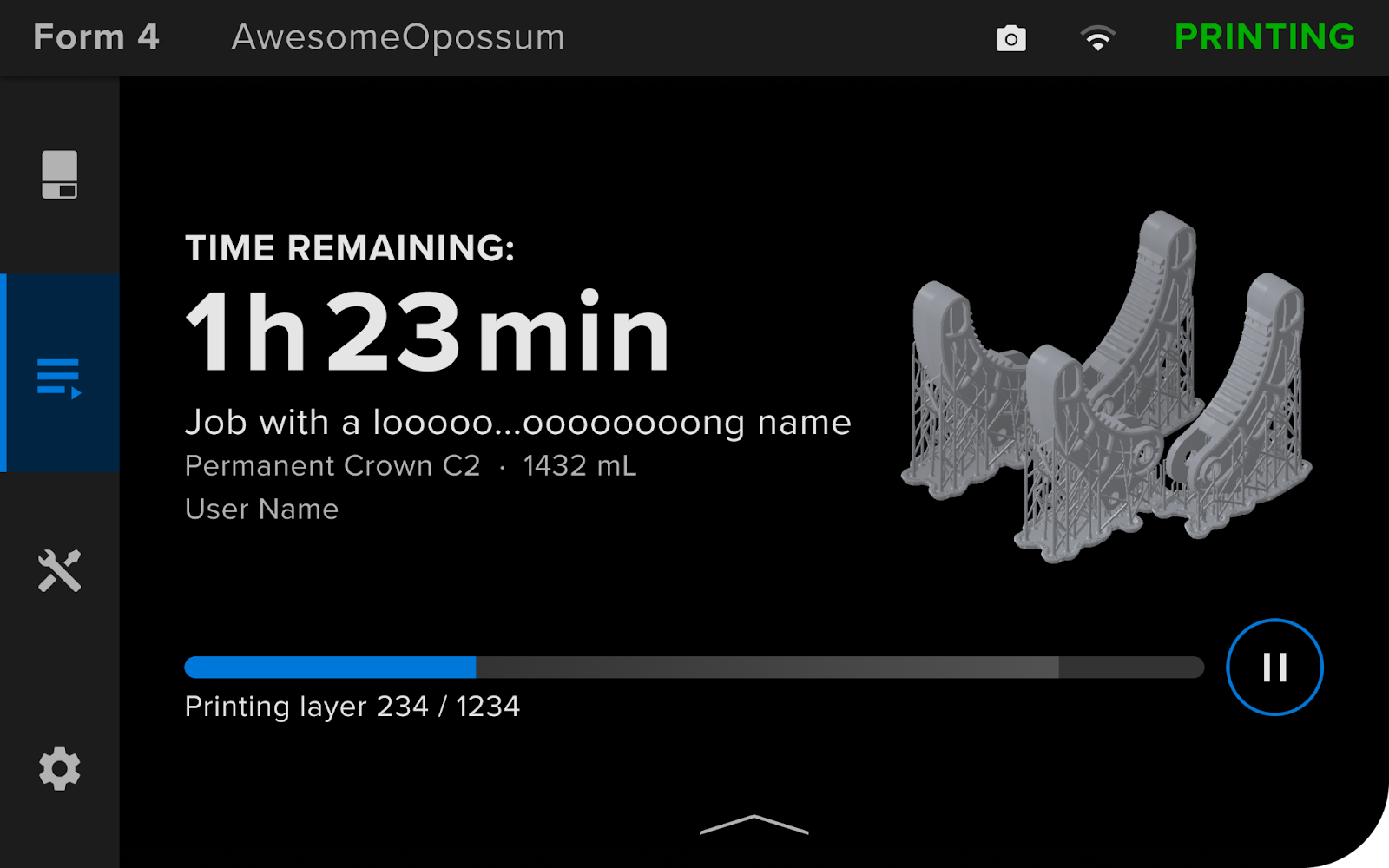
    • More details on the printing screen: See more details like resin volume required and resin for a job in the queue and printing screen.
alttext
    • Preheating information on Status screen: When the printer is ready and the preheating option is enabled, you will now see the current heating progress on the Status screen.
    • Optimized preheating: When the printer is ready and the preheating option is enabled, the printer will heat the resin in the tank in anticipation of a print. Preheating stops automatically when the resin reaches the required temperature.
    • Alerts to protect the LPU after a print: After a print finishes, removing the resin tank before removing the used build platform can allow resin to drip onto the LPU and lead to future print failures. The printer will alert you when it detects that the resin tank is being removed while a used build platform is still in the printer.
  • Bug Fixes:
    • Fixed issue where the job upload toast notification would not disappear if the upload was canceled or interrupted
    • Fixed issue where resin cartridges would not be detected correctly if they were swapped quickly
August 1, 2024Link
1.5.0
  • Compatible with PreForm 3.36.0 and later
  • Added post-print images in Dashboard. The on-board camera automatically takes a photo at the end of every print. View images in the Print History section of Dashboard.
  • Added resin level sensor calibration to ensure correct resin level readings
  • Added accelerometer calibration to ensure correct readings
  • Added an auto-dismiss cleaning sheet maintenance prompt. After a print failure, the printer alerts you to print a cleaning sheet. If you remove the tank or subsequently print successfully, the alert is automatically dismissed.
  • Added control notification volume. Change the volume for notifications using the slider under Settings > Configuration > Notification volume.
  • Fixed issue where the printer would occasionally keep heating even after turning off the preheating feature
  • Fixed issue where a job would be marked as complete while still printing
  • Fixed issue where incorrect “Debris was detected” errors were being displayed
  • Fixed issue where some misprogrammed tanks could not be read
  • Fixed issue where settings were not saved after a reboot
July 15, 2024Link
1.4.1 June 7, 2024Link
1.4.0

Note: Upgrading to firmware 1.4.0 will prevent rolling back to past firmware versions.

  • Compatible with PreForm 3.36.0 and later
  • Added proactive maintenance actions to help keep printer maintenance up to date. When a maintenance action is suggested, the printer will highlight the wrench icon with a dot.
  • Added cleaning sheet maintenance action. If a print fails, the printer will prompt you to run a cleaning sheet
  • Added preheating when ready. Once consumables are inserted and the printer is labeled as ready, the printer will start preheating.
  • Improved menu structure to make options more accessible
  • Fixed issue in which printing was interrupted if the UI crashed
  • Fixed issue where some prints could not be resumed after paused
  • Fixed issue with factory reset button
  • Fixed issue where printer status would incorrectly show as Check Printer in Dashboard
  • Added feature to delete completed jobs from print history. To delete a print job, select it from the Print History and tap the Delete button to remove it.
  • Improved tank reprogramming. When starting a print job, the printer will prompt for confirmation of consumables. Tap the Ignore button to reprogram the resin tank to the target resin. Note that not all resin tanks can be reprogrammed.
June 3, 2024Link
1.3.1
  • Compatible with PreForm 3.36.0 and later
  • Fixed issue where some timelapses appeared inconsistent
  • Fixed issue where timelapse creation would sometimes interfere with the printing process
  • Fixed issue where camera settings were lost when upgrading from firmware 1.1.x to 1.3.0
May 10, 2024Link
1.3.0

Upgrading to firmware 1.3.0 will cause a loss in network connectivity and require reentering credentials to connect to a WiFi network.

  • Compatible with PreForm 3.36.0 and later
  • Added support to generate timelapses of prints and to use the camera on Form 4 generation printers. Requires PreForm 3.36.0 or later. Generated timelaspses can be downloaded from Dashboard.
  • Introduced preheating once a print job is uploaded to reduce total print times. Preheating can be disabled by going to Settings > General > Resin preheating.
  • Added notifications for low flow rate when a cartridge is dispensing slowly. Make sure the vent cap is opened, and the bite valve is not sealed.
  • Introduced detailed information about consumables. To view more information, tap on Tank or Build Platform on the Printer Status screen.
  • Added option to clear finishing print jobs from print history (Settings > General > Storage)
  • Added Z-Axis Fine Tuning. Note that the Z Offset value will reset if using the Align build platform calibration tool.
  • Reduced motor noises in early stages of a print
  • Improved tank reprogramming warning to allow tank reprogramming with inserted consumables if possible
  • Fixed WiFi connectivity issues when a printer was set up with Ethernet and would not connect to a WiFi network without same Ethernet connection
  • Fixed a bug that caused resolutions to not dismiss
  • Fixed a bug that caused issues when updating printers from PreForm
April 30, 2024Link
1.1.2 April 17, 2024Link

Form 4

The following were recommended updates for Form 4 printers:

VersionWhat's NewDateDownload
1.10.1
  • Compatible with PreForm 3.40.1 and later
  • Bug fixes:
    • Mitigates Error 1.1.23: Based on user reports of intermittent Error 1.1.23 occurrences, this release implements improvements aimed at reducing the error frequency.
December 6, 2024Link
1.10.0
  • Compatible with PreForm 3.40.1 and later
  • New features:
    • Smarter debris warnings: The printer will notify you of suspected debris in the tank even if the print completed successfully. Requires PreForm 3.43.0.
    • Resin tank maintenance prompt: Periodic inspection and maintenance of your resin tank can increase its lifetime and reduce print failures. The printer will alert you to inspect the resin tank after it has printed 75,000 layers. Learn more here.
    • Time-out screen: Easily check the printer status and consumables with the time-out screen. It will automatically turn on if the printer has been idle and not printing for more than five minutes. Enable or disable it from Settings > Configuration > Time-out screen.
    • Motor movement tool: Inspect and troubleshoot motor issues with the Move motors utility
  • Improvements:
    • Advanced network configuration: Specify a custom name server when connecting through Ethernet or Wi-Fi
    • Automatic disk space management: Printing jobs with Timelapse enabled requires disk space. The printer will automatically delete old jobs from history to clear up disk space.
    • Improved support for Resin Pumping System
    • Improved support for printing with Open Material Mode
    • View Dashboard group members: If the printer is part of a printer group on Dashboard, easily see other members of the group under Settings > Connectivity
November 26, 2024Link
1.9.0
  • Compatible with PreForm 3.40.1 and later
  • Improvements:
    • Alerts when printing with low resin: When starting prints with insufficient resin, the printer will show a helpful alert. Printing with insufficient resin can cause the tank to dry out and lead to a print failure.
    • Automatic disk space management: When printing with Timelapse enabled, the printer will delete old jobs from Job History if disk space is low.
    • Easily register to Dashboard using a QR code: Register your printer on Formlabs Dashboard with a quick QR code scan. Use Dashboard to remotely send prints, monitor print progress, and track inventory.
  • Bug fixes:
    • Fixed issue where Form 4 Resin Pumping System would appear empty on PreForm
    • Fixed issue where Form 4 Resin Pumping System would sometimes appear empty on printer UI
    • Fixed a rare issue where Error 1.1.23 would appear after a finished print
October 30, 2024Link
1.8.0
  • Compatible with PreForm 3.40.1 and later
  • Improvements:
    • Improved cleaning sheets: when you have a print failure, it is recommended to print a cleaning sheet to clean up debris in the tank. This feature has been improved for BioMed Clear Resin, Dental LT Clear Resin, Fast Model Resin, and White Resins. To run a cleaning sheet, tap Maintenance > Print cleaning sheet.
    • Cleaning sheet reminder: if you select a thumbs down after your print, the printer will remind you to print a cleaning sheet. This can help increase the likelihood of printing successfully.
    • Warning to prevent resin from dripping onto the LPU: removing a dirty build platform without the tank in place can drip resin onto the LPU. If a tank is removed before a dirty build platform, the printer will flash a warning and sound an alert.
  • Bug fixes:
    • Fixed bug in Timelapse generation: Fixed issue where some timelapse prints would not show up on Dashboard. Make sure to enable the toggle in PreForm Job Setup to create the timelapse.
September 23, 2024Link
1.7.2

Note:

This update will hide jobs in the queue that were generated with PreForm 3.40.0 or earlier. New jobs must be uploaded with PreForm 3.40.1 or later.

  • Compatible with PreForm 3.40.1 and later
  • Bug fixes:
    • Fixed false debris detection issue: when printing with some viscous resins like Elastic 50A, BioMed Elastic 50A, BioMed Flex 80A, Flame Retardant, IBT Flex V1, Tough 2000 V1 or Durable V2.1, the printer would incorrectly alert that debris was detected. This bug has now been fixed. Requires PreForm 3.40.1 versions and later.
  • Known issues:
    • Timelapse videos are not generated correctly: when generating a Timelapse video, the file may sometimes be corrupt and not play.
September 17, 2024Link
1.7.0

Notice:

False debris detection with viscous resins: When printing with some viscous resins like Elastic 50A, BioMed Elastic 50A, BioMed Flex 80A, Flame Retardant, IBT Flex V1, Tough 2000 V1 or Durable V2.1, the printer may incorrectly alert that debris was detected. If you’re printing with these resins, we recommend not updating the firmware to this version.

  • Compatible with PreForm 3.36.0 and later
  • New features:
    • Power Saving Mode: You can now set a screen timeout or put the screen to sleep via the Settings menu.
    • Unicode character support: The touchscreen now supports Unicode characters.
  • Improvements:
    • More accurate cartridge volumes: The printer now displays more accurate resin volumes based on the weight of the cartridge. This change will be applied to PreForm and Dashboard in future releases.
    • Improved consumable notification behavior: Adjusted certain notifications to automatically resolve more reliably and to not repeat unless the cartridge has changed.
    • Improved cleaning sheet parameters: Cleaning sheet parameters for Fast Model Resin, White Resin V5, BioMed Clear Resin, and Dental LT Clear Resin have been adjusted to print thicker and reduce the risk of torn sheets.
  • Bug fixes:
    • Fixed issue where some users were getting repeated false debris detection errors during preprint.
    • Fixed issue where the Z-axis fine tuning adjustment was being applied incorrectly.
  • Known issues:
    • Timelapse videos are not generated correctly: when generating a Timelapse video, the file may sometimes be corrupt and not play.
August 29, 2024Link
1.6.0
  • Compatible with PreForm 3.36.0 and later
  • New Features:
    • Print any 405 nm resin with Open Material Mode: Open Material Mode unlocks the ability to print with any 405 nm non-Formlabs resin. Leverage the reliability and capability of Formlabs hardware. Learn more here.
    • Manually set IP address: When setting up your Form 4 for networking, you can now assign the printer a manual IP address.
    • Load cell calibration routine: The load cell measures the amount of resin in the cartridge to alert you if the printer doesn’t have enough resin to finish the current print job. Use the calibration routine if you repeatedly get incorrect warnings that there is not enough resin to finish the print.
  • Improvements:
    • More details on the printing screen: See more details like resin volume required and resin for a job in the queue and printing screen.
alttext
    • Preheating information on Status screen: When the printer is ready and the preheating option is enabled, you will now see the current heating progress on the Status screen.
    • Optimized preheating: When the printer is ready and the preheating option is enabled, the printer will heat the resin in the tank in anticipation of a print. Preheating stops automatically when the resin reaches the required temperature.
    • Alerts to protect the LPU after a print: After a print finishes, removing the resin tank before removing the used build platform can allow resin to drip onto the LPU and lead to future print failures. The printer will alert you when it detects that the resin tank is being removed while a used build platform is still in the printer.
  • Bug Fixes:
    • Fixed issue where the job upload toast notification would not disappear if the upload was canceled or interrupted
    • Fixed issue where resin cartridges would not be detected correctly if they were swapped quickly
August 1, 2024Link
1.5.0
  • Compatible with PreForm 3.36.0 and later
  • Added post-print images in Dashboard. The on-board camera automatically takes a photo at the end of every print. View images in the Print History section of Dashboard.
  • Added resin level sensor calibration to ensure correct resin level readings
  • Added accelerometer calibration to ensure correct readings
  • Added an auto-dismiss cleaning sheet maintenance prompt. After a print failure, the printer alerts you to print a cleaning sheet. If you remove the tank or subsequently print successfully, the alert is automatically dismissed.
  • Added control notification volume. Change the volume for notifications using the slider under Settings > Configuration > Notification volume.
  • Fixed issue where the printer would occasionally keep heating even after turning off the preheating feature
  • Fixed issue where a job would be marked as complete while still printing
  • Fixed issue where incorrect “Debris was detected” errors were being displayed
  • Fixed issue where some misprogrammed tanks could not be read
  • Fixed issue where settings were not saved after a reboot
July 15, 2024Link
1.4.1 June 7, 2024Link
1.4.0

Note: Upgrading to firmware 1.4.0 will prevent rolling back to past firmware versions.

  • Compatible with PreForm 3.36.0 and later
  • Added proactive maintenance actions to help keep printer maintenance up to date. When a maintenance action is suggested, the printer will highlight the wrench icon with a dot.
  • Added cleaning sheet maintenance action. If a print fails, the printer will prompt you to run a cleaning sheet
  • Added preheating when ready. Once consumables are inserted and the printer is labeled as ready, the printer will start preheating.
  • Improved menu structure to make options more accessible
  • Fixed issue in which printing was interrupted if the UI crashed
  • Fixed issue where some prints could not be resumed after paused
  • Fixed issue with factory reset button
  • Fixed issue where printer status would incorrectly show as Check Printer in Dashboard
  • Added feature to delete completed jobs from print history. To delete a print job, select it from the Print History and tap the Delete button to remove it.
  • Improved tank reprogramming. When starting a print job, the printer will prompt for confirmation of consumables. Tap the Ignore button to reprogram the resin tank to the target resin. Note that not all resin tanks can be reprogrammed.
June 3, 2024Link
1.3.1
  • Compatible with PreForm 3.36.0 and later
  • Fixed issue where some timelapses appeared inconsistent
  • Fixed issue where timelapse creation would sometimes interfere with the printing process
  • Fixed issue where camera settings were lost when upgrading from firmware 1.1.x to 1.3.0
May 10, 2024Link
1.3.0

Upgrading to firmware 1.3.0 will cause a loss in network connectivity and require reentering credentials to connect to a WiFi network.

  • Compatible with PreForm 3.36.0 and later
  • Added support to generate timelapses of prints and to use the camera on Form 4 generation printers. Requires PreForm 3.36.0 or later. Generated timelaspses can be downloaded from Dashboard.
  • Introduced preheating once a print job is uploaded to reduce total print times. Preheating can be disabled by going to Settings > General > Resin preheating.
  • Added notifications for low flow rate when a cartridge is dispensing slowly. Make sure the vent cap is opened, and the bite valve is not sealed.
  • Introduced detailed information about consumables. To view more information, tap on Tank or Build Platform on the Printer Status screen.
  • Added option to clear finishing print jobs from print history (Settings > General > Storage)
  • Added Z-Axis Fine Tuning. Note that the Z Offset value will reset if using the Align build platform calibration tool.
  • Reduced motor noises in early stages of a print
  • Improved tank reprogramming warning to allow tank reprogramming with inserted consumables if possible
  • Fixed WiFi connectivity issues when a printer was set up with Ethernet and would not connect to a WiFi network without same Ethernet connection
  • Fixed a bug that caused resolutions to not dismiss
  • Fixed a bug that caused issues when updating printers from PreForm
April 30, 2024Link
1.1.2 April 17, 2024Link

Form 4BL

The following were recommended updates for Form 4BL printers:

VersionWhat's NewDateDownload
1.10.1
  • Compatible with PreForm 3.40.1 and later
  • Bug fixes:
    • Mitigates Error 1.1.23: Based on user reports of intermittent Error 1.1.23 occurrences, this release implements improvements aimed at reducing the error frequency.
December 6, 2024Link
1.10.0
  • Compatible with PreForm 3.41.0 and later
  • New features:
    • Smarter debris warnings: The printer will notify you of suspected debris in the tank even if the print completed successfully. Requires PreForm 3.43.0.
    • Resin tank maintenance prompt: Periodic inspection and maintenance of your resin tank can increase its lifetime and reduce print failures. The printer will alert you to inspect the resin tank after it has printed 75,000 layers. Learn more here.
    • Time-out screen: Easily check the printer status and consumables with the time-out screen. It will automatically turn on if the printer has been idle and not printing for more than five minutes. Enable or disable it from Settings > Configuration > Time-out screen.
    • Motor movement tool: Inspect and troubleshoot motor issues with the Move motors utility
  • Improvements:
    • Advanced network configuration: Specify a custom name server when connecting through Ethernet or Wi-Fi
    • Automatic disk space management: Printing jobs with Timelapse enabled requires disk space. The printer will automatically delete old jobs from history to clear up disk space.
    • Improved support for Resin Pumping System
    • Improved support for printing with Open Material Mode
    • View Dashboard group members: If the printer is part of a printer group on Dashboard, easily see other members of the group under Settings > Connectivity
November 26, 2024Link
1.9.0
  • Compatible with PreForm 3.41.0 and later
  • Improvements:
    • Alerts when printing with low resin: When starting prints with insufficient resin, the printer will show a helpful alert. Printing with insufficient resin can cause the tank to dry out and lead to a print failure.
    • Automatic disk space management: When printing with Timelapse enabled, the printer will delete old jobs from Job History if disk space is low.
    • Easily register to Dashboard using a QR code: Register your printer on Formlabs Dashboard with a quick QR code scan. Use Dashboard to remotely send prints, monitor print progress, and track inventory.
    • Improved chamber lighting during certain maintenance routines for better visibility
  • Bug fixes:
    • Fixed issue where Form 4 Resin Pumping System would appear empty on PreForm
    • Fixed issue where Form 4 Resin Pumping System would sometimes appear empty on printer UI
    • Fixed a rare issue where Error 1.1.23 would appear after a finished print
    • Fixed issue where both cartridges were not represented properly in Dashboard
October 30, 2024Link
1.8.0
  • Compatible with PreForm 3.41.0 and later
  • Improvements:
    • Improved cleaning sheets: when you have a print failure, it is recommended to print a cleaning sheet to clean up debris in the tank. This feature has been improved for BioMed Clear Resin, Dental LT Clear Resin, Fast Model Resin, and White Resins. To run a cleaning sheet, tap Maintenance > Print cleaning sheet.
    • Cleaning sheet reminder: if you select a thumbs down after your print, the printer will remind you to print a cleaning sheet. This can help increase the likelihood of printing successfully.
    • Warning to prevent resin from dripping onto the LPU: removing a dirty build platform without the tank in place can drip resin onto the LPU. If a tank is removed before a dirty build platform, the printer will flash a warning and sound an alert.
  • Bug fixes:
    • Fixed bug in Timelapse generation: Fixed issue where some timelapse prints would not show up on Dashboard. Make sure to enable the toggle in PreForm Job Setup to create the timelapse.
September 23, 2024Link
1.7.0 August 29, 2024Link

Form 4L

The following were recommended updates for Form 4L printers:

VersionWhat's NewDateDownload
1.10.1
  • Compatible with PreForm 3.40.1 and later
  • Bug fixes:
    • Mitigates Error 1.1.23: Based on user reports of intermittent Error 1.1.23 occurrences, this release implements improvements aimed at reducing the error frequency.
December 6, 2024Link
1.10.0
  • Compatible with PreForm 3.41.0 and later
  • New features:
    • Smarter debris warnings: The printer will notify you of suspected debris in the tank even if the print completed successfully. Requires PreForm 3.43.0.
    • Resin tank maintenance prompt: Periodic inspection and maintenance of your resin tank can increase its lifetime and reduce print failures. The printer will alert you to inspect the resin tank after it has printed 75,000 layers. Learn more here.
    • Time-out screen: Easily check the printer status and consumables with the time-out screen. It will automatically turn on if the printer has been idle and not printing for more than five minutes. Enable or disable it from Settings > Configuration > Time-out screen.
    • Motor movement tool: Inspect and troubleshoot motor issues with the Move motors utility
  • Improvements:
    • Advanced network configuration: Specify a custom name server when connecting through Ethernet or Wi-Fi
    • Automatic disk space management: Printing jobs with Timelapse enabled requires disk space. The printer will automatically delete old jobs from history to clear up disk space.
    • Improved support for Resin Pumping System
    • Improved support for printing with Open Material Mode
    • View Dashboard group members: If the printer is part of a printer group on Dashboard, easily see other members of the group under Settings > Connectivity
November 26, 2024Link
1.9.0
  • Compatible with PreForm 3.41.0 and later
  • Improvements:
    • Alerts when printing with low resin: When starting prints with insufficient resin, the printer will show a helpful alert. Printing with insufficient resin can cause the tank to dry out and lead to a print failure.
    • Automatic disk space management: When printing with Timelapse enabled, the printer will delete old jobs from Job History if disk space is low.
    • Easily register to Dashboard using a QR code: Register your printer on Formlabs Dashboard with a quick QR code scan. Use Dashboard to remotely send prints, monitor print progress, and track inventory.
    • Improved chamber lighting during certain maintenance routines for better visibility
  • Bug fixes:
    • Fixed issue where Form 4 Resin Pumping System would appear empty on PreForm
    • Fixed issue where Form 4 Resin Pumping System would sometimes appear empty on printer UI
    • Fixed a rare issue where Error 1.1.23 would appear after a finished print
    • Fixed issue where both cartridges were not represented properly in Dashboard
October 30, 2024Link
1.8.0
  • Compatible with PreForm 3.41.0 and later
  • Improvements:
    • Improved cleaning sheets: when you have a print failure, it is recommended to print a cleaning sheet to clean up debris in the tank. This feature has been improved for BioMed Clear Resin, Dental LT Clear Resin, Fast Model Resin, and White Resins. To run a cleaning sheet, tap Maintenance > Print cleaning sheet.
    • Cleaning sheet reminder: if you select a thumbs down after your print, the printer will remind you to print a cleaning sheet. This can help increase the likelihood of printing successfully.
    • Warning to prevent resin from dripping onto the LPU: removing a dirty build platform without the tank in place can drip resin onto the LPU. If a tank is removed before a dirty build platform, the printer will flash a warning and sound an alert.
  • Bug fixes:
    • Fixed bug in Timelapse generation: Fixed issue where some timelapse prints would not show up on Dashboard. Make sure to enable the toggle in PreForm Job Setup to create the timelapse.
September 23, 2024Link
1.7.0 August 29, 2024Link

Form 3BL

The following were recommended updates for Form 3BL printers:

VersionWhat's NewDateDownload
2.5.2
  • Compatible with PreForm 3.33.0 and later
  • Improvements:
    • If the printer is connected to Fleet Control, easily find more information about its printer group under Settings > Connectivity > Printer Group
  • Bug fixes:
    • Fixed issue where some material names were displayed incorrectly on the UI. For example, Black Resin V4.1 would be displayed as Black V41.
    • Fixed an issue that would cause Error 56 to abort a print in progress
November 4, 2024Link
2.5.1
  • Compatible with PreForm 3.33.0 and later
  • Improved logging to reduce the amount of data captured and uploaded
  • Renamed Formlabs Open Material License and updated the location in the Settings menu for activation on the printer
July 18, 2024Link
2.5.0
  • Compatible with PreForm 3.33.0 and later
  • Added Support for Open Material License to unlock the ability to print with any 405 nm photopolymer resin
  • Improved resin consumption measurements
  • Fixed issue where replacing cartridges caused false mismatch errors
June 10, 2024Link
2.4.0
  • Compatible with PreForm 3.33.0 and later
  • Fixed issue where some cartridges could not be detected
  • Fixed issue where some printers could not be downgraded to earlier firmware versions
  • Added support for the Resin Pumping System
  • Added support for starting jobs with custom print settings created using the Print Settings Editor in PreForm
  • Fixed issue where some V2 tanks could not be reprogrammed
March 21, 2024Link

Form 3L

The following were recommended updates for Form 3L printers:

VersionWhat's NewDateDownload
2.5.2
  • Compatible with PreForm 3.33.0 and later
  • Improvements:
    • If the printer is connected to Fleet Control, easily find more information about its printer group under Settings > Connectivity > Printer Group
  • Bug fixes:
    • Fixed issue where some material names were displayed incorrectly on the UI. For example, Black Resin V4.1 would be displayed as Black V41.
    • Fixed an issue that would cause Error 56 to abort a print in progress
November 4, 2024Link
2.5.1
  • Compatible with PreForm 3.33.0 and later
  • Improved logging to reduce the amount of data captured and uploaded
  • Renamed Formlabs Open Material License and updated the location in the Settings menu for activation on the printer
July 18, 2024Link
2.5.0
  • Compatible with PreForm 3.33.0 and later
  • Added Support for Open Material License to unlock the ability to print with any 405 nm photopolymer resin
  • Improved resin consumption measurements
  • Fixed issue where replacing cartridges caused false mismatch errors
June 10, 2024Link
2.4.0
  • Compatible with PreForm 3.33.0 and later
  • Fixed issue where some cartridges could not be detected
  • Fixed issue where some printers could not be downgraded to earlier firmware versions
  • Added support for the Resin Pumping System
  • Added support for starting jobs with custom print settings created using the Print Settings Editor in PreForm
  • Fixed issue where some V2 tanks could not be reprogrammed
March 21, 2024Link

Form Wash L

The following were recommended updates for the Form Wash L:

VersionWhat's NewDateDownload
1.3.0
  • Added profiles for Dental SG Resin, Denture Base Resin DP, Denture Teeth Resin A1, and Premium Teeth Resin A2
October 30, 2024Link
1.2.5
  • Added support for BioMed Durable Resin, BioMed Elastic 50A Resin, BioMed Flex 80A Resin, IBT Flex Resin and Dental LT Comfort Resin
January 24, 2024Link

Form Cure L

The following were recommended updates for the Form Cure L:

VersionWhat's NewDateDownload
1.2.4
  • Added support for BioMed Durable Resin, BioMed Elastic 50A Resin, BioMed Flex 80A Resin, IBT Flex Resin and Dental LT Comfort Resin
  • Updated description for Temp CB Resin and Permanent Crown Resin
  • Updated profile for BioMed Amber Resin and Surgical Guide Resin
  • Deleted profile for Dental SG Resin
January 24, 2024Link
1.2.3
  • Fixed an issue with wireless firmware updates
  • Added ability to run a factory reset from the machine’s UI
  • Added support for Model V3 Resin
  • Fixed preheating feature
October 18, 2022Link
1.2.0
  • Added support for BioMed Black Resin and BioMed White Resin
  • Added log upload functionality via PreForm
  • Improved Time and Heat recommendations for resins with multiple applications
  • Improved heater performance
  • Various bug fixes
April 21, 2022Link
1.1.2
  • Added support for biocompatible materials with the exception of Denture Base Resin (LP, OP, RP, DP) and Denture Teeth Resin (A1, A2, A3, A3.5, B1, B2)
  • Improved screens and interface
  • Added security improvements
  • Improved general performance
  • Various bug fixes
January 11, 2022Link

Form 3B/Form 3B+

The following were recommended updates for Form 3B printers:

VersionWhat's NewDateDownload
2.5.2
  • Compatible with PreForm 3.33.0 and later
  • Improvements:
    • If the printer is connected to Fleet Control, easily find more information about its printer group under Settings > Connectivity > Printer Group
  • Bug fixes:
    • Fixed issue where some material names were displayed incorrectly on the UI. For example, Black Resin V4.1 would be displayed as Black V41.
November 4, 2024Link
2.5.1
  • Compatible with PreForm 3.33.0 and later
  • Improved logging to reduce the amount of data captured and uploaded
  • Renamed Formlabs Open Material License and updated the location in the Settings menu for activation on the printer
July 17, 2024Link
2.5.0
  • Compatible with PreForm 3.33.0 and later
  • Added Support for Open Material License to unlock the ability to print with any 405 nm photopolymer resin
  • Improved resin consumption measurements
  • Fixed issue where replacing cartridges caused false mismatch errors
June 10, 2024Link
2.4.0
  • Compatible with PreForm 3.33.0 and later
  • Added Traditional Chinese, Simplified Chinese, and Japanese language support to the UI. Language can be changed under Settings > System > Language.
  • Fixed issue where some cartridges could not be detected
  • Added support for starting jobs with custom print settings created using the Print Settings Editor in PreForm
  • Fixed issue where some V2 tanks could not be programmed
March 21, 2024Link
2.3.2
  • Compatible with PreForm 3.33.0 and later
  • Added the ability to switch UI to Simplified Chinese under Settings > System > Language
January 9, 2024Link

Form 3/Form 3+

The following were recommended updates for Form 3 printers:

VersionWhat's NewDateDownload
2.5.2
  • Compatible with PreForm 3.33.0 and later
  • Improvements:
    • If the printer is connected to Fleet Control, easily find more information about its printer group under Settings > Connectivity > Printer Group
  • Bug fixes:
    • Fixed issue where some material names were displayed incorrectly on the UI. For example, Black Resin V4.1 would be displayed as Black V41.
November 4, 2024Link
2.5.1
  • Compatible with PreForm 3.33.0 and later
  • Improved logging to reduce the amount of data captured and uploaded
  • Renamed Formlabs Open Material License and updated the location in the Settings menu for activation on the printer
July 17, 2024Link
2.5.0
  • Compatible with PreForm 3.33.0 and later
  • Added Support for Open Material License to unlock the ability to print with any 405 nm photopolymer resin
  • Improved resin consumption measurements
  • Fixed issue where replacing cartridges caused false mismatch errors
June 10, 2024Link
2.4.0
  • Compatible with PreForm 3.33.0 and later
  • Added Traditional Chinese, Simplified Chinese, and Japanese language support to the UI. Language can be changed under Settings > System > Language.
  • Fixed issue where some cartridges could not be detected
  • Added support for starting jobs with custom print settings created using the Print Settings Editor in PreForm
  • Fixed issue where some V2 tanks could not be programmed
March 21, 2024Link
2.3.2
  • Compatible with PreForm 3.33.0 and later
  • Added the ability to switch UI to Simplified Chinese under Settings > System > Language
January 9, 2024Link

Form Auto

The following were recommended updates for Form 3 and Form 3B printers connected to a Form Auto:

VersionWhat's NewDateDownload
2.4.0 March 21, 2024Link

Form 2

The following were recommended updates for Form 2 printers:

VersionWhat's NewDateDownload
1.19.26 January 25, 2023Link
1.19.25
  • Compatible with PreForm 3.24.0 and later
  • Added support for PU Rigid 650 Resin at 50 and 100 microns
  • Added support for PU Rigid 1000 Resin at 50 and 100 microns
May 19, 2022Link
1.19.24
  • Compatible with PreForm 3.24.0 and later
  • Added support for BioMed Black Resin at 50 and 100 microns
  • Added support for BioMed White Resin at 50 and 100 microns
  • Various bug fixes
April 12, 2022Link
1.19.23
  • Improved Dental LT Clear Resin cartridge detection
  • Various bug fixes
March 3, 2022Link
1.19.22
  • Added support for IBT Resin
  • Various bug fixes
February 16, 2021Link
1.19.21
  • Added support for Castable Wax 40 Resin
  • Various bug fixes
January 7, 2021Link
1.19.20
  • Added support for Rigid 10K Resin
  • Added support for Draft V2 Resin
  • Various bug fixes
October 27, 2020Link

Form 1+

The following were recommended updates for Form 1+ printers:

VersionWhat's NewDateDownload
1.40
  • This is the latest version of firmware that is compatible with the Form 1+
  • Dashboard registration from printer
  • Display MAC addresses in the UI
  • Pre-print checks for failed uploads
December 17, 2014Link
1.3f
  • Peel cycle optimizations
  • Print speed optimizations
  • Add capability to better handle fine tuning settings
  • Fix occasional incorrect LCD display
May 19, 2014N/A


Older versions

Looking for previous versions of firmware from before the year 2024? Check the archive: