
WHITE PAPER
Device on fire error message (Form Cure V1)
Device on fire error message (Form Cure V1)
The Form Cure V1 uses a temperature sensor to monitor its internal temperature as it heats up during a post-cure cycle. This allows it to reach the appropriate target temperature and acts as a safety feature. If the machine detects an unrealistically high temperature, it stops the post-cure cycle and displays the message ON FIRE.
Symptoms
- Form Cure V1 displays ON FIRE error message with a line of code
Causes
- Temperature sensor is unplugged
- Temperature sensor is broken
Troubleshooting steps
- Reseat the temperature sensor cable. Follow the guide for replacing the Form Cure display assembly to remove the bottom of the Form Cure and access the motherboard. The temperature sensor connector is circled in the image below.
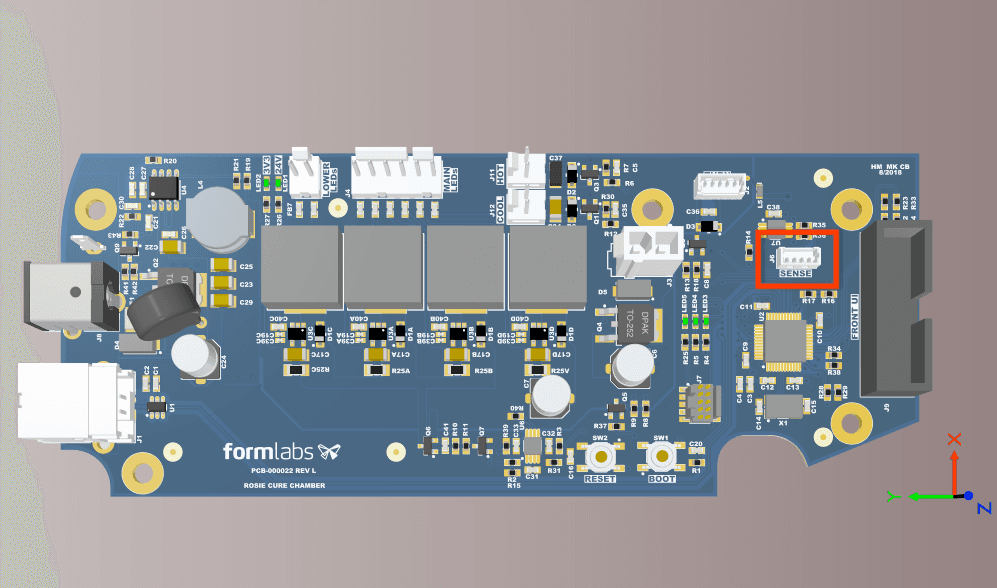
- If reseating the cable does not resolve the issue, the temperature sensor is likely broken. This is not a replaceable part on the Form Cure V1—contact Formlabs Support or your authorized reseller for options for replacing the machine.