

Using the Print Report panel in PreForm (SLS)
Using the Print Report panel in PreForm (SLS)
Starting with version 3.40.0, PreForm features a Print Report panel that shows material usage and part cost information for your prints. The Print Report panel can be accessed from the top toolbar. Click Edit > Print Report.
Inputs tab (SLS)
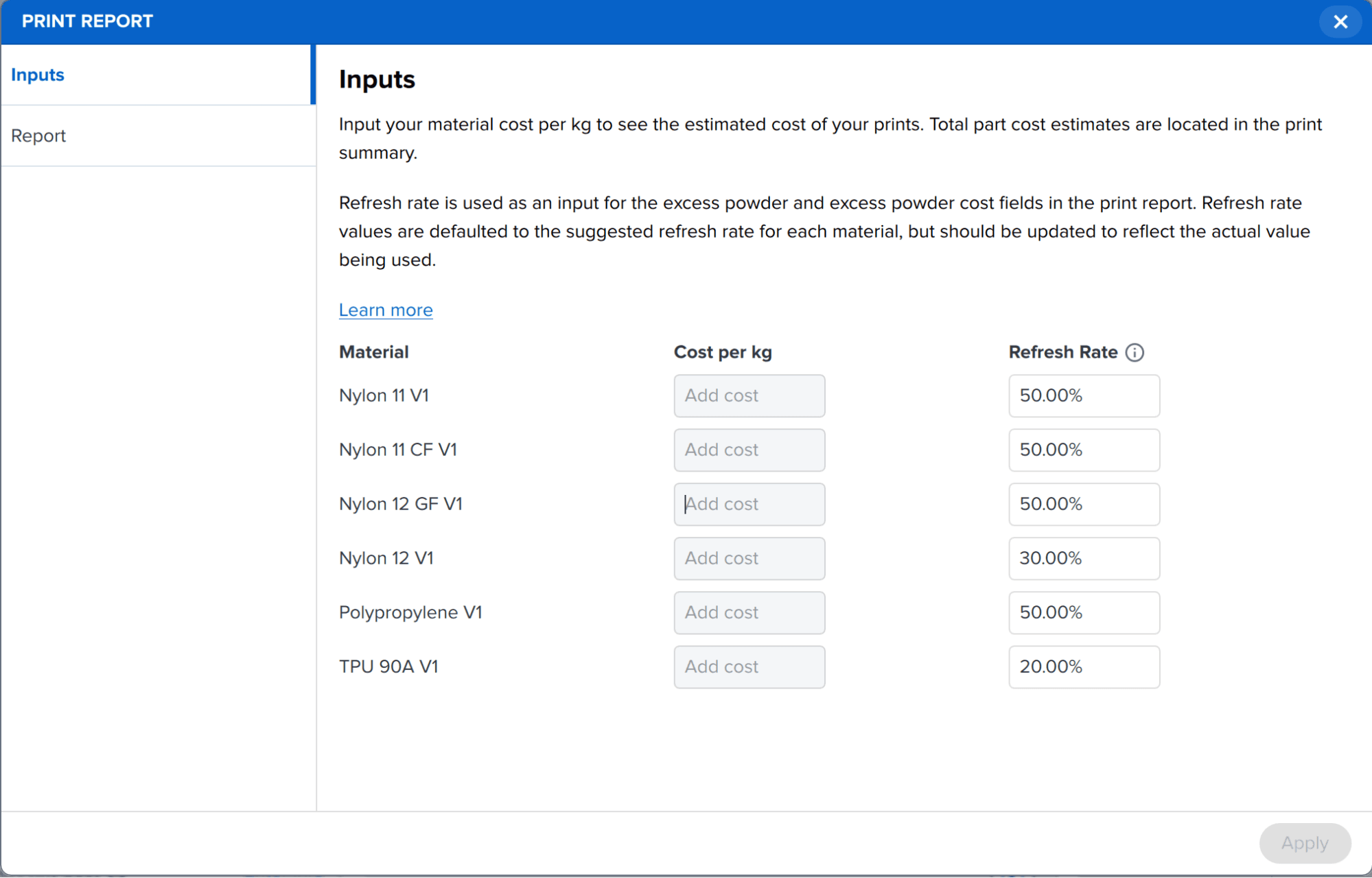
When you have an SLS printer selected, the Inputs panel lets you add your material cost and refresh rate for each powder type to properly estimate the cost and material usage of your prints. Total part costs estimates are located in the Report tab.
- Material: List of powders available for your printer
- Cost per kg: Your cost per kilogram of each material. Note that PreForm does not allow for inputting material cost when using a third-party material with Open Material Mode.
- Refresh rate: The refresh rate you are using for each material. The default values are the recommended refresh rates and should be updated to reflect your workflow.
Report tab (SLS)
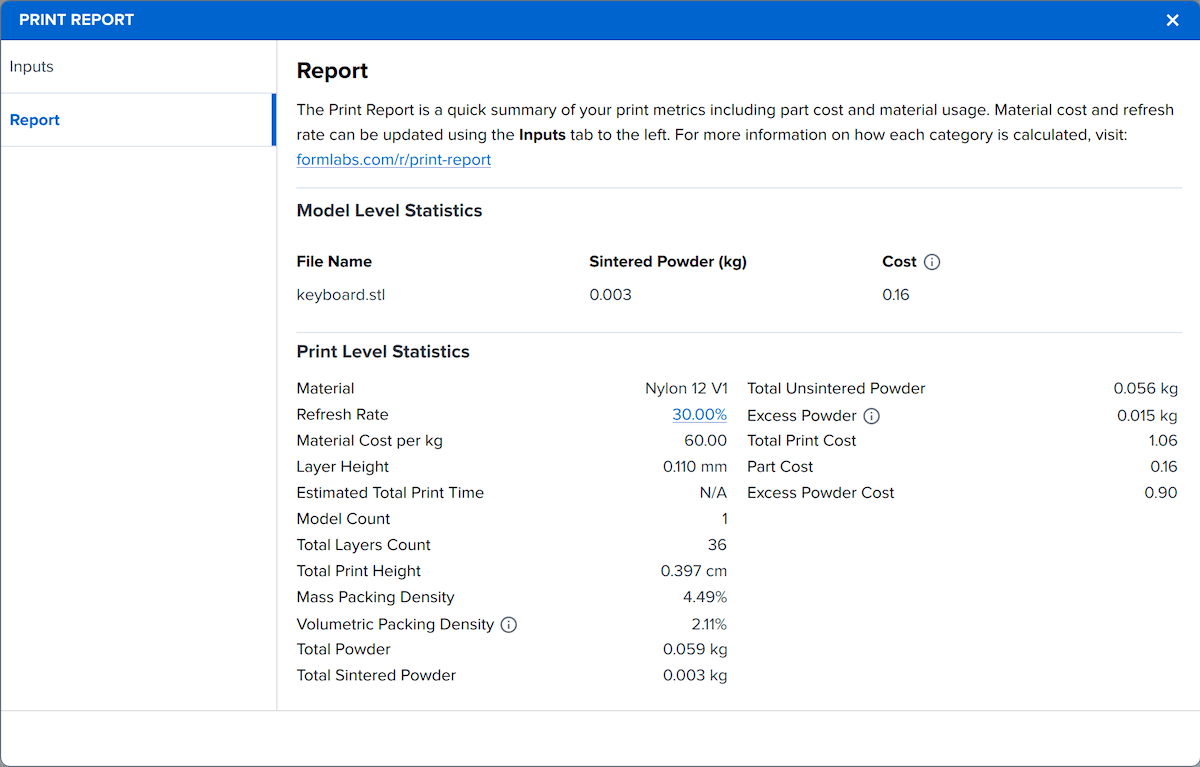
The Report tab shows detailed information about your print based on your currently-selected powder and your input material cost and refresh rate.
Model Level Statistics
The Model Level Statistics section lists information for each model in the current print job:
- File Name: The name of the model, including the file extension.
- Sintered Powder (kg): The quantity of powder that will be sintered to print the model, rounded to the nearest gram.
- Cost: The cost of the model based on the material price and total amount of sintered powder. This estimate does not include labor, electricity, or any powder waste between steps in the printing process.
Print Level Statistics
The Print Level Statistics section provides a detailed breakdown of print time, powder usage, and print cost for the entire print job.
| NAME | UNIT | EXPLANATION |
|---|---|---|
| Material | N/A | The type of powder being used for printing |
| Refresh Rate | % | The percentage of new, unused powder used for a print, taken from the Input tab |
| Material cost per kg | Currency | Cost per kilogram of the selected material, taken from the Input tab |
| Layer Height | mm | The thickness of each print layer |
| Estimated Total Print Time | Hours and minutes | The estimated time required for the current print job, including preprint processes, printing, and cooling the build chamber to 100 °C. If this field shows N/A, close the Print Report window and refresh the print time in the Summary panel. |
| Model Count | Quantity | The number of models in the current print job |
| Total Layers Count | Quantity | The total number of layers required for the current print job |
| Total Print Height | cm | The total height of all the layers being printed between all models |
| Mass Packing Density | % | The percentage of the mass of dispensed powder being sintered into a part in the print. Calculated as Total Sintered Powder / Total Powder. |
| Volumetric Packing Density | % | The percentage of the volume of dispensed powder being sintered into a part in the print. A higher packing density results in less waste powder. Calculated as volume of sintered parts / total powder volume. |
| Total Powder | kg | The total amount of powder (sintered and unsintered) it will take to complete the job. This includes the powder required to prepare the print bed and insulate the print walls. |
| Total Sintered Powder | kg | The total amount of powder that is sintered in the build. |
| Total Unsintered Powder | kg | The amount of powder dispensed during the print that is not sintered into a part. Calculated as Total Powder - Total Sintered Powder. |
| Excess Powder | kg | The amount of powder dispensed but not sintered that exceeds the amount of used powder required at your current refresh rate. For example, if 75% of the powder in your print job is unsintered and your refresh rate for the current powder is 30% (i.e., 30% fresh powder and 70% used powder per cartridge), 5% of each print will be excess. Calculated as (Refresh Rate - Mass Packing Density) * Total Powder. |
| Total Print Cost | Currency | The expected material cost of your printed parts and associated excess waste. Calculated as (Total Sintered Powder + Excess Powder) * Material Cost per kg. |
| Part Cost | Currency | The cost of the model based on the material price and total amount of sintered powder. This estimate does not include labor, electricity, or any powder waste between steps in the printing process. |
| Excess Powder Cost | Currency | The expected material cost of excess powder. Calculated as Excess Powder * Material Cost per kg. |