
WHITE PAPER
Bucket not detected (Form Wash L)
Bucket not detected (Form Wash L)
Explanation
The error message Bucket not detected indicates that the Form Wash L limit switch was unable to detect the wash bucket. If the limit switch is malfunctioning or the wash bucket is damaged or deformed, the Form Wash L may not be able to operate properly.
Causes
- Malfunctioning limit switch
- Damaged or deformed wash bucket
Symptoms
- Form Wash L displays error message Bucket not detected
Troubleshooting steps
- Update the Form Wash L firmware.
- Inspect the wash bucket for damage.
- Tap Raise. The platform mount rises out of the wash bucket.
- Open the Form Wash L door.
- Disconnect the solvent monitor from the Form Wash L. Twist the plug collar counterclockwise and pull the plug away from the machine.
- Gently pull the wash bucket towards you to remove it from the Form Wash L.
- Inspect the rear of the wash bucket for damage or deformation.
- Take photos of any damage.
- Inspect the limit switch for damage. It is located to the right of the platform mount at the base of the unit. Clean it with a dampened paper towel if it is contaminated with solvent or resin. Take photos of any damage.
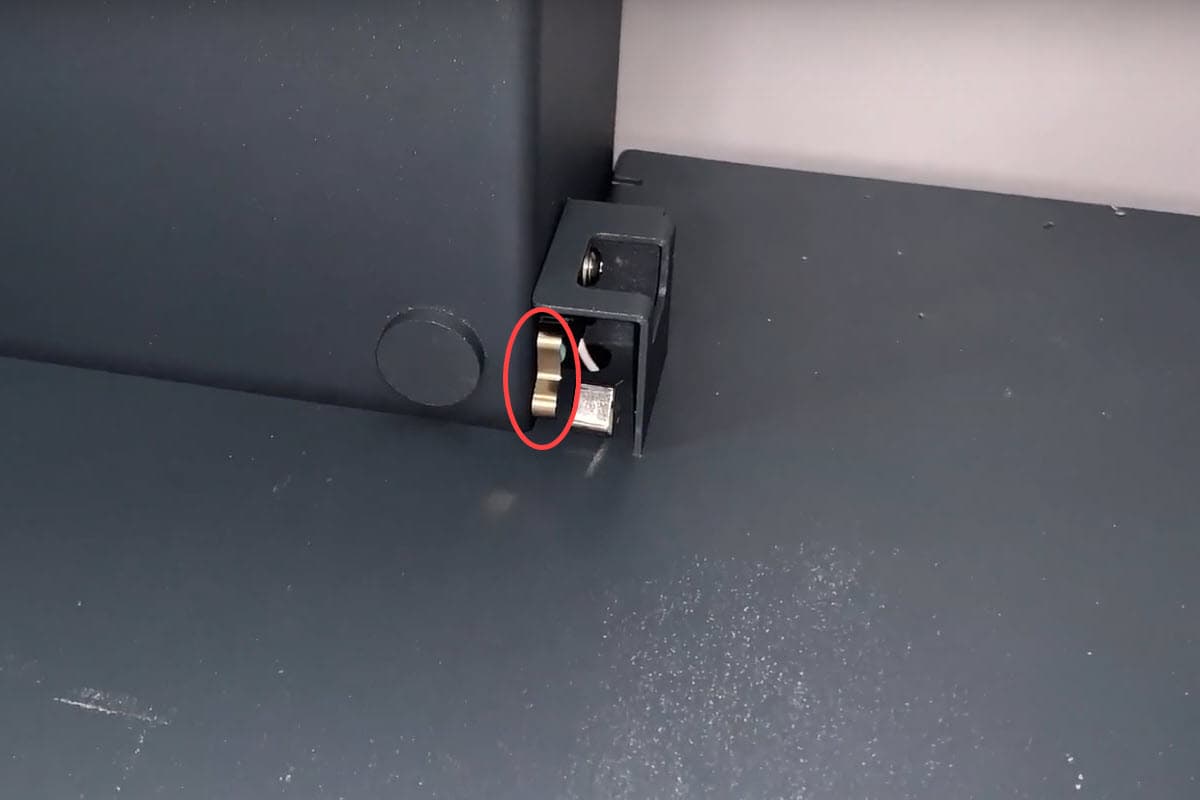
- While wearing gloves, press and hold the limit switch by hand. The Form Wash L beeps when a functioning limit switch is engaged.
- Reinsert the wash bucket. Push the wash bucket in until it reaches the back wall of the unit.
- Plug the solvent monitor into the socket on the front of the unit. The Form Wash L beeps when the wash bucket is successfully inserted.
- If the issue persists, contact Formlabs Support or your authorized reseller. Include the Form Wash L diagnostic logs with other relevant observations and details to speed up resolution.