技術白書
Formlabs Logo

Fuse 1 generation motor movement errors (Error 90, 93, 94, and 95)

Fuse 1 generation motor movement errors (Error 90, 93, 94, and 95)

Fuse 1世代プリンターのモーターの概要

Fuse 1世代のプリンタには、以下のコンポーネントを駆動する5つのモーターが搭載されています。

  1. ホッパーフリッパー(プリント面の右側、パウダーホッパーの近く)
  2. バッファーフリッパー(プリント面の左側、パウダーホッパーの反対側)
  3. リコーター
  4. Zドライブ(ビルドチャンバーのプリントベッドを上下に駆動。エラーコードではCylinderと表示)
  5. ドーザー

実際のハードウェアはコンポーネントによって異なりますが、各モーターには以下のような基本的な機能が備わっています。

  • モーター(またはコンポーネント)の相対位置を設定された「ゼロ」位置に対して測定するエンコーダーボードこれは、モーターシャフトに取り付けられた磁石の極性を測定することで機能します。
  • モーターまたはコンポーネントに取り付けられた磁石の位置がエンコーダーボードによって測定されます。
  • コンポーネントを動かすステッピングモーター
  • モーターとコンポーネントを組み合わせ、モーターの回転を移動するコンポーネントの動作に変換する一連の機能です。

ヒント:

Fuse 1世代のモーターアセンブリはFormlabsストアでご購入いただけます。トラブルシューティングの一環としてモーターの交換が必要な場合は、Formlabs サポートまたは公認サービスプロバイダにお問い合わせください。

大型モーターアセンブリ:フリッパーとリコーター

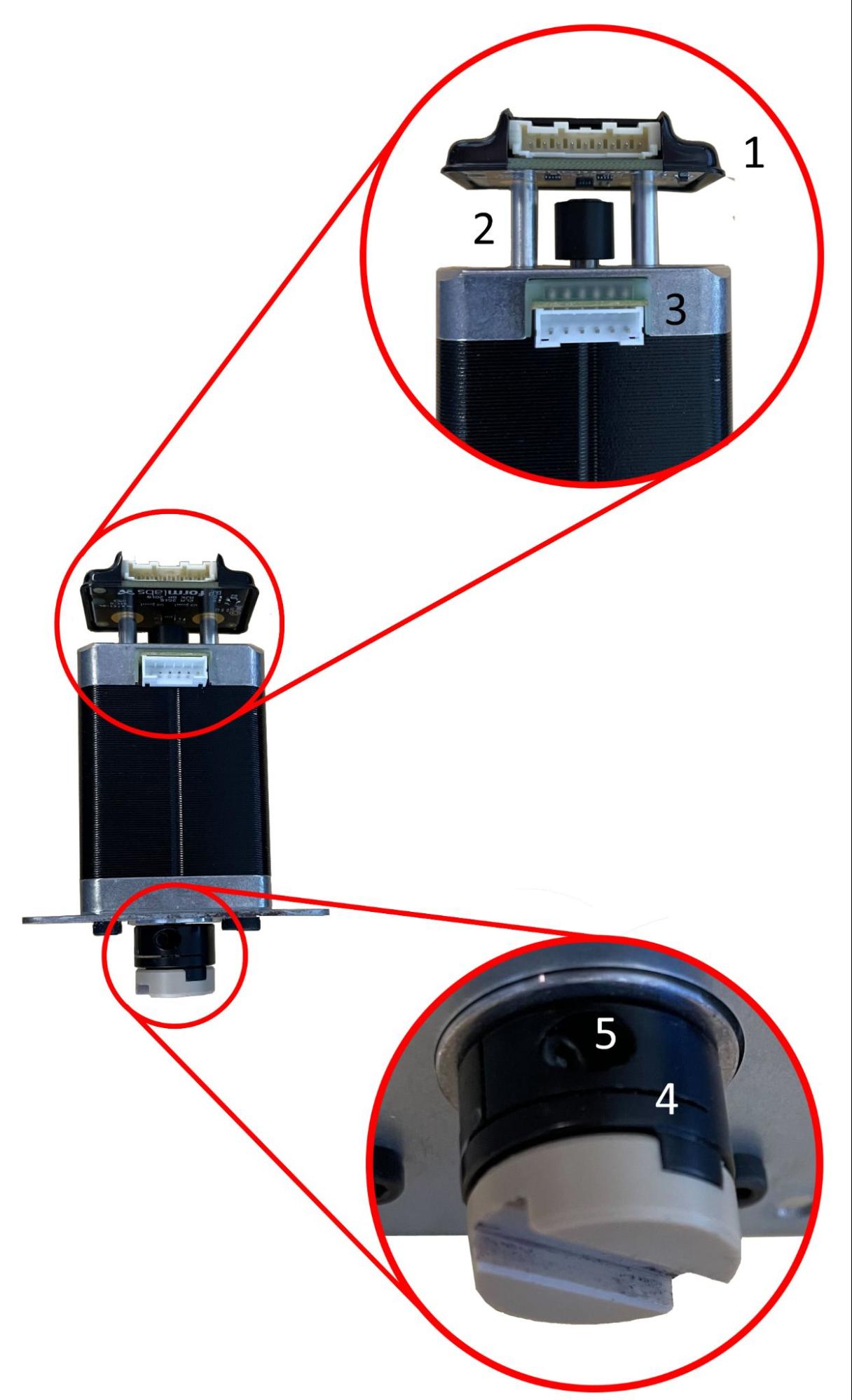
フリッパーとリコーターは、下図の同じモーターアセンブリで駆動します。

モーターの特徴:
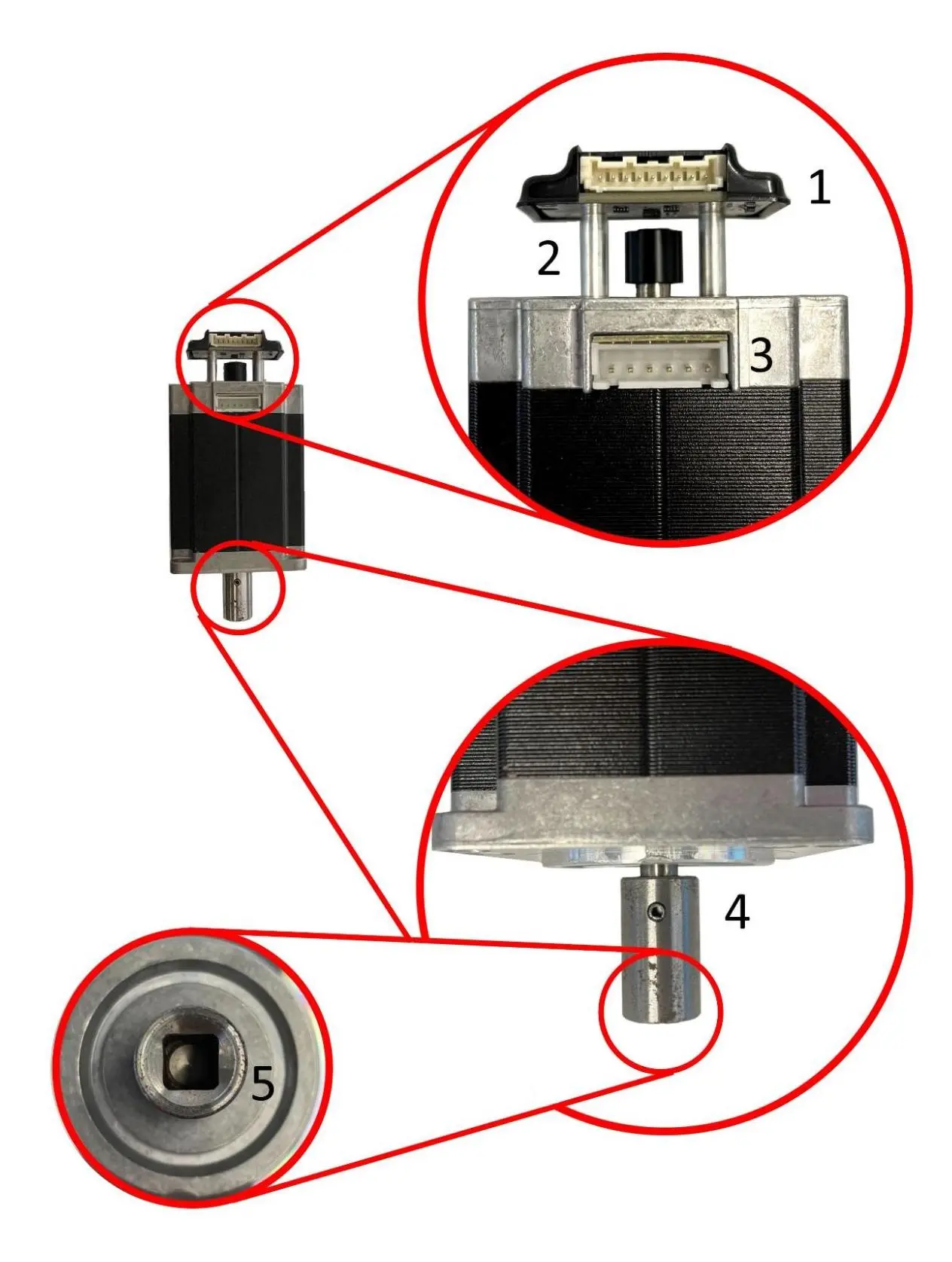
  1. モーターシャフトの端の後ろに取り付けられたエンコーダーボード
  2. モーターシャフトの端にあるマグネット
  3. ステッピングモーター(プリンター内の他のモーターより大きい)
  4. カプラーをモーターシャフトに固定するスプリングピン
  5. モーターを駆動するコンポーネントの角シャフトに固定するカプラー
Fuse 1 世代フリッパーおよびリコーターモーターアセンブリ

Z軸駆動モーター

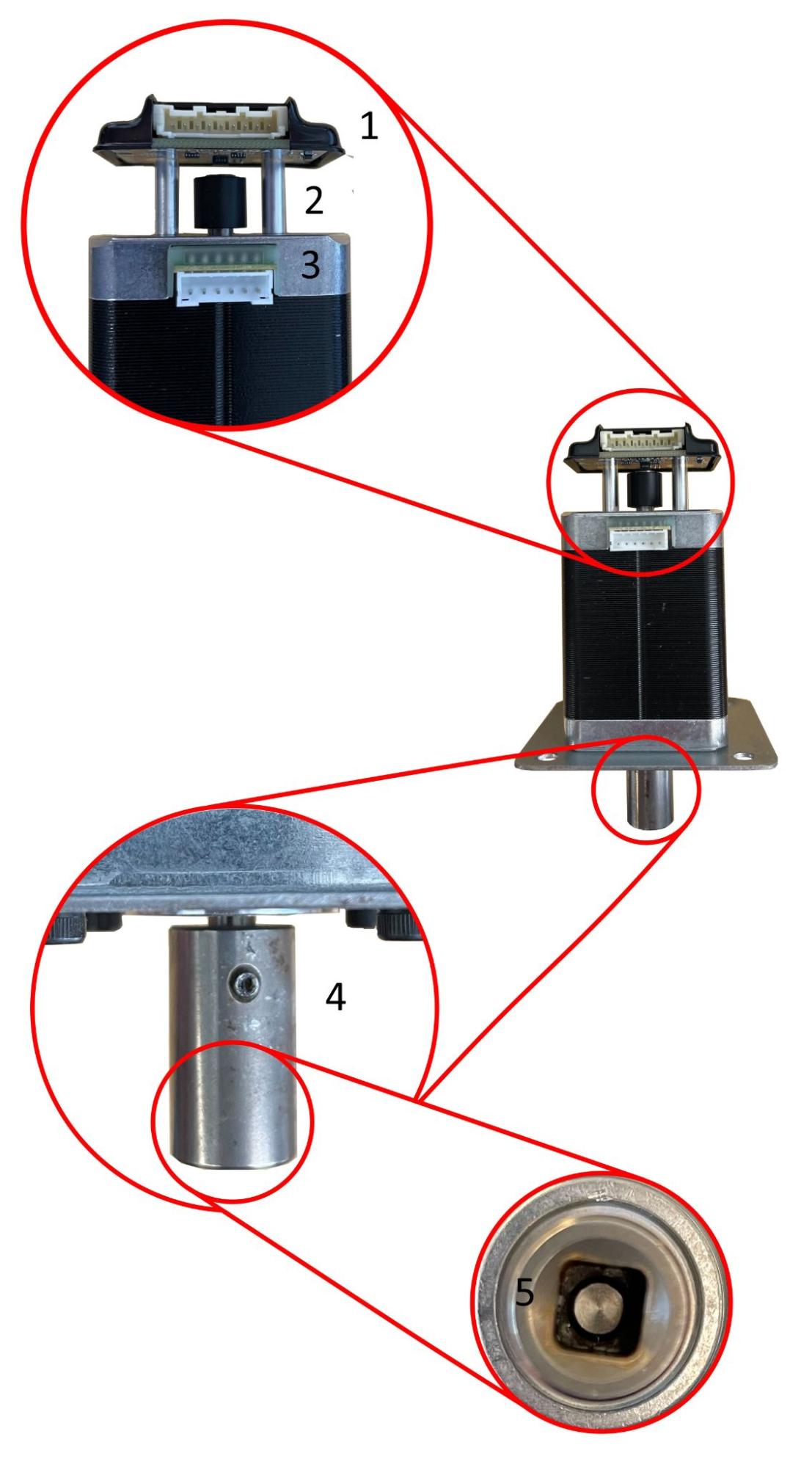
には2つのバージョンがあります。1つは大半のFuse 1ユニットに搭載されているもので、もう1つは後期モデルのFuse 1ユニットとすべてのFuse 1+ 30Wユニットに搭載されています。

初期モデルのFuse 1 Z軸駆動モーターアセンブリ後期モデルのFuse 1およびFuse 1+ 30W Z軸駆動モーターアセンブリ
Early model Fuse 1 Z-drive motor assemblyLate model Fuse 1 and Fuse 1+ 30W Z-drive motor assembly

モーターの特徴:

  1. モーターシャフトの端の後ろに取り付けられたエンコーダーボード
  2. モーターシャフトの端にあるマグネット
  3. ステッピングモーター(リコーター/フリッパーモーターより小型)
  4. モーターシャフトに固定されたオルダムカップリング
  5. オルダムカップリングをモーターシャフトに固定する止めネジ

モーターの特徴:

  1. モーターシャフトの端の後ろに取り付けられたエンコーダーボード
  2. モーターシャフトの端にあるマグネット
  3. ステッピングモーター(リコーター/フリッパーモーターより小型)
  4. カプラーをモーターシャフトに固定するスプリングピン
  5. モーターをZドライブの角シャフトに固定するカプラー

ドーサーモーター

ドーザーは、モーターシャフトに取り付けられたスプロケット付きの小型モーターによって動作し、そのスプロケットがドーザードラムのシャフトに取り付けられたチェーンを動かします。Fuse 1およびFuse 1+ 30Wの他のすべてのモーターとは異なり、エンコーダーボードの磁石はモーターシャフトではなくコンポーネントのシャフトに取り付けられています。
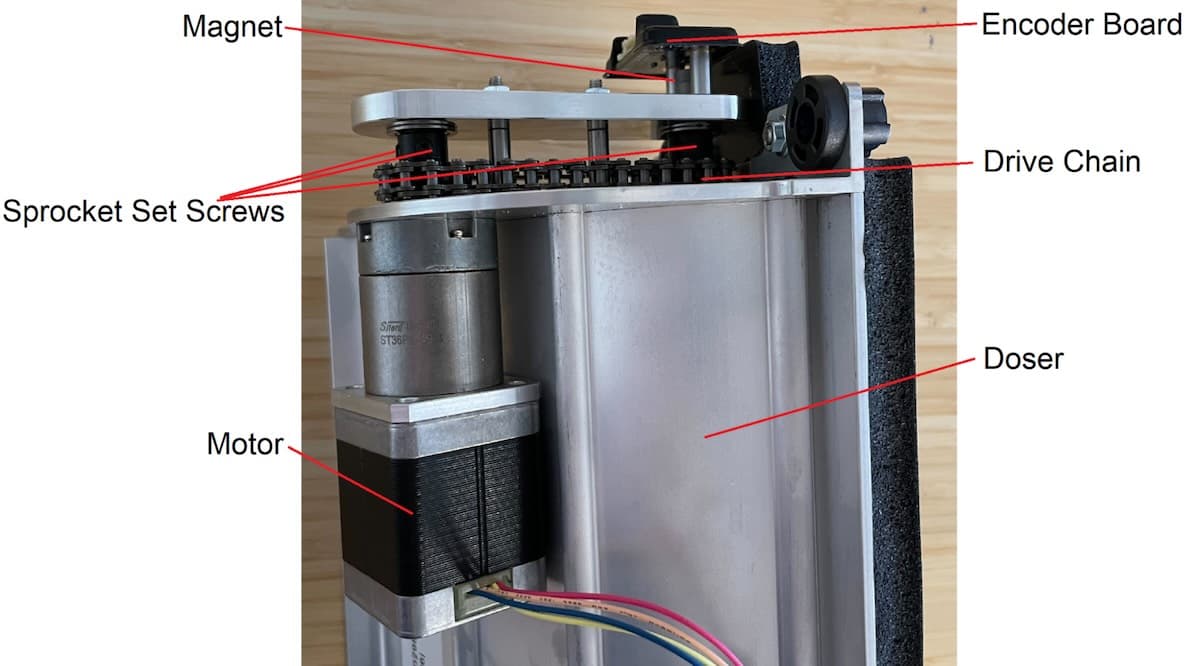
Fuse 1 世代ドーサーモーターアセンブリ

エラー

Fuse 1世代プリンターのモーター動作に関連する主なエラーコードは以下の通りです。

  • エラー90/1-5 PR_ERROR_MOTORS_UNEXPECTED__[コンポーネント]:モーターが予期しない応答を返しました。これは通常、一過性のファームウェアバグ(例えば、チャーンやオペレーションタイムアウト)に起因する単発のエラーです。このエラーは、エンコーダボードが機能していないか、切断されている場合にも発生します。
  • エラー 93/1-5 PR_ERROR_MOTORS_MOVE_DEVIATION__[コンポーネント名]:モーターが何かに衝突したために、予定されていた距離を移動できなかったことを示します。
  • エラー94/3、94/4 PR_ERROR_MOTORS_MOVE_MISSED_HARDSTOP__[コンポーネント名]:コンポーネントがハードストップに衝突することなく、モーターが非常に長い時間回転していたことを示します。
  • エラー95/1-5 PR_ERROR_MOTORS_MOVE_MISSED_INDEX__[コンポーネント名]:プリンターがモーターを再度ホームに戻そうとしたものの、エンコーダボードがモーターのホーム位置への到達を検出できなかったことを示します。

エラーコードには、どのモーターから報告されたかを示すサブコードが表示されます。例えば、エラー93/4PR_ERROR_MOTORS_MOVE_DEVIATION__CYLINDERに対応し、Z軸駆動モーターが予想された動きから外れたことを意味します。これらのサブコードの数字は、上記のリストに対応しています。

エラー 90/1-5 PR_ERROR_MOTORS_UNEXPECTED

エラー90は、特定のモーターのエンコーダーボードから送られてくる情報の処理に問題が発生していることを意味します。すべてのモーターで同じエンコーダーボードを使用しているため、トラブルシューティングの手順も同じです。

症状

  • 造形前または造形中のエラーコード
  • コンポーネントが正しくホームポジションに戻らない
  • Motor Moves(モーター動作)画面からコマンドを送信してもコンポーネントが動かない
  • 動作中のコンポーネントからのきしみ音/クリック音

原因

このエラーメッセージの考えられる原因は、可能性の高い順に次のとおりです。

  • ソフトウェアのバグ
  • エンコーダーボードの不良/故障/切断
  • コントロールボードの不良/故障(Fuse 1またはFuse 1+ 30W MoTempBo)
  • モーターの不良/故障
  • 電気ノイズ

トラブルシューティング手順

上記のとおり、すべてのモーターで同じエンコーダーボードを使用しているため、トラブルシューティング手順はすべてのモーターで同じです。

  1. お使いのプリンターのファームウェアが最新であることを確認してください。最新でない場合は、ファームウェアをアップデートします。
  2. プリンターの電源を再投入します。
  3. 問題が解決しない場合は、エンコーダーボードが外れているか故障している可能性があります。
    1. 問題のモータのエンコーダボードを再度取り付けます。
    2. 問題が解決しない場合は、エンコーダボードを含め該当するモータアセンブリを交換してください。

Fuse 1世代のモーターアセンブリはFormlabsストアでご購入いただけます。Formlabsサポートまたは公認サービスプロバイダまでお問い合わせください。

エラー93の概要

エラー 93は、問題のコンポーネントが何かに衝突したために、予定されていた距離を移動できなかったことを示します。このようなエラーの主な原因は、プリントに失敗した造形品のデブリがコンポーネントを詰まらせていたり、別のコンポーネントが誤った場所で停止したために元のコンポーネントが衝突したりすることが挙げられます。また、エンコーダーボードの故障やエンコーダーデータの処理不良が原因の場合もあります。

原因

このエラーメッセージの原因として考えられるものを、可能性の高い順に挙げます。

  • 以前のプリント失敗による破片がコンポーネントに詰まっている
  • 別のコンポーネントが誤った位置で停止し、衝突が発生している
  • エンコーダーボードの故障
  • エンコーダーデータの処理不良またはその他のソフトウェアバグ
  • ホッパーが空のルーチンに関連するソフトウェアバグ(エラー93/1のみ)ビルドチャンバーの挿入ミス(エラー93/4のみ)
  • 周囲の溶融(上部シリンダー壁RTD/ヒーターの故障)(エラー93/4のみ)
  • 症状

プリント前またはプリント中のエラーコード

  • コンポーネントが正しくホーム位置に戻らない
  • Motor Moves(モーターの動き)画面からのコマンドでコンポーネントが動かない可動部からの異音(きしみ音、クリック音)

エラー 93/1 PR_ERROR_MOTORS_MOVE_DEVIATION__HOPPER_FLIPPER

エラー93/1は、ホッパーフリッパーモーターが予想された動きから外れ、フリッパーが予定されていた距離を移動できなかったことを示します。

ヒント:

エラー93/1は、一般的にゴミが原因で発生します。他のトラブルシューティング手順を試す前に、ホッパーのトラフとホッパーのフリッパーの周辺をよく点検し、清掃してください。

  1. Error 93/1 can occur when running the Empty Hopper routine through the printer touchscreen. In these cases, retry the routine.
  2. Confirm the printer’s firmware is up to date. If it is not, update the firmware.
  3. Open the printer door and inspect the hopper flipper area, to the right of the print plane.
    1. If there is debris in the hopper side powder trough, proceed to step 3.
    2. If the recoater is directly above the flipper, proceed to step 4.
    3. If the hopper flipper appears to have nothing impeding it, proceed to step 5.
  4. In the Motor Moves menu, rotate the hopper flipper away from the debris and clean out any debris found.
  1. This failure mode generally happens after another print failure, usually a PrinterWatcher failure such as Error 112. Check the printer’s history to determine whether this may be the case.
    1. Find the Event UUID alphanumeric code corresponding to the error.
    2. Navigate to the PrinterWatcherFrames folder and locate the folder with the Event UUID you just found.
    3. Review the last ten frames provided by the PrinterWatcher before the error occurred for any debris.
  2. If debris is blocking the hopper flipper, inspect the print area and all moving components for other debris.
  3. If the motor does not rotate when activated in the Motor Moves menu and the debris cannot be accessed without moving the flipper, try moving the flipper manually.
    1. Power off the printer and allow it to cool to room temperature.
    2. Try moving the flipper manually. When powered off, the motor holds no torque and should not resist movement.
  4. In some cases, the debris may be stuck to the hopper trough, preventing the flipper from rotating in both directions. In this case, it may be necessary to apply heat to the melted powder with a heat gun.
    1. Vacuum any unsintered powder prior to applying heat to the debris in the powder trough.
    2. Always wear a respirator when applying heat to SLS powders and only attempt in a well-ventilated area.
  5. If the recoater is directly above the hopper flipper after an error, the recoater motor coupling has likely been damaged. If so, you may need to replace the recoater motor assembly.
  1. When this error is caused by a collision with the recoater, it often occurs several minutes after the start of a print, the first point at which the hopper flipper moves after the recoater has moved to the hopper side of the printer.
  2. Check the recoater motor coupling for damage by removing the motor and feeling the coupler for play. Follow the repair guide Replacing the Fuse 1 generation recoater motor assembly [EN] until you have removed the recoater motor and can access the recoater motor coupler. The coupler should be secured tightly to the motor shaft and should have little to no play.
    1. If the recoater motor coupling is damaged, the motor may need to be replaced. Fuse 1 generation recoater motors are available for purchase on the Formlabs Store. The recoater motor does not have a calibrated home position, so this motor can be removed and replaced without requiring calibration.
  1. In the Motor Moves menu, home the doser, then rotate the hopper flipper to confirm that it can travel a full 360° and homes to the correct place every time. If you do not home the doser first, the hopper flipper may collide with it, making it more difficult to diagnose the issue.
    1. If the flipper doesn’t move and makes an audible clicking sound, or if it appears to hit an obstruction in the powder trough, there is likely debris in the powder trough that is not visible. Refer back to step 3.
    2. Take a video of the flipper’s rotation for at least 2–3 full turns to look for any unusual or unexpected behavior.
    3. If the hopper flipper does not turn smoothly, the encoder board may be malfunctioning.
      1. Reseat the cable on the hopper flipper motor encoder board.
      2. If reseating the cable does not resolve the issue, you may need to replace the hopper flipper motor assembly. Fuse 1 generation flipper motors are available for purchase on the Formlabs Store.
    4. If the hopper flipper turns smoothly but does not home to the right position, then it has lost its calibrated home position. Contact Formlabs Support or a certified service provider for assistance.
      1. If the issue returns after recalibration, the hopper flipper motor assembly may need to be replaced. Fuse 1 generation flipper motors are available for purchase on the Formlabs Store.
  2. If the motor is colliding with something not previously mentioned, or if the issue cannot be reproduced by moving the motors manually, contact Formlabs Support or a certified service provider for assistance.
  1. Motor Moves(モーター動作)メニューでドーザーをホーム位置に戻し、ホッパーフリッパーを回転させて、360°全方向に動作し、毎回正しい位置に戻ることを確認します。ドーザーを先に原点復帰させないと、ホッパーフリッパーがドーザーに衝突し、問題の診断が難しくなる可能性があります。
    1. フリッパーが動かず、カチカチと音がする場合、またはパウダートラフ内で障害物に当たっているように見える場合は、パウダートラフに目視では確認できないデブリが入っている可能性があります。ステップ3を参照してください。
    2. 少なくとも2~3回、フリッパーの回転を動画に撮り、異常や予期せぬ動作がないかを確認してください。
    3. ホッパーのフリッパーがスムーズに回転しない場合は、エンコーダーボードが故障している可能性があります。
      • ケーブルをホッパーフリッパーモーターエンコーダーボードに戻します。
      • ケーブルを交換しても問題が解決しない場合は、ホッパーフリッパーモーターアセンブリを交換する必要があるかもしれません。Fuse 1世代のフリッパーモーターはFormlabsストアでご購入いただけます。
    4. ホッパーがスムーズに回転してもホーム位置に正常に戻らない場合は、較正後のホーム位置が設定されていない可能性があります。Formlabsサポートまたは公認サービスプロバイダまでお問い合わせください。
      • 再較正後も問題が再発する場合は、ホッパーフリッパーモーターアセンブリの交換が必要な場合があります。Fuse 1世代のフリッパーモーターはFormlabsストアでご購入いただけます。
  2. もしモーターが先に述べた以外のものと衝突していたり、手動でモーターを動かしても問題が再現できない場合は、Formlabsサポートまたは公認サービスプロバイダにご相談ください。

エラー 93/2 PR_ERROR_MOTORS_MOVE_DEVIATION__BUFFER_FLIPPER

Error 93/2 indicates that the buffer flipper motor deviated from the expected movement and the flipper was not able to move the expected amount.

Troubleshooting steps

  1. このエラーモードは通常、他のプリント不良(通常はエラー112などPrinterWatcherの不具合)が起きた後に発生します。プリンターの履歴を確認し、この可能性があるかどうかを判断してください。
    1. エラーに対応するイベントUUID(英数字のコード)を検索します。
    2. PrinterWatcherFramesフォルダに移動し、先ほど見つけたEvent UUIDフォルダを探します。
    3. エラーが発生する前に、PrinterWatcherによって提供された最後の10フレームにデブリがないか確認してください。
  2. デブリがバッファーフリッパーを塞いでいる場合、造形面とすべての可動部品にデブリがないか点検してください。
  3. Motor Moves(モーター動作)メニューで起動してもモーターが回転せず、フリッパーを動かさないとデブリに手が届かない場合は、手動でフリッパーを動かしてみてください。
    1. プリンターの電源を切り、室温まで冷まします。
    2. フリッパーを手動で動かします。電源オフ時、モーターはトルクを維持しないため、抵抗力は発生しないはずです。
  4. 場合によっては、デブリがバッファートラフに付着し、フリッパーの両方向への回転を妨げていることがあります。この場合、溶けたパウダーをヒートガンで加温する必要があるかもしれません。
    1. パウダートラフ内のパウダーを加温する前に、未焼結のパウダーを集じん機で吸い取ってください。
    2. SLS用のパウダーを加温する際は、必ず保護マスクを着用し、換気の良い場所で行ってください。
  1. If the recoater is directly above the buffer flipper after an error, the recoater motor coupling has likely been damaged. If so, you may need to replace the recoater motor assembly.
  1. When this error is caused by a collision with the recoater, it often occurs several minutes after the start of a print, the first point at which the hopper flipper moves after the recoater has moved to the hopper side of the printer.
  2. Check the recoater motor coupling for damage by removing the motor and feeling the coupler for play. Follow the repair guide Replacing the Fuse 1 generation recoater motor assembly [EN] until you have removed the recoater motor and can access the recoater motor coupler. The coupler should be secured tightly to the motor shaft and should have little to no play.
  3. If the recoater motor coupling is damaged, the motor may need to be replaced. Fuse 1 generation recoater motors are available for purchase on the Formlabs Store. The recoater motor does not have a calibrated home position, so this motor can be removed and replaced without requiring calibration.
  1. Motor Moves(モーター動作)メニューでホッパーフリッパーを回転させ、360°フルに移動できること、毎回正しいホーム位置に戻ることができることを確認します。
    1. フリッパーが動かず、カチカチと音がする場合、またはパウダートラフ内で障害物に当たっているように見える場合は、パウダートラフに目視では確認できないデブリが入っている可能性があります。ステップ3を参照してください。
    2. 少なくとも2~3回、フリッパーの回転を動画に撮り、異常や予期せぬ動作がないかを確認してください。
    3. バッファーフリッパーがスムーズに回転しない場合は、エンコーダーボードが故障している可能性があります。
      1. ケーブルをホッパーフリッパーモーターエンコーダーボードに戻します。
      2. ケーブルを交換しても問題が解決しない場合は、ホッパーフリッパーモーターアセンブリを交換する必要があるかもしれません。Fuse 1世代のフリッパーモーターはFormlabsストアでご購入いただけます。
    4. バッファーフリッパーがスムーズに回転してもホーム位置に正常に戻らない場合は、較正後のホーム位置が設定されていない可能性があります。Formlabsサポートまたは公認サービスプロバイダまでお問い合わせください。
      1. 再較正後も問題が再発する場合は、バッファーフリッパーモーターアセンブリの交換が必要な場合があります。Fuse 1世代のフリッパーモーターはFormlabsストアでご購入いただけます。
  2. もしモーターが先に述べた以外のものと衝突していたり、手動でモーターを動かしても問題が再現できない場合は、Formlabsサポートまたは公認サービスプロバイダにご相談ください。

エラー 93/3 PR_ERROR_MOTORS_MOVE_DEVIATION__RECOATER

エラー93/3は、リコーターモーターが予想された動きから外れ、リコーターが予定されていた距離を移動できなかったことを示します。

備考:

通常、リコーターモーターのカップリングが損傷しても、モーターのマグネットは正常に回転するため、エラー 93/3は発生しません。リコーターカップリングが損傷すると、通常はエラー 93/1エラー 93/2エラー 94/3のいずれかが発生します。

Troubleshooting steps

  1. Confirm the printer’s firmware is up to date. If it is not, update the firmware.
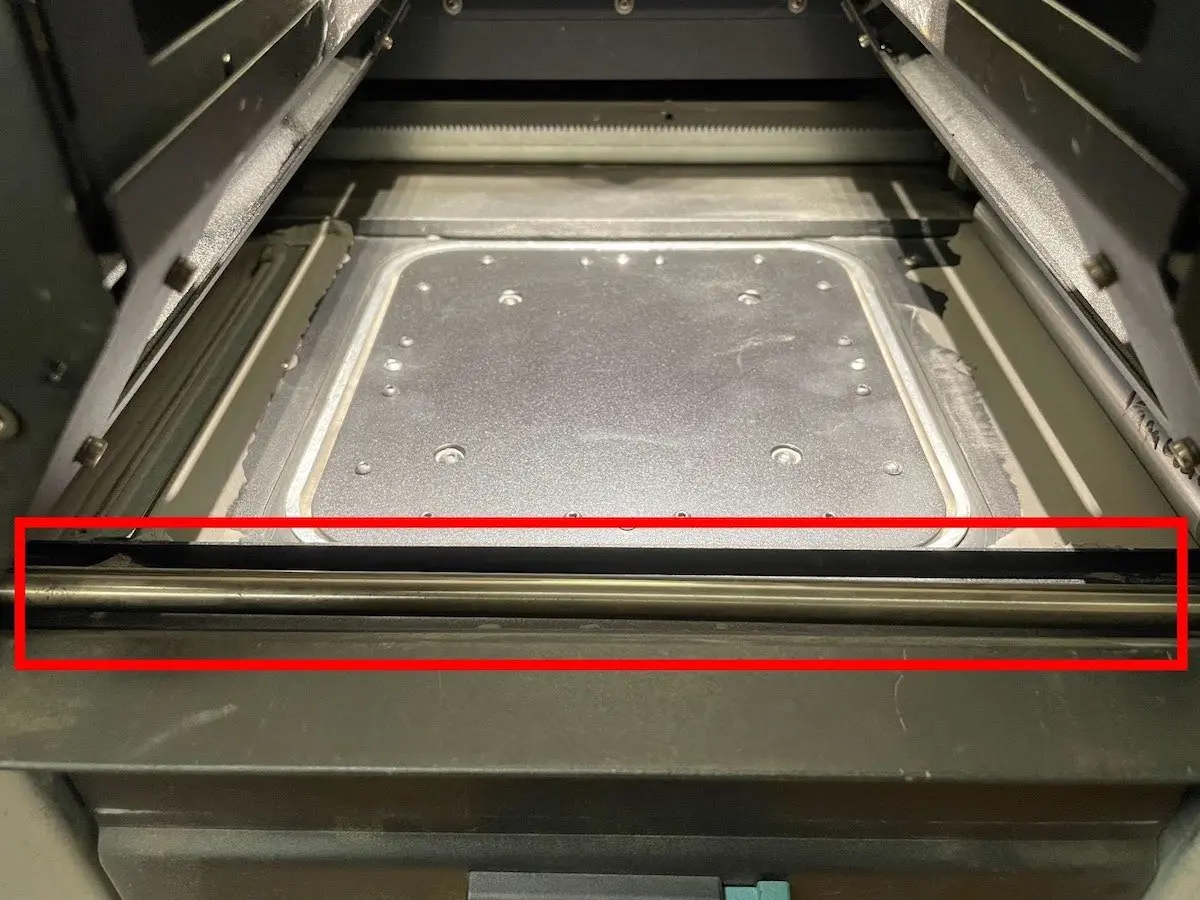
  2. Open the printer and inspect the recoater area, including:
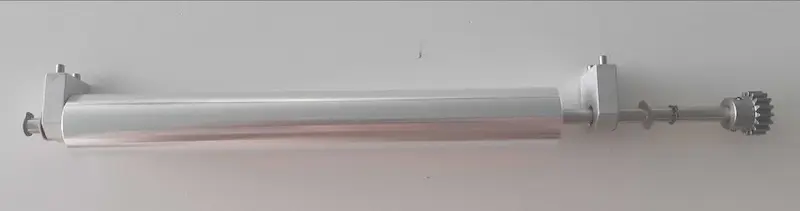
    1. The roller
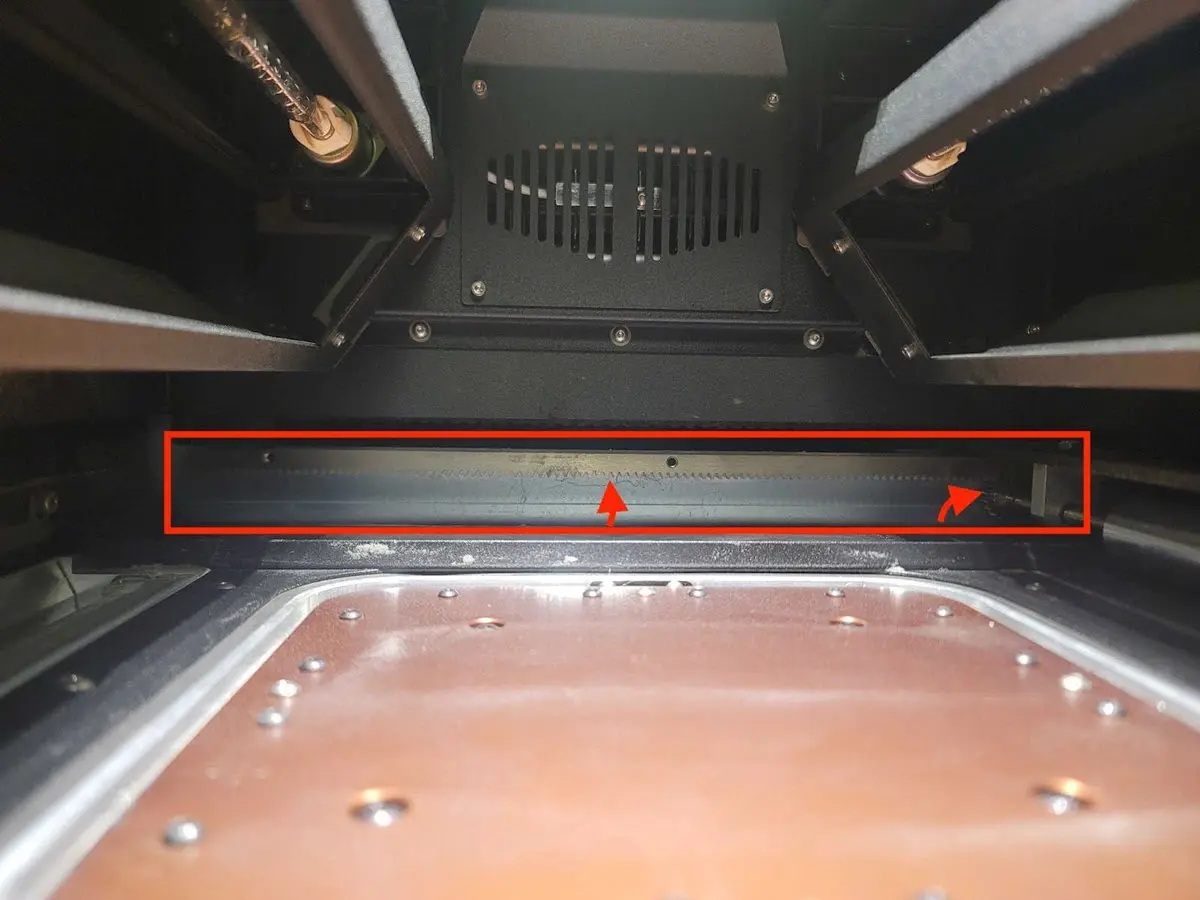
    2. The recoater rack and pinion gears (in the rear of the printer)
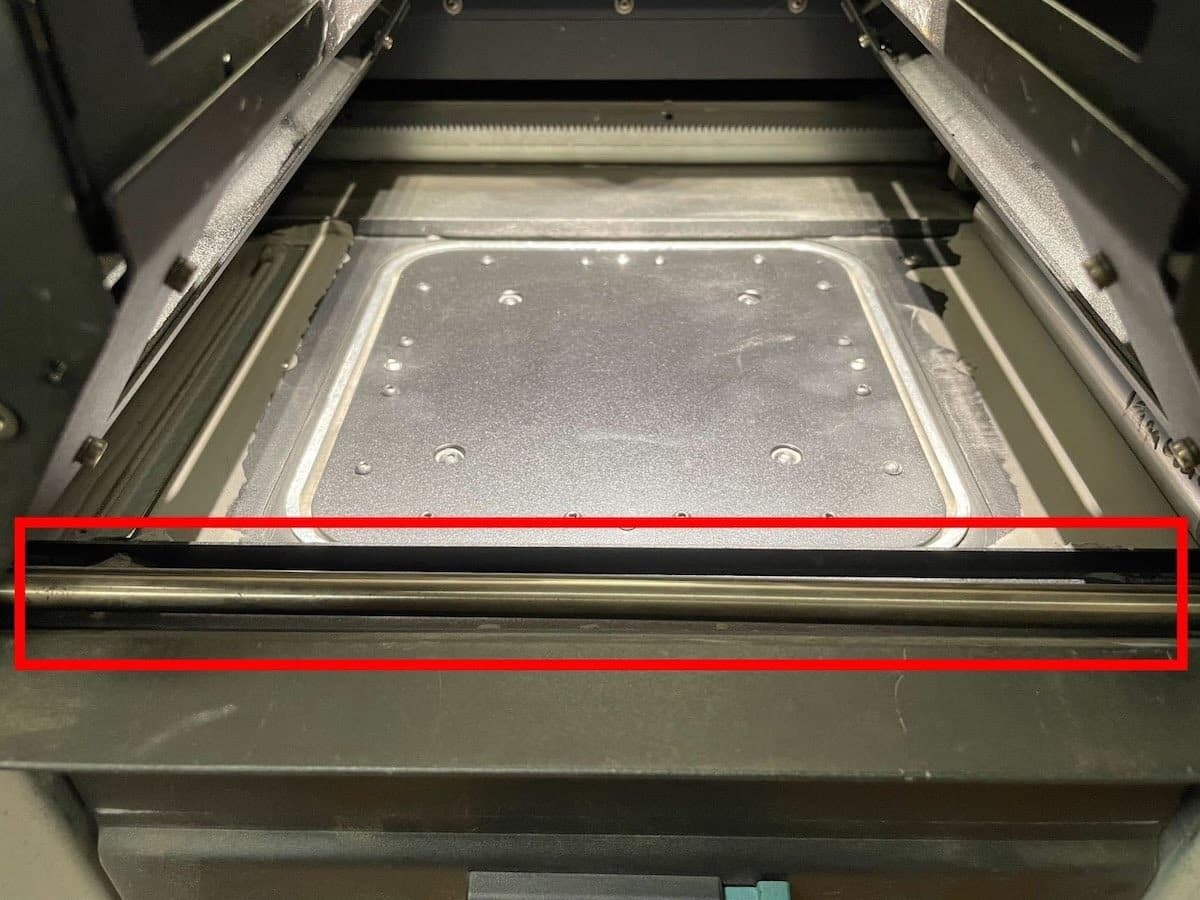
    3. The front linear rails
    4. The build chamber print bed
Fuse 1世代リコーターローラーラックギア
Fuse 1世代リニアレール
  1. 溶けたパウダーや影響を受けたパウダーがある場合は、その部分をクリーニングしてください。
    1. 場合によっては、デブリがプリンターの部品に付着し、除去が困難になることがあります。この場合、溶けたパウダーをヒートガンで加温する必要があるかもしれません。
      1. パウダートラフ内のパウダーを加温する前に、未焼結のパウダーを集じん機で吸い取ってください。
      2. SLS用のパウダーを加温する際は、必ず保護マスクを着用し、換気の良い場所で行ってください。
    2. パウダーが溶けていたり、何か影響を受けている場合は、他の問題がある可能性があります。このエラーが他の問題の症状でないかどうか、プリンターの履歴を確認してください。
  2. リコーターがフリッパーに衝突したように見える場合は、フリッパーがホーム位置に正常に戻れていません。エラー93/1およびエラー93/2で、フリッパーのホームへの移動の問題を解決するための手順を参照してください。
  3. 明らかなデブリや障害物が見当たらない場合は、Motor Moves(モーター動作)メニューでリコーターを動かしてみてください。
    1. リコーターの動きを動画に撮り、いつもと違う挙動や予期せぬ挙動が発生していないかを確認します。
    2. Motor Moves(モーター動作)メニューでリコーターを動作中、リコーターが不意に停止した場合:
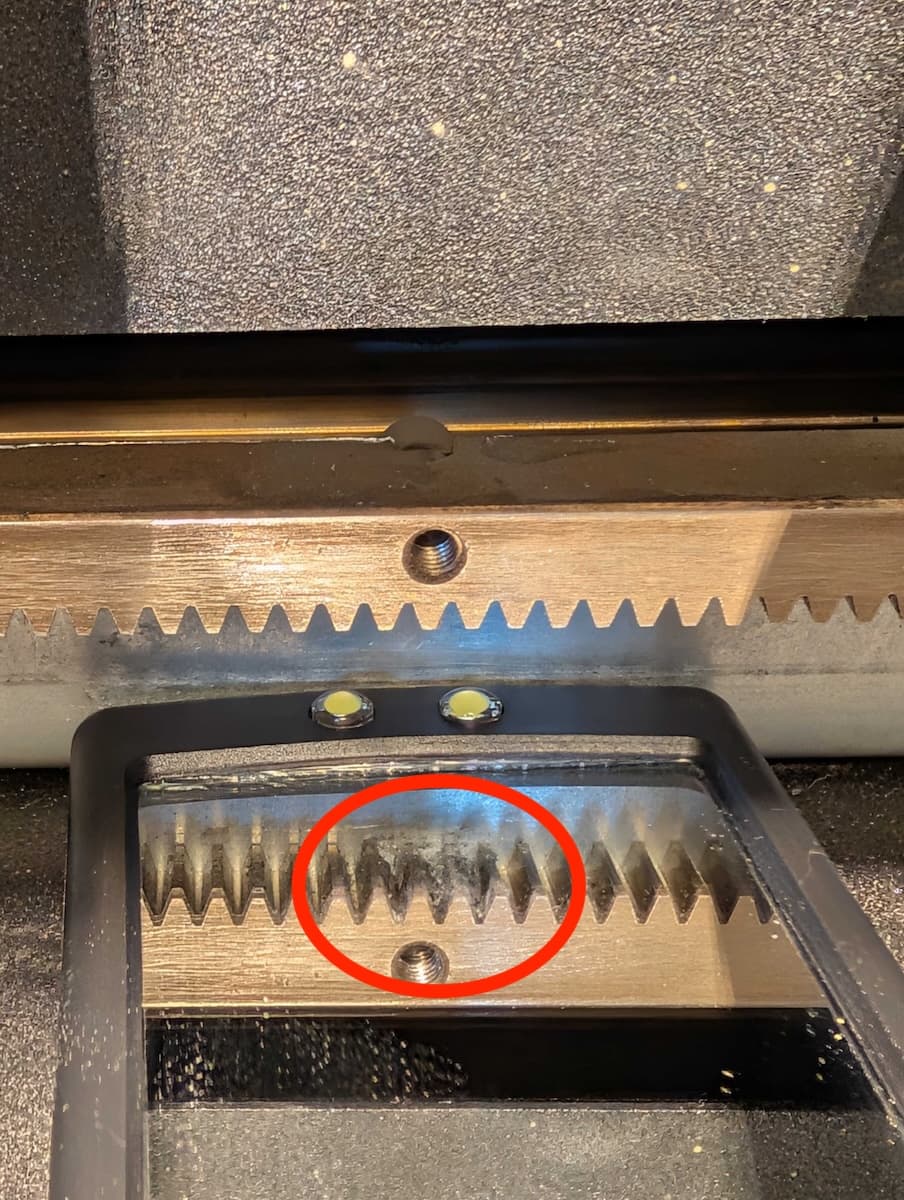
      • プリンター後部のラックギアにパウダーが付着していないかよく点検してください。Fuse Siftに付属のピックを使って、歯の間に溜まったパウダーを取り除き、各歯を徹底的に清掃します。
      • リコーターローラーを取り外し、ローラーアセンブリのピニオンギアにパウダーが付着していないか点検します。ピックを使って蓄積物を取り除き、ローラーを再装着します。
清掃のために取り外したFuse 1世代のリコーター
      1. エタノールと傷のつかないマイクロファイバーの布で、前方のリニアレールを拭きます。
Fuse 1世代の前面リニアレール
      1. ローラーアセンブリにパウダーが見つからない場合、またはクリーニング後も問題が解決しない場合は、ローラーを取り外した状態でMotor Moves(モーター動作)メニューを使用してリコーターを動かしてみてください。
        1. 問題が再発しない場合は、ローラーの交換が必要な可能性があります。Fuse 1世代のリコーターローラーはFormlabsストアでご購入いただけます。
        2. ローラーを取り外しても問題が解決しない場合は、Formlabsサポートまたは公認サービスプロバイダにお問い合わせください。
    1. リコーターの挙動が不規則ながら障害物が見つからない場合、
      1. エンコーダーボードに欠陥がある可能性があります。
      2. リコーターモーターアセンブリを交換します。Fuse 1世代のリコーターモーターはFormlabsストアでご購入いただけます。

エラー 93/4 PR_ERROR_MOTORS_MOVE_DEVIATION__CYLINDER

Error 93/4 indicates that the Z-drive motor deviated from the expected movement and the print bed was not able to move the expected amount.

Troubleshooting steps

  1. Confirm the printer’s firmware is up to date. If it is not, update the firmware.
  2. Confirm whether the issue is a printer issue or if the issue is specific to one build chamber.
    1. Test the affected build chamber in the Fuse Sift. If the issue occurs on both the printer and Fuse Sift, the problem is likely with the build chamber. Proceed to step 2.
    2. Try another build chamber in the printer, if one is available. If the issue occurs persistently with both build chambers, it is likely specific to that printer. Proceed to step 3.
    3. If the issue is inconsistent, or the affected hardware cannot be isolated, contact Formlabs Support or a certified service provider for assistance.
  3. If the issue is specific to one build chamber:
    1. Remove the print bed and vacuum the felt seal.
      1. If debris cannot be removed or the felt seal is visibly damaged, replace the print bed assembly. Follow the steps in Replacing the Fuse 1 generation build chamber print bed [EN] [DE] [ES] [FR] [IT] [JA] [ZH].
    2. Inspect the edge of the print bed and the build chamber walls for melted plastic powder. Remove any melted debris.
      1. It may be necessary to remove or replace the build chamber print bed to clean melted powder around the perimeter of the build chamber.
      2. If you cannot remove the melted powder, replace the build chamber. Melted powder around the print bed is often a symptom of another issue. Refer to the steps for troubleshooting perimeter melting for next steps.
    3. Optional: To reduce friction within the build chamber and prolong the life of its Z-axis components, clean, and lubricate the build chamber lead screw. Follow the steps in Cleaning and lubricating the build chamber lead screw [EN] [DE] [ES] [FR] [IT] [JA] [ZH].
  4. If the issue is specific to the printer, there may be an issue with the printer’s Z-drive assembly or motor.
    1. Remove the build chamber from the printer and use the Motor Moves menu to move the Z-drive bevel gear.
      1. If the printer’s Z-drive does not move at all, the encoder board may have failed.
        1. Reseat the Z-drive encoder board cable.
        2. If reseating does not help, you may need to replace the Z-drive motor assembly. The assembly is available for purchase on the Formlabs Store.
      2. If the Z-drive motor moves intermittently or erratically, replace the Z-drive motor assembly. The assembly is available for purchase on the Formlabs Store.

エラー 93/5 PR_ERROR_MOTORS_MOVE_DEVIATION__DOSER

Error 93/5 indicates that the doser motor deviated from the expected movement and the doser was not able to move the expected amount.

Troubleshooting steps

Confirm the printer’s firmware is up to date. If it is not, update the firmware.

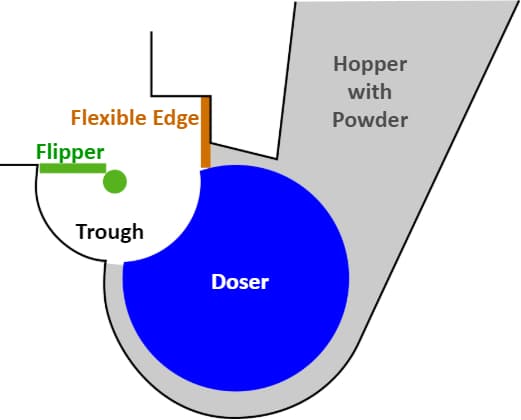
It can be challenging to observe the doser’s movement while the printer is full of powder. For cases that need detailed inspection of the doser assembly and doser motion, it may be necessary to empty the hopper and hopper trough area, if possible.

Fuse 1世代のプリンターのホッパー、ドーサー、フリッパーアセンブリの図。

Motor Moves(モーター動作)メニューで、ドーサーとホッパー側フリッパーを動かし、その動きを評価します。その様子を動画に撮ってください。

  1. ホッパー側フリッパーをドーサードラムの可動範囲外に移動します。ホーム位置の近くまで動かすとうまくいきます。
  2. ドーサーのドラムを数回、回転させます。
  3. ドーサーのドラムがホーム位置に戻る前に止まる場合は、この点をよく点検してください。
  4. Motor Moves(モーター動作)メニューを使用してドーザーを駆動しているときに、ドーザーが予期せず停止した場合:
    1. ドーサーのドラムに干渉しているものがないか、特にこの周辺を確認してください。具体的には、溶けたパウダーがないか、ドラムやパウダートラフにデブリが詰まっていないかを確認してください。
  5. ドーサーのドラムが完全に回転しても、ホーム位置に正常に戻らない場合(上の画像を参照):
    1. ドラムが毎回同じホーム位置に戻るか確認します。
      1. その場合は、ドーザーアセンブリを再較正してください。ドーサーを再較正するには、プリンターのタッチスクリーンでSettings(設定) > Calibration(較正) > Doser Calibration(ドーサーの較正)の順にタップします。スクリーンに表示される指示に従います。
      2. そうでない場合は、エンコーダーボードが故障している可能性があります。ドーザーエンコーダーボードを再度取り付けます。
      3. ドーサーエンコーダーボードを交換しても問題が解決しない場合は、ドーサーアセンブリを交換する必要があるかもしれません。Fuse 1Fuse 1+ 30WのドーサーアセンブリはFormlabsストアでご購入いただけます。交換品を取り付けたドーサーアセンブリを再較正します。
  6. ドーサードラムが正常に回転し、正しいホーム位置に戻る場合、ホッパーフリッパーの動きを評価します。
    1. ホッパーを動かす前に、ドーサードラムがホーム位置にあることを確認してください。
    2. ホッパーを数回転させます。
      1. フリッパーが一貫して不正な位置で停止する場合は、Formlabs サポートまたは公認サービスプロバイダにフリッパーの再較正を依頼してください。
      2. フリッパーが、毎回同じ位置ではないものの不正な位置で止まったり、不規則に動いたりする場合は、エンコーダーボードが壊れている可能性があります。
        1. フリッパーモーターエンコーダーボードケーブルを元に戻します。
        2. ケーブルを交換しても問題が解決しない場合は、バッファーフリッパーモーターアセンブリを交換する必要があるかもしれません。Fuse 1世代のフリッパーモーターはFormlabsストアでご購入いただけます。
  7. ドーザーが不規則に動くが障害物が見えない場合、エンコーダーボードに欠陥があるか、ドライブトレインのコンポーネントがスリップしている可能性があります。
    1. ドーザーモーターエンコーダーボードケーブルを元に戻します。
    2. ドーサーエンコーダーボードを交換しても問題が解決しない場合は、ドーサーアセンブリを交換する必要があるかもしれません。Fuse 1Fuse 1+ 30WのドーサーアセンブリはFormlabsストアでご購入いただけます。
  8. 上記のステップを実行しても故障箇所が特定できない場合は、Formlabs サポートまたは公認サービスプロバイダにお問い合わせください。フリッパーとドーサーが動いている状態の動画もご用意ください。

エラー 94/3-4 PR_ERROR_MOTORS_MOVE_MISSED_HARDSTOP

プリントの開始時に、プリンターはリコーターとプリントベッドのホーム位置を較正し、各コンポーネントをハードストップと呼ばれる移動範囲の端まで移動させます。電流が特定のしきい値に達すると、プリンターはコンポーネントがハードストップに衝突したことを示し、これをプリント全体のホーム位置として確定します。

エラー94は、コンポーネントがハードストップに達することなく、モーターが非常に長い時間回転したことを示します。これは、コンポーネントのドライブトレインのどこかに失敗があり、モーターの回転がコンポーネントの動きに変換されない場合に発生します。

症状

  • 造形前または造形中のエラーコード
  • 可動部品からのきしみ音/カチカチ音

原因

エラー94/3エラー94/4
  • リコーターモーターの損傷
  • ビルドチャンバーZ軸アセンブリの損傷
  • Z軸モーターの損傷

Troubleshooting steps

  1. Confirm the printer’s firmware is up to date. If it is not, update the firmware.
  2. Replace the affected motor assembly. Fuse 1 generation motor assemblies are available for purchase on the Formlabs Store.
  3. If the issue persists after the motor has been replaced, contact Formlabs Support or a certified service provider.

エラー 95/1-5 PR_ERROR_MOTOR_MOVE_MISSED_INDEX

通常のモーター運転では、小さな偏差が発生し、コンポーネントの実際の位置と意図した位置との間にわずかな違いが生じます。ドーサーやフリッパーのようにホーム位置が固定されているコンポーネントの場合、プリンターはコンポーネントを再度ホーム位置に戻すことでこれらのズレを定期的に修正します。このようにホーム位置に戻る動作をインデックス動作と呼びます。インデックス動作は、意図的にモーターにホーム位置から少し外れた位置まで移動するように命令し、モーターがホーム位置に到達したことをエンコーダーボードが確定すると停止します。

エラー 95は、インデックス動作中にモータが指令された距離だけ移動したが、エンコーダボードがホーム位置に到達したことを検出しなかったことを示します。

症状

  • 事前準備または造形中にエラーコードが表示される

原因

  • コンポーネントのエンコーダーボードとの接続不良
  • コンポーネントの較正済みホームポジションのドリフト
  • 小さな偏差(エラー93の閾値以下)により、後の時点でコンポーネントがインデックス位置を外れる

トラブルシューティング手順

エラー95/1~5は、エラー93と同じトラブルシューティング手順で解決できます。エンコーダボードの問題は、エラー93よりもエラー95が発生しやすくなります。

エラーメッセージが表示されていないのにモーターが予期せぬ動作をしたり音がする

モーターの予期せぬ動きや異音の原因のほとんどは、最終的に上記のエラーメッセージのいずれかを引き起こします。新しい、または異常なモーターの動きに気づいたが、プリンターにエラーが報告されていない場合は、影響を受けているモーターを特定し、上記の該当するエラーメッセージのトラブルシューティング手順に従ってください。