

Form Wash V2のトラブルシューティング
Form Wash V2のトラブルシューティング
Form Wash V2に異常が発生すると、タッチスクリーンにエラーメッセージが表示され、エラーの詳細が表示されます。トラブルシューティングの手順に従って、Form Washの一般的なエラーコードを解決してください。この記事に掲載されていないエラーコードが発生した場合は、下の一般的なトラブルシューティングの手順を参照してください。
一般的なトラブルシューティング手順
The following steps are recommended for most issues seen on the Form Wash:
- Common steps for bugs, software issues, and electrical issues:
- Ensure that your unit’s firmware is up to date.
- Power cycle the unit using the switch on the rear of the machine. Leave the unit powered off for at least 30 seconds before powering back on.
- If an issue persists and the unit’s firmware is already up to date, manually reinstall the latest firmware package.
- If an issue began immediately after updating the unit’s firmware, roll back the firmware package to the previous version.
- Best practices for opening a support case with Formlabs Support:
- Provide photos of the error code and any other symptoms you are seeing, including videos of the following:
- entire unit
- areas near the tower
- down into the Wash Bucket
- Note the context of the issue (e.g., did the issue occur immediately after installation, after a software update, etc.).
- Note the frequency of this issue and whether it is persistent or intermittent.
- Note all troubleshooting steps already attempted.
エラーメッセージ:モーター動作エラー
Motors Jammed(モーターが詰まっています)を表示します。この問題を解決するには:
- 本体の電源プラグを抜き、エレベーターを手動で最大高さまで持ち上げます。
- エレベーターを最大の高さまで上げたら、ユニットの電源を入れます。
- ウォッシュバケットを取り外します。
- ウォッシュバケットを元通りに取り付けます。内蓋が蓋のヒンジ付近のタブの下でスライドすることを確認してください。
- 蓋とバケットの高さが同じになるよう、内蓋の端を下に押さえつけます。
- ウォッシュバケットを元通りに取り付けます。内蓋とバケットの高さが同じになるようにします。
洗浄バケットの位置を変えても問題が解決しない場合は、Formlabs Supportまたは正規販売代理店にお問い合わせください。
インペラーから異音がする
ウォッシュバケットとForm Washのベースが正しくセットされていないと、洗浄サイクル中にミキサーが共振したり、異音がすることがあります。これらの異音は、ウォッシュバケットをベースより少し前方にゆっくりとスライドさせると解決する場合があります。
If repositioning the wash bucket does not resolve the issue, replace the impeller. Form Wash V2 impellers are available for purchase on the Formlabs Store. Follow the guide Replacing the Form Wash V2 impeller to replace the component.
If the issue persists, contact Formlabs Support or your authorized reseller.
ウォッシュバケットの移動時に内蓋にぶつかる
外蓋と内蓋の部品の装着位置がずれていると、ウォッシュバケットの昇降時に内蓋に衝突することがあります。ウォッシュバケットが内蓋に何度も衝突する場合、Formlabsは衝突を防ぐためにエレベーターを少し曲げることを推奨しています。
この問題を解決するには:
- エレベーターを最大高さまで上昇させるには、Raise(上昇)をタップします。
- 片手でタワーを支えながら、マウントとウォッシュバケットをタワーの方に押します。金属がわずかに曲がります。
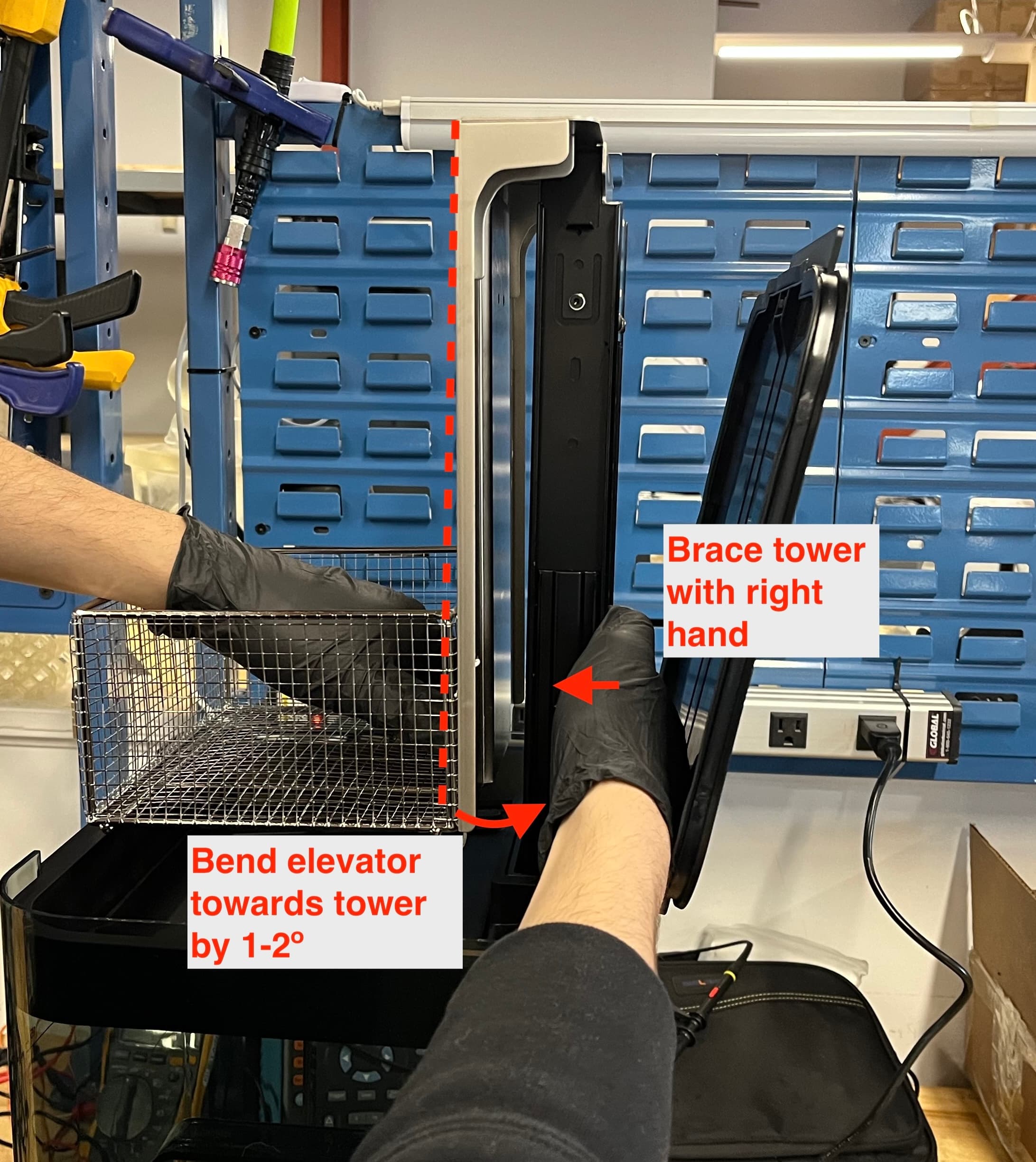
- Lower(下げる)をタップします。ウォッシュバケットが内蓋にぶつかることなく上下に動くことを確認してください。
- ウォッシュバケットが内蓋に衝突し続ける場合は、手順1~3を繰り返してください。
問題が解決しない場合は、Formlabsサポートまたは正規販売代理店にお問い合わせください。
ビルドプラットフォームのマウントアームのフィット感が悪い
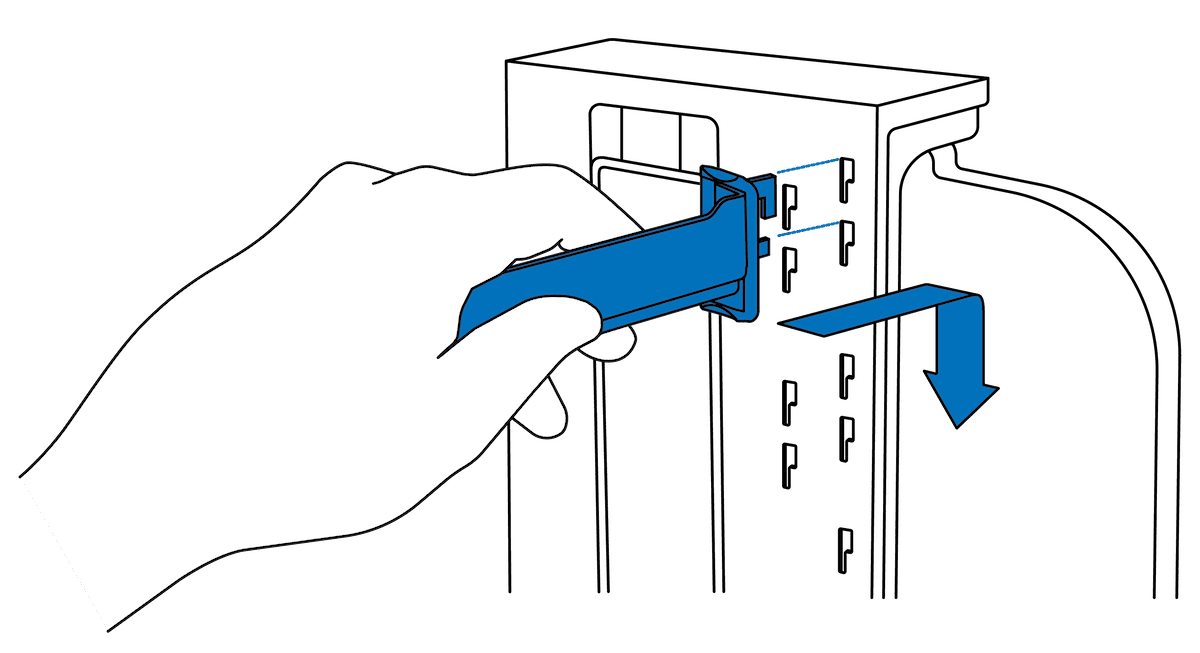
ビルドプラットフォームのリフトアームは、スロットに簡単に収まるはずです。それでも動かない場合は、アームの交換が必要な可能性があります。ビルドプラットフォームマウントアームの交換品は、Formlabsストアでご購入いただけます。アームが新しいForm Washに正しく取り付けられない場合は、Formlabsサポートまたは正規販売代理店にお問い合わせください。
外蓋のガスケットがForm Washの蓋を閉じるのを妨げている
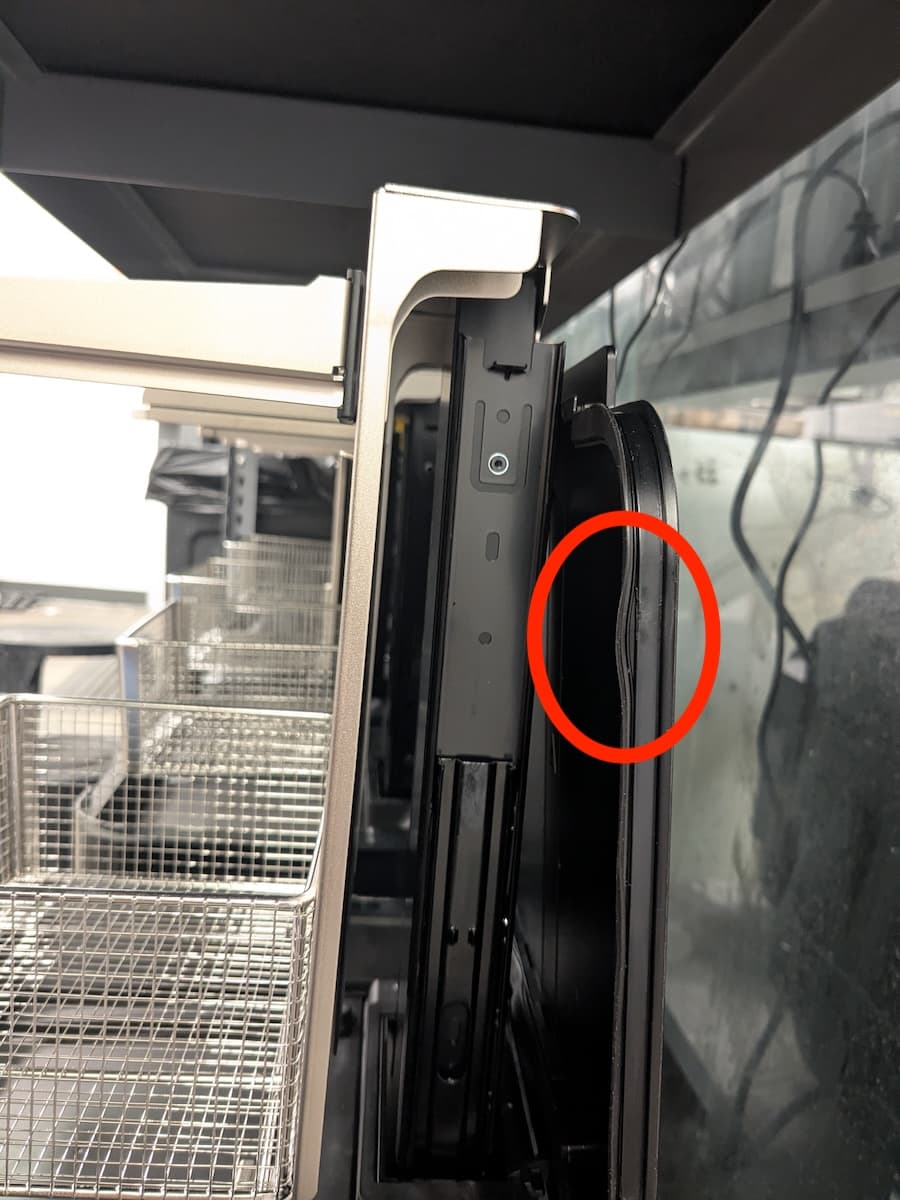
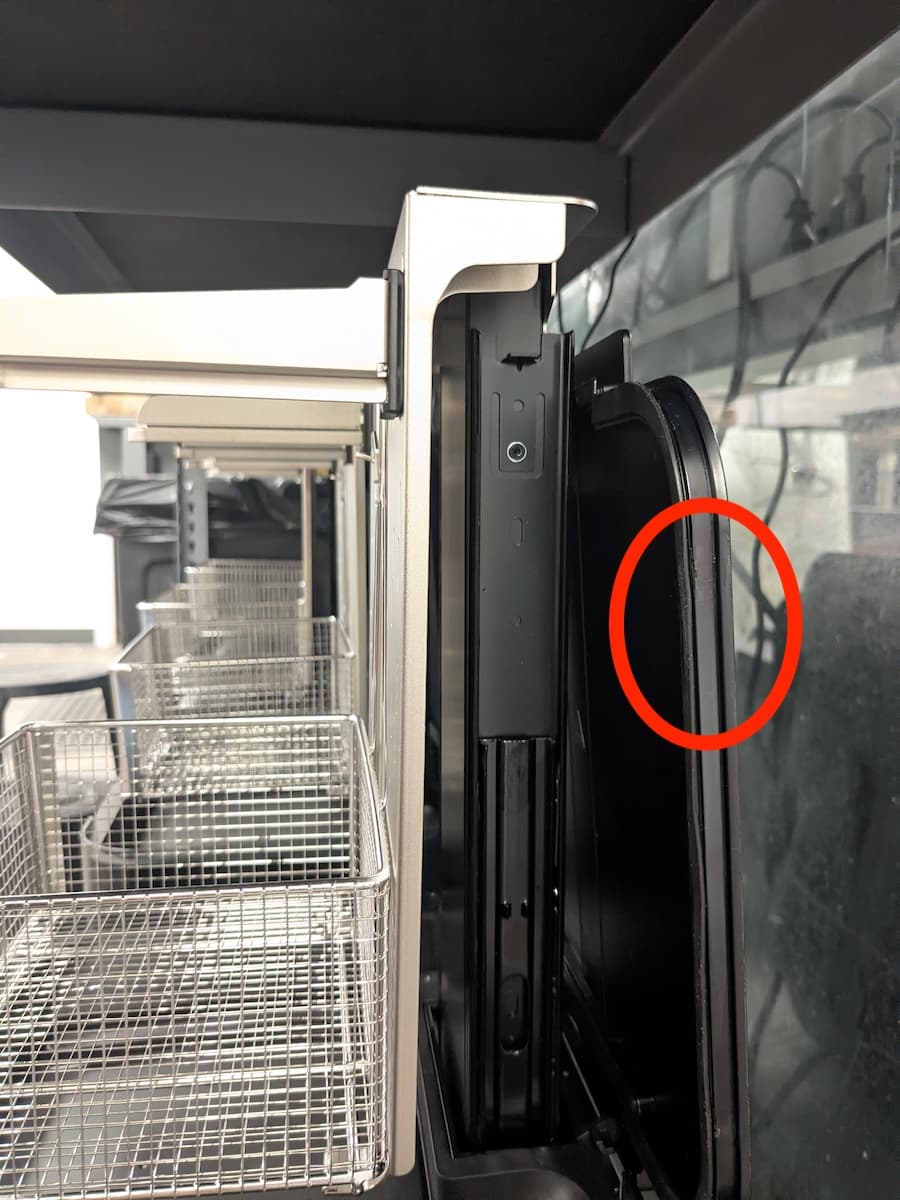
Form Wash V2の外蓋には、洗浄バケットに密着して溶剤の蒸発速度を遅らせるガスケットが付いています。ガスケットが外れると、外蓋が完全に閉まらなくなることがあります。この問題を解決するには、ガスケットを元の位置に押し戻します。ガスケットが破損している、または所定の位置に留まらない場合は、外蓋アセンブリを交換してください。交換用の外蓋は、Formlabsストアでご購入いただけます。
インペラーが回転しない
The Form Wash removes uncured resin from the surface of printed parts by simultaneously soaking and moving them in a solvent with an impeller at the bottom of the wash bucket. If the impeller does not spin, your printed parts will not be cleaned effectively. To fix an impeller that no longer spins:
- Check the other functions of the Form Wash. If the Form Wash does not respond to menu selections, replace the display and control knob assembly. The part is available for purchase on the Formlabs Store.
- Start a new wash cycle, wait for the elevator to lower, then listen for the impeller motor.
- If you can hear the impeller motor moving but the impeller itself does not spin, check that the impeller is mounted properly within the wash bucket. Follow the instructions in the guide on replacing the impeller.
- If the impeller is damaged and cannot be remounted, replace the impeller.
- If the mount in the wash bucket is damaged, replace the wash bucket.
- If you cannot hear the motor spinning, the unit may need to be replaced. Contact Formlabs Support or your authorized reseller.
リフトプレートの錆
Form Wash V2には、長時間水にさらされると錆びる可能性のある金属部品が含まれています。この現象は、ユニットに水を入れた場合(例:TPMでパーツを洗浄した後の二次すすぎ用)に発生することがありますが、純度の低いIPAに含まれる水分も錆の原因となります。錆が発生すると、リフトプレートが正常に動作しなくなったり、錆が溶剤に混入して造形品が汚染されたりする可能性があります。
Form Wash V2のリフトプレートに錆が発生しているのを発見したら:
- リフトプレートを交換します。Form Wash V2のリフトプレートの交換品は、Formlabsストアでご購入いただけます。お使いのFuse Siftがまだ保証期間内の場合は、Formlabsサポートまたは正規販売代理店にお問い合わせください。
- 洗浄用溶剤を交換してください。Form Wash V2に水を入れないでください。純度の低いIPAを使用している場合は、より純度の高い溶剤への交換をご検討ください。