

Unusual noises or vibration (Fuse Sift)
Unusual noises or vibration (Fuse Sift)
The Fuse Sift uses a motor to vibrate a sieve to separate printed parts from unsintered powder. Even if the motor turns on and the Fuse Sift does not display a Sifter error, it can still malfunction.
Symptoms
- Weaker sifting
- Unusual shaking of the entire unit
- Noisier operation during sifting
Causes
- Loose sifter assembly rivets
- Torn or disconnected sifter assembly bellows
- Damaged or malfunctioning vibration motor
Troubleshooting steps
To troubleshoot and resolve unusual Fuse Sift noises or vibrations:
- Remove the surface grate to expose the sieve underneath.
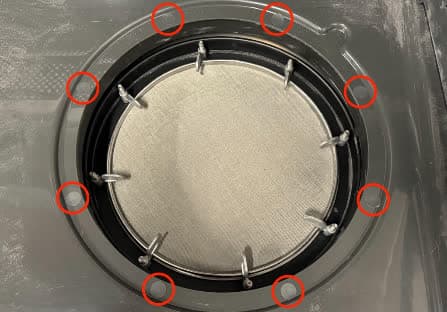
- On the lip the surface grate had been sitting on, locate eight round stickers. Each of these stickers covers a rivet.
- Peel the stickers back to expose the rivets underneath.
- Press the Sift button on the control panel or turn on the sifter using the touchscreen.
- Watch and listen to the rivets to determine if any are damaged or have loosened.
- If any of the rivets are loose, use an adhesive like a silicone caulk to fix them in place.
- If the rivets are too loose to adhere in place, or caulking them does not resolve the issue, replace them using the Fuse Sift sifter rework kit, available for purchase on the Formlabs Store. Install the kit using the guide Replacing the Fuse Sift sifter flange.
- If none of the rivets are loose, replace the Fuse Sift vibration motor. Replacement motors are available for purchase on the Formlabs Store. Note that there are different part numbers for 120 V and 230 V Fuse Sift units:
- 120 V: RP-FS1-120-VB-01
- 230 V: RP-FS1-230-VB-01
If the problem persists, contact Formlabs Support or a certified service provider.