WHITE PAPER
Formlabs Logo

Using Tough 1000 Resin

Using Tough 1000 Resin

Tough 1000 Resin is a ductile, impact-resistant material with comparable strength, stiffness, and toughness to high-density polyethylene (HDPE), designed with exceptional wear and fatigue resistance for long-term toughness and utility.

Tough 1000 Resin is impact-resistant and highly wear-resistant, capable of extreme deformation before breaking, and has low friction compared to other resins. Use Tough 1000 Resin for durable end-use applications or to prototype parts that will eventually be made from high density polyethylene (HDPE).

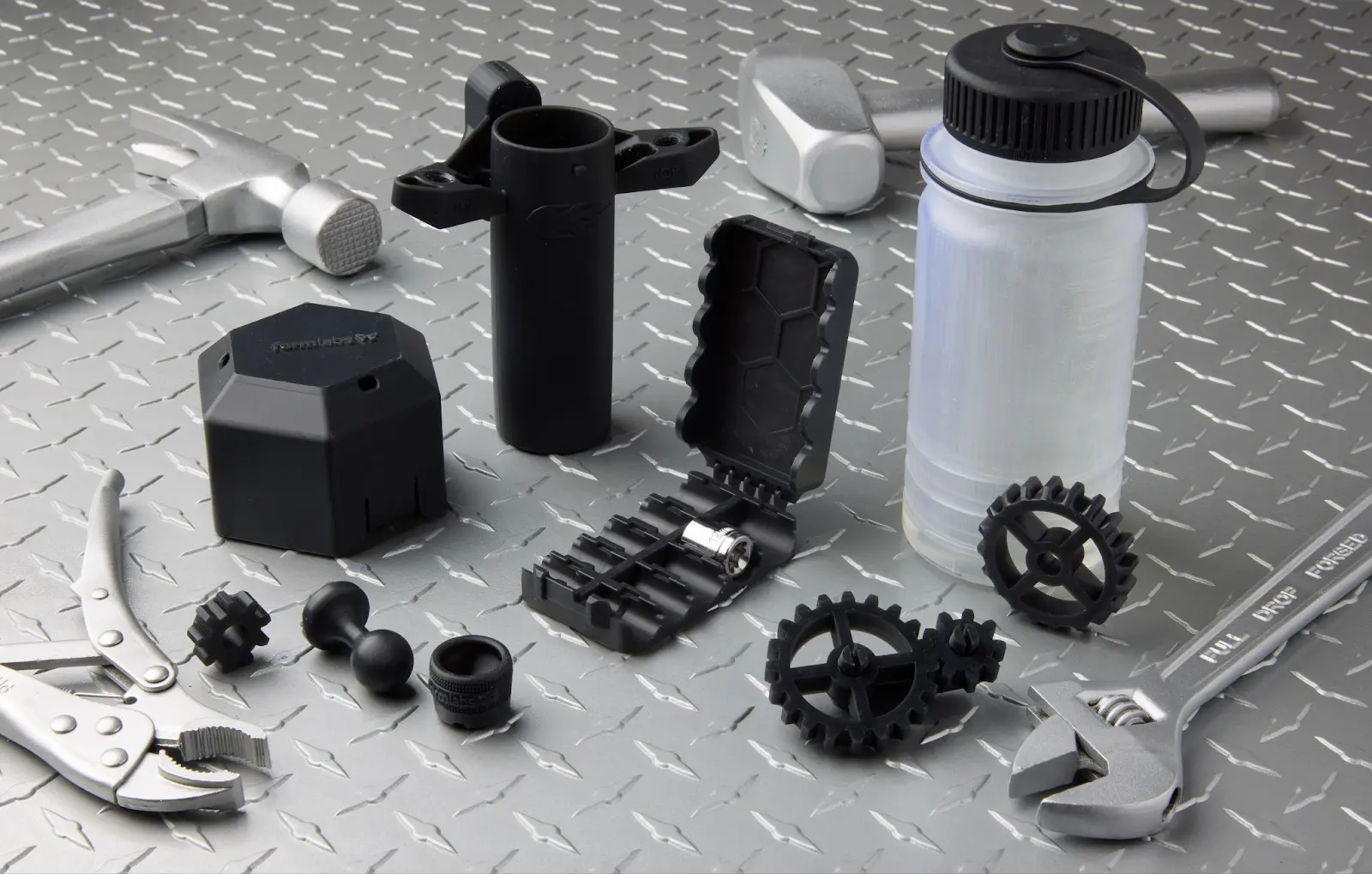
Parts printed in Tough 1000 Resin

Parts made from Tough 1000 Resin have comparable lubricity to Delrin (POM), for surfaces that slide against each other without abrasion or scratches. The material is ideal for moving assemblies such as hinges, gears, and fixtures.

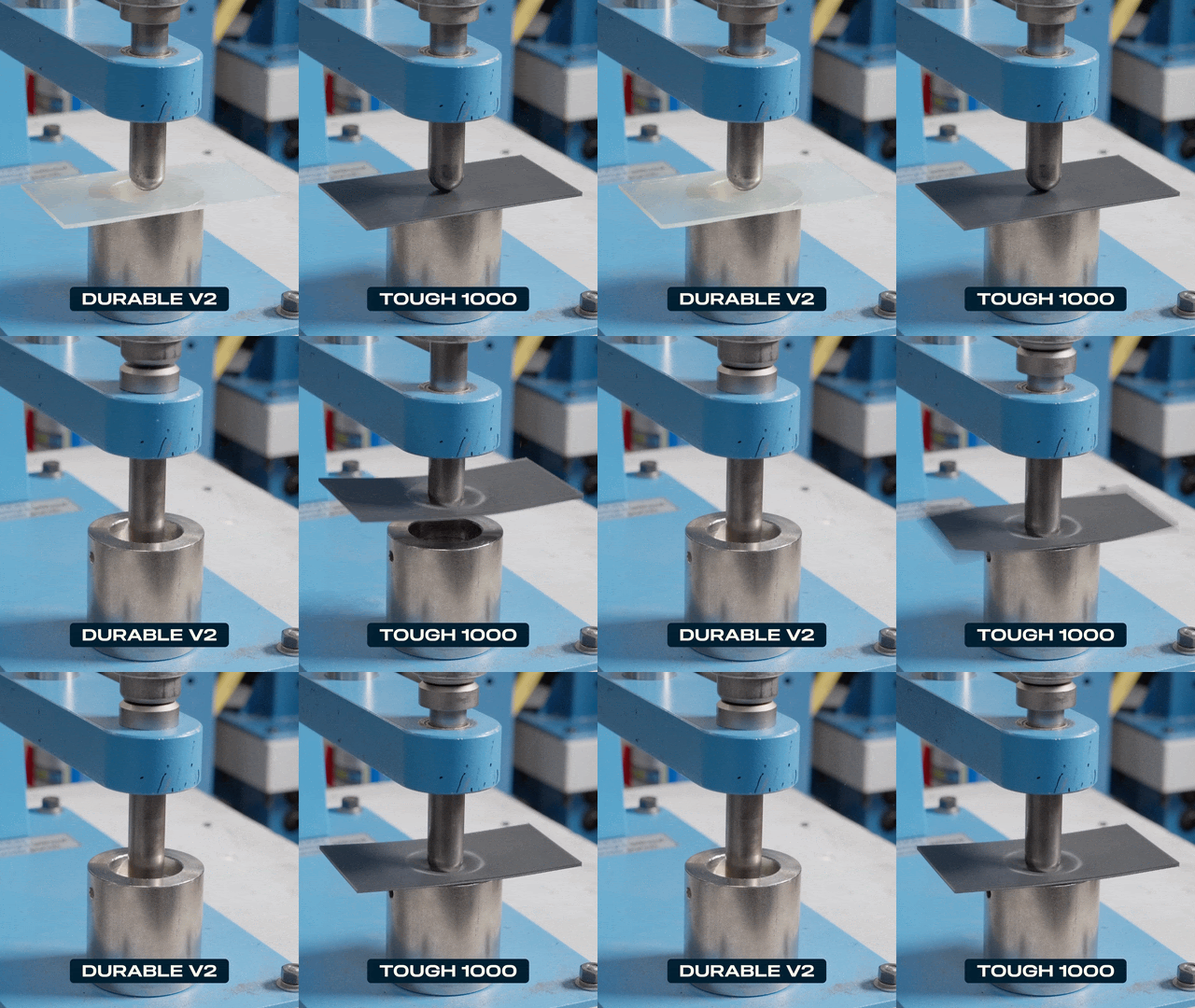
Tough 1000 Resin replaces Durable Resin, offering improved temperature, creep, and aging resistance compared to its predecessor. Parts resist warping and sagging at corners and edges.

Comparison of parts printed in Tough 1000 Resin V1 and Durable Resin V2

Note:

To learn more about the performance or specific material properties of Tough 1000 Resin, refer to the Safety Data Sheet (SDS) and Technical Data Sheet (TDS). Always consult the SDS as the primary source of information to understand safety and handling of Formlabs materials.

Recommended for

 Parts requiring high impact strength
 Prototyping parts that will be made out of HDPE
 Parts that require a low-friction surface, like ball joints
 Parts that need to bend, compress, or deform without cracking
 Hinges and other functional parts that see repeated stress and wear

Not recommended for

 Parts that will be used in elevated temperature environments
 Constant loading

Comparison with other materials

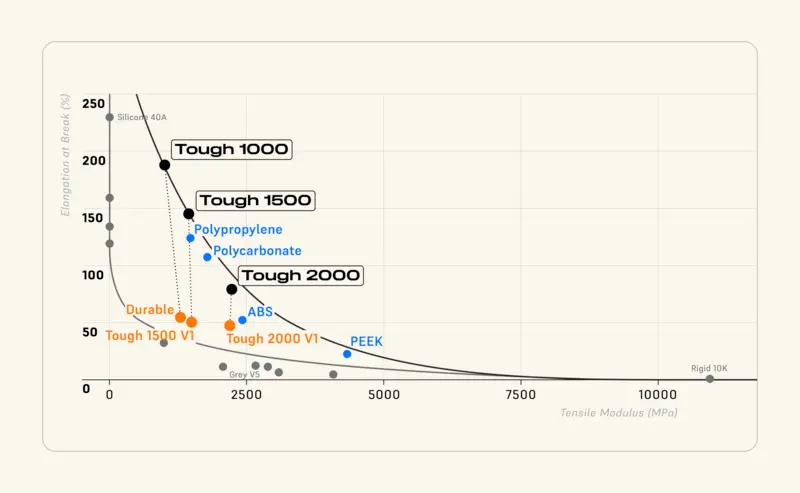
Tough 1000 Resin is a member of the Formlabs Tough family of Resins, along with Tough 1500 Resin and Tough 2000 Resin. As its name implies, it has the lowest tensile modulus of the three but the highest elongation at break. It performs similarly to HDPE, making it a resilient, robust, and versatile material.

Comparison of mechanical properties of the Tough family of resins and other common materials
ResinTough 1000 Resin (post-cured)Tough 1500 Resin V2 (post-cured)Tough 2000 Resin V2 (post-cured)HDPE, extruded sheet (McMaster-Carr)
Ultimate Tensile Strength (MPa)26.33440.430
Tensile Modulus (MPa)9321,4601,8001,000
Elongation at Break (%)18015579100
Gardner Impact Strength @ 1/32 in (0.8 mm) (J)13.15.91.65.4
Work of Fracture (J/m2)32001,011305Not tested. From literature, ~5,000–6,000
Heat Deflection Temp @ 0.45 MPa (ºC)55.36670 Not tested. From literature, ~70–90

To learn more about the performance properties of each Formlabs resin, refer to the library of material properties datasheets. To learn more about toughness metrics, refer to the Methods for Measuring Toughness article.

Printing with Tough 1000 Resin

Before starting a print, note that parts printed in Tough 1000 Resin may adhere strongly to the build platform, particularly if you have previously used that build platform with other resins or the print surface is heavily scratched. You may experience difficulty removing printed parts from the build platform or see strain whitening on the bottoms of parts or rafts. To prevent this:

  • Before starting a print with Tough 1000 Resin, wipe the build platform with acetone.
  • Consider dedicating a build platform to printing with Tough 1000 Resin if you print in multiple different materials on a regular basis.
  • If you consistently experience difficulty removing printed parts from a particular build platform, consider sanding down the surface of that build platform or switching to a less scratched build platform.

Otherwise, Tough 1000 Resin does not require special preparation or processes to print. Install or update PreForm, then set up a print job.

To prepare a model for printing in PreForm:

  1. Open a model.
  2. Select the resin, resin version, and the desired layer thickness.
  3. Orient as desired.
  4. Generate supports.
  5. Send the print job to the printer.

Printing and installing a cartridge shim

The newest Tough family of resins (Tough 1000 Resin V1, Tough 1500 Resin V2, and Tough 2000 Resin V2) cause the resin cartridge bite valve to swell over time. A swollen bite valve dispenses resin more slowly, especially towards the end of a cartridge’s life. In a limited and contained number of cases, the bite valve can ultimately fall off the resin cartridge entirely, leading to a significant resin spill.

If your resin cartridge is from lot number 20251022 or later, it is not at risk for a resin spill, so you can print a shim that mitigates poor dispensing even if the valve swells. To prevent dispense interruptions caused by valve swelling, Formlabs recommends using this shim.


Notice:

If your resin cartridge’s lot number is earlier than 20251022, do not add a shim. Use it as normal until the printer displays Error 1.227.5 or Error 1.227.6, pour resin from the cartridge into the resin tank until the resin level reaches the maximum fill line marked on the resin tank frame, then discontinue use of the resin cartridge and contact Formlabs Support.

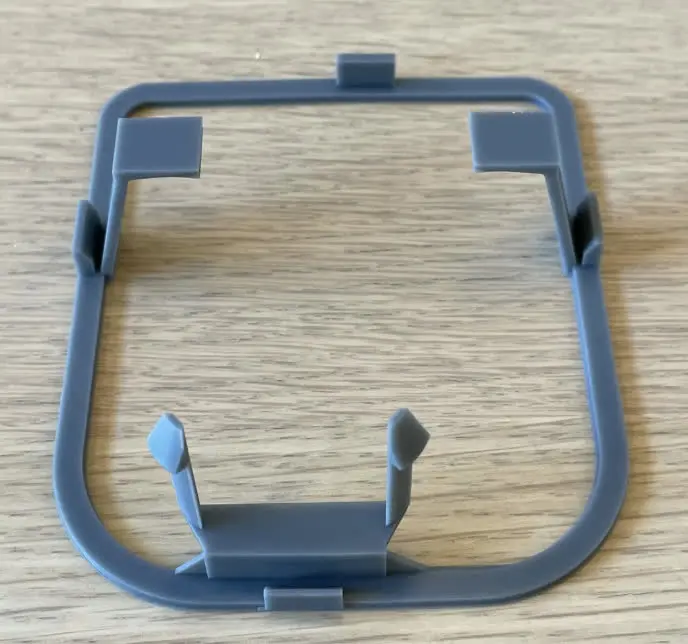
Printed cartridge shim

To install the cartridge shim:

  1. Download the shim file.
  2. Prepare the print job.
    1. Import the shim file into PreForm.
    2. Select your printer and resin type. The shim is designed to print with any General Purpose Resin, Fast Model Resin, or any resin in the Tough family.
    3. Set the Raft Type to None and generate supports. This will support the overhanging portions of the shim while leaving it flat against the build platform.
  3. Print and post-process the shim.
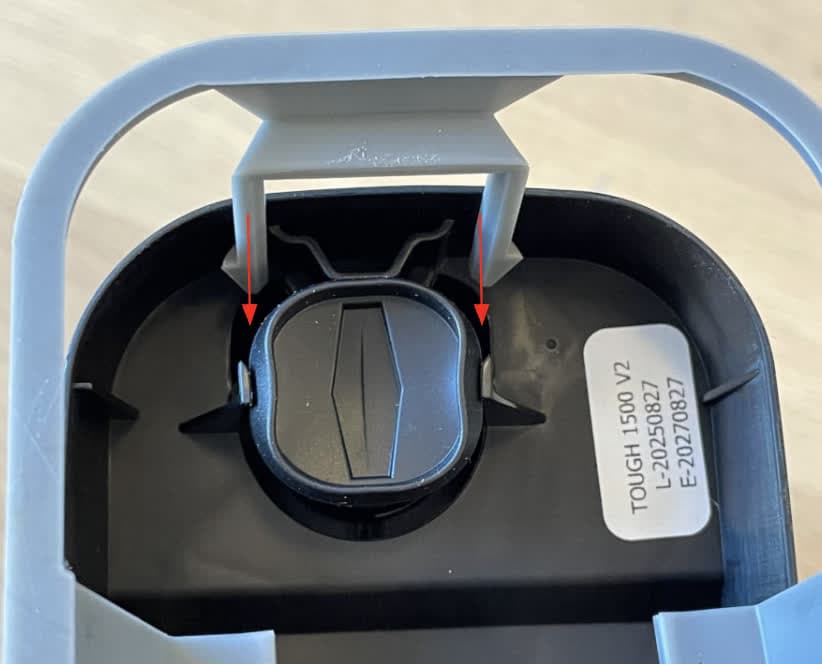
  4. Position the shim so that its rounded edges are aligned with the cartridge skirt.
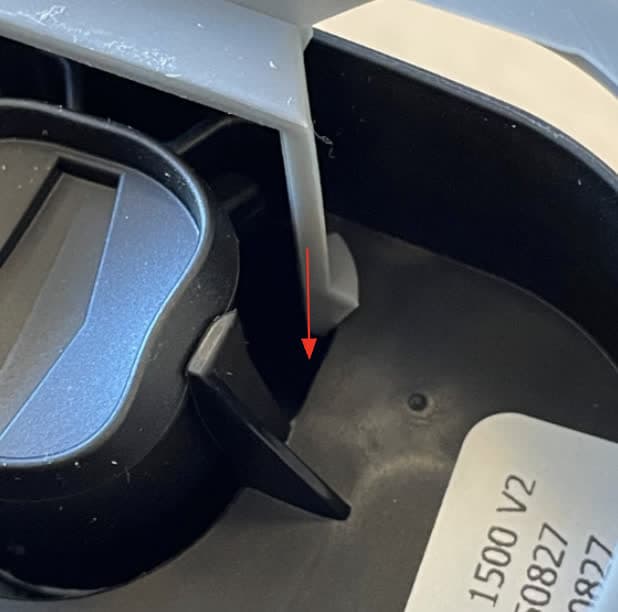
  5. Insert the retention tabs straight into the opening next to the bite valve. They should click into place with minimal force.The flat portion between the tabs should sit next to, not on top of, the bite valve.
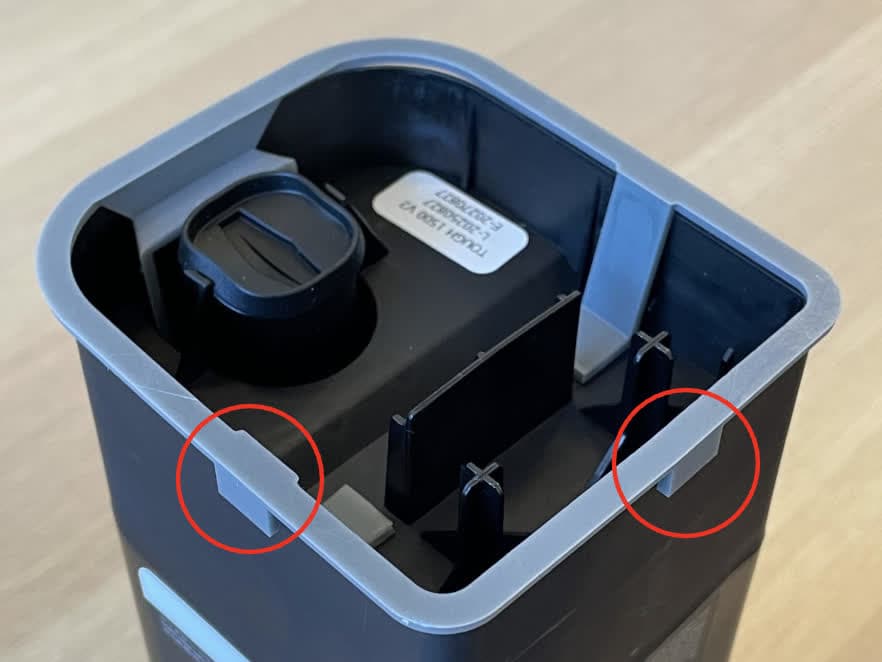
Installing the Tough family cartridge shim
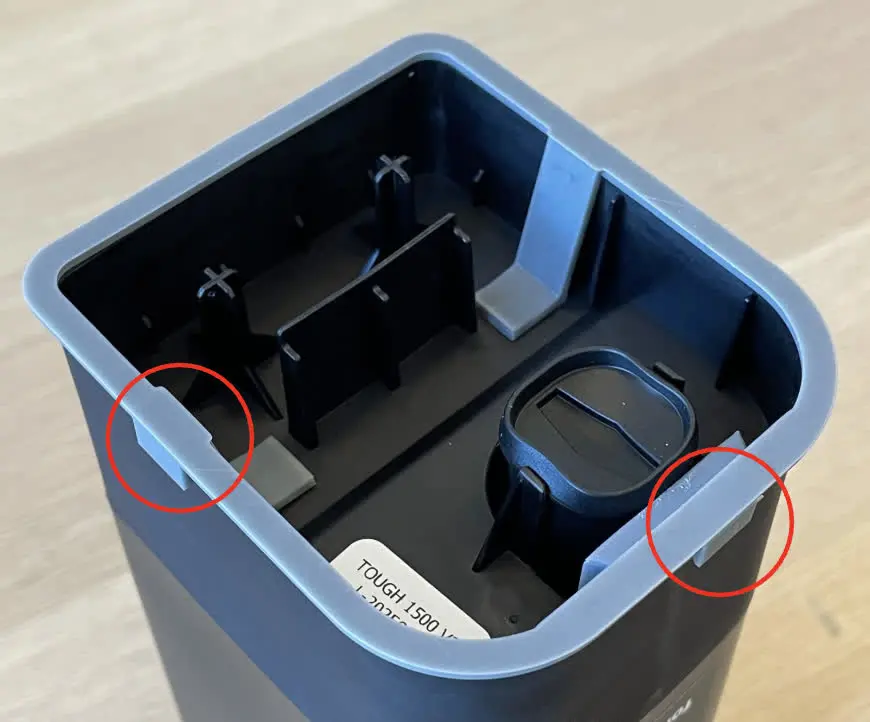
  1. Check that the four grooves around the shim align with the walls on the bottom of the cartridge.
Installing the Tough family cartridge shim

Washing recommendations

All SLA 3D printed parts require washing to remove residual resin. Formlabs SLA printers come with a Finish Kit that you can use to manually wash your printed parts. Formlabs also offer automated part washing solutions, including the Form Wash and Form Wash L, that agitate the solvent bath and remove parts from the bath after a set time.

Wash parts according to the support article Form Wash/Form Wash L time settings. Pay particular attention to information that affects mechanical properties or biocompatibility requirements.

For best surface finish, Formlabs recommends allowing parts printed in Tough 1000 Resin to air dry for at least 30 minutes prior to handling or post-curing. You can also use compressed air to speed up the drying process.

Post-curing requirements

Tough 1000 Resin requires post-curing to reach its optimal mechanical properties. Refer to the time and temperature settings for your machine for post-curing recommendations: